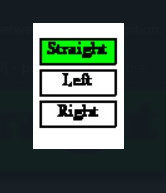
Pls suggest how can I change the color of the button when I pressed it, and the color of the first button will be changed to the default color when I pressed the second button.
For example, After I clicked the STRAIGHT Button, the button will become green color and when I click the LEFT button the LEFT button will change to green color and the STRAIGHT button will become the default color which is white color. Thanks in advance 🙂
CODE:
def draw_button(self):

    global clicked
    action = False

    # get mouse position
    pos = pygame.mouse.get_pos()

    # create pygame Rect object for the button
    button_rect = Rect(self.x, self.y, self.width, self.height)

    # check mouseover and clicked conditions
    if button_rect.collidepoint(pos):
        if pygame.mouse.get_pressed()[0] == 1:
            clicked = True
            pygame.draw.rect(screen, self.click_col, button_rect)
        elif pygame.mouse.get_pressed()[0] == 0 and clicked == True:
            clicked = False
            action = True

        else:
            pygame.draw.rect(screen, self.hover_col, button_rect)
    else:
        pygame.draw.rect(screen, self.button_col, button_rect)
Answers:
Thank you for visiting the Q&A section on Magenaut. Please note that all the answers may not help you solve the issue immediately. So please treat them as advisements. If you found the post helpful (or not), leave a comment & I’ll get back to you as soon as possible.
Method 1
When you draw the button, you have to set the color dependent on the global variable clicked:
def draw_button(self):

    global clicked

    # get mouse position
    pos = pygame.mouse.get_pos()

    # create pygame Rect object for the button
    button_rect = Rect(self.x, self.y, self.width, self.height)

    # check mouseover and clicked conditions
    hover = button_rect.collidepoint(pos)
    if hover and pygame.mouse.get_pressed()[0] == 1:
        clicked = not clicked

    color = self.button_col
    if clicked:
        color = self.click_col
    elif hover:
        color = self.hover_col

    pygame.draw.rect(screen, color, button_rect)
Anyway, that won’t satisfy you, because pygame.mouse.get_pressed() returns a list of Boolean values that represent the state (True or False) of all mouse buttons. The state of a button is True as long as a button is held down.
You have to use MOUSEBUTTONDOWN event. The MOUSEBUTTONDOWN event occurs once when you click the mouse button and the MOUSEBUTTONUP event occurs once when the mouse button is released. The pygame.event.Event() object has two attributes that provide information about the mouse event. pos is a tuple that stores the position that was clicked. button stores the button that was clicked.
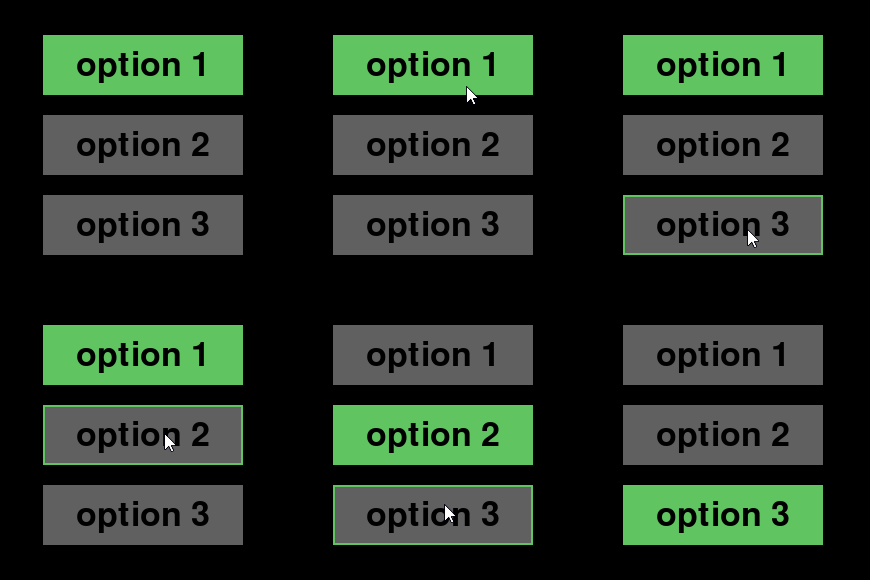
If you have multiple buttons that you have to interact with each other, a single clicked status is not enough. You need a separate “clicked” state for each button. If the clicked state of 1 button becomes True, the states of the other keys must be set to False. I recommend to implement a RadioButton class for this.
Minimal example:
 repl.it/@Rabbid76/PyGame-RadioButton
import pygame

class RadioButton(pygame.sprite.Sprite):
    def __init__(self, x, y, w, h, font, text):
        super().__init__()
        text_surf = font.render(text, True, (0, 0, 0))
        self.button_image = pygame.Surface((w, h))
        self.button_image.fill((96, 96, 96))
        self.button_image.blit(text_surf, text_surf.get_rect(center = (w // 2, h // 2)))
        self.hover_image = pygame.Surface((w, h))
        self.hover_image.fill((96, 96, 96))
        self.hover_image.blit(text_surf, text_surf.get_rect(center = (w // 2, h // 2)))
        pygame.draw.rect(self.hover_image, (96, 196, 96), self.hover_image.get_rect(), 3)
        self.clicked_image = pygame.Surface((w, h))
        self.clicked_image.fill((96, 196, 96))
        self.clicked_image.blit(text_surf, text_surf.get_rect(center = (w // 2, h // 2)))
        self.image = self.button_image
        self.rect = pygame.Rect(x, y, w, h)
        self.clicked = False
        self.buttons = None

    def setRadioButtons(self, buttons):
        self.buttons = buttons

    def update(self, event_list):
        hover = self.rect.collidepoint(pygame.mouse.get_pos())
        for event in event_list:
            if event.type == pygame.MOUSEBUTTONDOWN:
                if hover and event.button == 1:
                    for rb in self.buttons:
                        rb.clicked = False
                    self.clicked = True

        self.image = self.button_image
        if self.clicked:
            self.image = self.clicked_image
        elif hover:
            self.image = self.hover_image


pygame.init()
window = pygame.display.set_mode((300, 300))
clock = pygame.time.Clock()
font50 = pygame.font.SysFont(None, 50)

radioButtons = [
    RadioButton(50, 40, 200, 60, font50, "option 1"),
    RadioButton(50, 120, 200, 60, font50, "option 2"),
    RadioButton(50, 200, 200, 60, font50, "option 3")
]
for rb in radioButtons:
    rb.setRadioButtons(radioButtons)
radioButtons[0].clicked = True

group = pygame.sprite.Group(radioButtons)

run = True
while run:
    clock.tick(60)
    event_list = pygame.event.get()
    for event in event_list:
        if event.type == pygame.QUIT:
            run = False

    group.update(event_list)

    window.fill(0)
    group.draw(window)
    pygame.display.flip()

pygame.quit()
exit()
Method 2
your_button_rect = pygame.Rect(x,y,width,height)
color = (0,0,0)
pos = pygame.mouse.get_pos()
def change_button_color():
    if your_button_rect.colliderect(pos):
        if event.type == pygame.MOUSEBUTTONDOWN: #checks if mouse button is pressed down while the cursor is on the rectangle
            color = (your_desired_Color_RGBvalue)

while True:
    pygame.draw.rect(screen,color,your_button_rect)
    change_button_color()
All methods was sourced from stackoverflow.com or stackexchange.com, is licensed under cc by-sa 2.5, cc by-sa 3.0 and cc by-sa 4.0