I have the following code and it fails, because it cannot read the file from disk. The image is always None.
# -*- coding: utf-8 -*-
import cv2
import numpy

bgrImage = cv2.imread(u'D:\ö\handschuh.jpg')
Note: my file is already saved as UTF-8 with BOM. I verified with Notepad++.
In Process Monitor, I see that Python is acccessing the file from a wrong path:
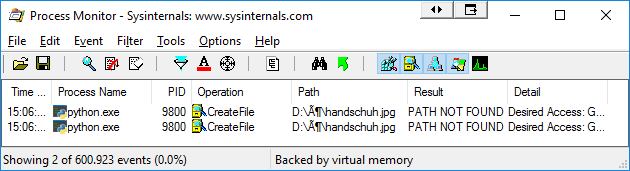
I have read about:
- Open file with unicode filename, which is about the
open()function and not related to OpenCV. - How do I read an image file using Python, but that’s unrelated to Unicode issues.
Answers:
Thank you for visiting the Q&A section on Magenaut. Please note that all the answers may not help you solve the issue immediately. So please treat them as advisements. If you found the post helpful (or not), leave a comment & I’ll get back to you as soon as possible.
Method 1
It can be done by
- opening the file using
open(), which supports Unicode as in the linked answer, - read the contents as a byte array,
- convert the byte array to a NumPy array,
- decode the image
# -*- coding: utf-8 -*-
import cv2
import numpy

stream = open(u'D:\ö\handschuh.jpg', "rb")
bytes = bytearray(stream.read())
numpyarray = numpy.asarray(bytes, dtype=numpy.uint8)
bgrImage = cv2.imdecode(numpyarray, cv2.IMREAD_UNCHANGED)
Method 2
Inspired by Thomas Weller’s answer, you can also use np.fromfile() to read the image and convert it to ndarray and then use cv2.imdecode() to decode the array into a three-dimensional numpy ndarray (suppose this is a color image without alpha channel):
import numpy as np

# img is in BGR format if the underlying image is a color image
img = cv2.imdecode(np.fromfile('测试目录/test.jpg', dtype=np.uint8), cv2.IMREAD_UNCHANGED)
np.fromfile() will convert the image on disk to numpy 1-dimensional ndarray representation. cv2.imdecode can decode this format and convert to the normal 3-dimensional image representation. cv2.IMREAD_UNCHANGED is a flag for decoding. Complete list of flags can be found here.
PS. For how to write image to a path with unicode characters, see here.
Method 3
I copied them to a temporary directory. It works fine for me.
import os
import shutil
import tempfile

import cv2


def cv_read(path, *args):
    """
    Read from a path with Unicode characters.

    :param path: path of a single image or a directory which contains images
    :param args: other args passed to cv2.imread
    :return: a single image or a list of images
    """
    with tempfile.TemporaryDirectory() as tmp_dir:
        if os.path.isdir(path):
            shutil.copytree(path, tmp_dir, dirs_exist_ok=True)
        elif os.path.isfile(path):
            shutil.copy(path, tmp_dir)
        else:
            raise FileNotFoundError

        img_arr = [
            cv2.imread(os.path.join(tmp_dir, img), *args)
            for img in os.listdir(tmp_dir)
        ]

        return img_arr if os.path.isdir(path) else img_arr[0]
Method 4
My problem is similar to you, however, my program will terminate at the
image = cv2.imread(filename)statement.
I solved this problem by first encode the file name into utf-8 and then decode it as
image = cv2.imread(filename.encode('utf-8', 'surrogateescape').decode('utf-8', 'surrogateescape'))
Method 5
bgrImage = cv2.imread(filename.encode('utf-8'))
encode file full path to utf-8
All methods was sourced from stackoverflow.com or stackexchange.com, is licensed under cc by-sa 2.5, cc by-sa 3.0 and cc by-sa 4.0