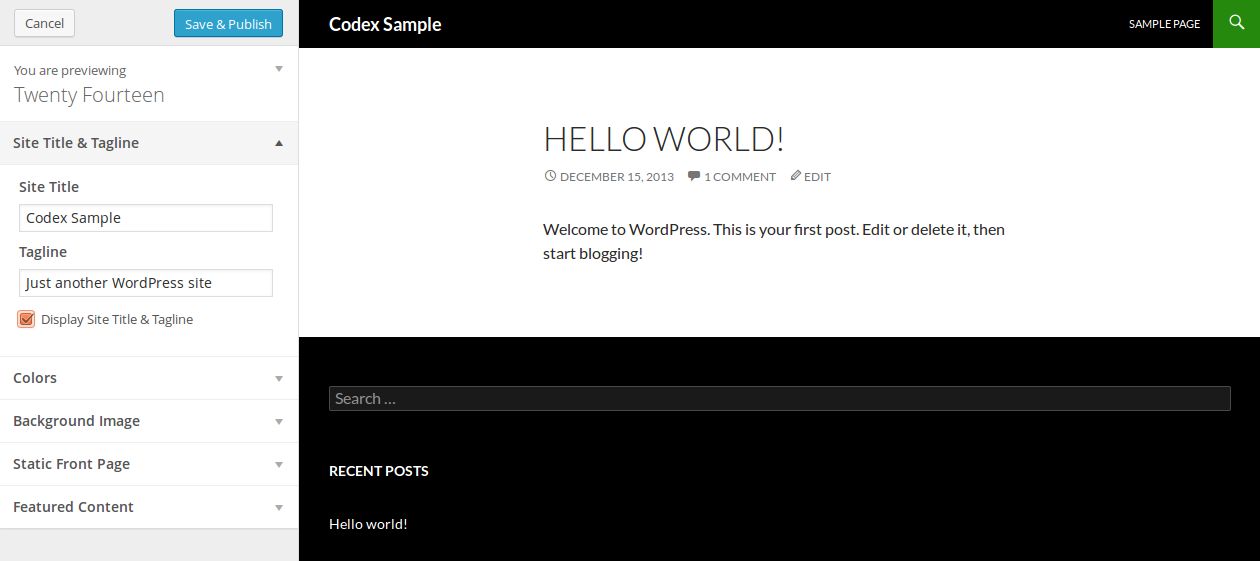
My theme doesn’t use the tag line, how can I remove it from the customizer?
Answers:
Thank you for visiting the Q&A section on Magenaut. Please note that all the answers may not help you solve the issue immediately. So please treat them as advisements. If you found the post helpful (or not), leave a comment & I’ll get back to you as soon as possible.
Method 1
Late to the party but this will do the trick:
$wp_customize->remove_control('blogdescription');
You want to remove just that control, not entire section as suggested above.
Method 2
Remove a pre exising customizer setting in wordpress theme with this code.
add_action( "customize_register", "ruth_sherman_theme_customize_register" );
function ruth_sherman_theme_customize_register( $wp_customize ) {

 //=============================================================
 // Remove header image and widgets option from theme customizer
 //=============================================================
 $wp_customize->remove_control("header_image");
 $wp_customize->remove_panel("widgets");

 //=============================================================
 // Remove Colors, Background image, and Static front page
 // option from theme customizer
 //=============================================================
 $wp_customize->remove_section("colors");
 $wp_customize->remove_section("background_image");
 $wp_customize->remove_section("static_front_page");

}
Method 3
I found out the WP_Customize_Manager class has a function called remove_section(). In your function hooked to customize_register you can just do:
    $wp_customize->remove_section('nav');
    $wp_customize->remove_section('static_front_page');
You can find the ID of the section (i.e. ‘nav’) if you inspect the accordion title bar of the section. Look at the ID of the containing <li> tag and it’s the portion of the string after "customize-section-". I.E.:
<li id="customize-section-static_front_page" class="control-section customize-section">
— the ID is "static_front_page"
Method 4
Accoring to OTTO
One final thing you can add to a section is a “theme_supports” option.
This will make the menu not appear unless the theme supports
something. If you’re putting this code in a theme itself, then you
already know what the theme supports, so it doesn’t make much sense.
The core uses this to not show the header and background options if
the theme doesn’t support them.
So I put that together with
$wp_customize->get_setting('blogdescription')->transport='postMessage';
… and discovered that the following code worked. I put false in for the theme_supports … not sure what I really should be putting in … maybe someone a bit more expert can improve on this.
$wp_customize->add_control('blogdescription')->theme_supports=false;
Method 5
if the section / panel or control core , it is always better to disable them in place of removing.
add_action( 'customize_register', 'wp_stackexchange_58932' );
function wp_stackexchange_58932($wp_customize){
    $wp_customize->get_section( 'static_front_page' )->active_callback = '__return_false';
    $wp_customize->get_section( 'custom_css' )->active_callback = '__return_false';
}
Method 6
If you are using this in a plugin you should use priority argument like 999 and it will work in the plugin.
add_action( "customize_register","wpcb_theme_customize_register",999,1);

function wpcb_theme_customize_register($wp_customize){
   $wp_customize->get_setting('blogdescription')->transport='postMessage';
}
All methods was sourced from stackoverflow.com or stackexchange.com, is licensed under cc by-sa 2.5, cc by-sa 3.0 and cc by-sa 4.0