import pygame
pygame.init()

red = 255,0,0
blue = 0,0,255
black = 0,0,0

screenWidth = 800
screenHeight = 600

gameDisplay = pygame.display.set_mode((screenWidth,screenHeight))        ## screen width and height
pygame.display.set_caption('JUST SOME BLOCKS')       ## set my title of the window

clock = pygame.time.Clock()

class player():       ## has all of my attributes for player 1
    def __init__(self,x,y,width,height):
        self.x = x
        self.y = y
        self.height = height
        self.width = width
        self.vel = 5
        self.left = False
        self.right = False
        self.up = False
        self.down = False

class projectile():     ## projectile attributes
    def __init__(self,x,y,radius,colour,facing):
        self.x = x
        self.y = y
        self.radius = radius
        self.facing = facing
        self.colour = colour
        self.vel = 8 * facing       # speed of bullet * the direction (-1 or 1)

    def draw(self,gameDisplay):
        pygame.draw.circle(gameDisplay, self.colour , (self.x,self.y),self.radius)      ## put a 1 after that to make it so the circle is just an outline

def redrawGameWindow():
    for bullet in bullets:      ## draw bullets
        bullet.draw(gameDisplay)

    pygame.display.update()

#mainloop

player1 = player(300,410,50,70)     # moves the stuff from the class (when variables are user use player1.var)
bullets = []

run = True
while run == True:
    clock.tick(27)
    for event in pygame.event.get():
        if event.type == pygame.QUIT:
            run = False

    for bullet in bullets:
        if bullet.x < screenWidth and bullet.x > 0 and bullet.y < screenHeight and bullet.y > 0: ## makes sure bullet does not go off screen
            bullet.x += bullet.vel
        else:
            bullets.pop(bullets.index(bullet))


    keys = pygame.key.get_pressed()     ## check if a key has been pressed

    ## red player movement
    if keys[pygame.K_w] and player1.y > player1.vel:    ## check if that key has been pressed down (this will check for w)     and checks for boundry
        player1.y -= player1.vel            ## move the shape in a direction
        player1.up = True
        player1.down = False

    if keys[pygame.K_a] and player1.x > player1.vel:      ### this is for a
        player1.x -= player1.vel
        player1.left = True
        player1.right = False

    if keys[pygame.K_s] and player1.y < screenHeight - player1.height - player1.vel: ## this is for s
        player1.y += player1.vel
        player1.down = True
        player1.up = False

    if keys[pygame.K_d] and player1.x < screenWidth - player1.width - player1.vel:   ## this is for d
        player1.x += player1.vel
        player1.right = True
        player1.left = False

    if keys[pygame.K_SPACE]:     # shooting with the space bar
        if player1.left == True:   ## handles the direction of the bullet
            facing = -1
        else:
            facing = 1


        if len(bullets) < 5:    ## max amounts of bullets on screen
            bullets.append(projectile(player1.x + player1.width //2 ,player1.y + player1.height//2,6,black,facing))   ##just like calling upon a function


    ## level


    gameDisplay.fill((0,255,0))        ### will stop the shape from spreading around and will have a background
    pygame.draw.rect(gameDisplay,(red),(player1.x,player1.y,player1.width,player1.height))  ## draw player
    pygame.display.update()
    redrawGameWindow()

pygame.quit()
When I shoot more than 1 bullet fires and I only want 1 bullet to fire at a time (but not only 1 bullet on the screen)
They all fire in a large clump and stick together also so I want them to fire at different times
I have tried using a delay clock.tick but that makes the game extremely laggy
I am relatively new to pygame and don’t fully understand it any help would be appreciated thanks !
Answers:
Thank you for visiting the Q&A section on Magenaut. Please note that all the answers may not help you solve the issue immediately. So please treat them as advisements. If you found the post helpful (or not), leave a comment & I’ll get back to you as soon as possible.
Method 1
The general approach to firing bullets is to store the positions of the bullets in a list (bullet_list). When a bullet is fired, add the bullet’s starting position ([start_x, start_y]) to the list. The starting position is the position of the object (player or enemy) that fires the bullet. Use a for-loop to iterate through all the bullets in the list. Move position of each individual bullet in the loop. Remove a bullet from the list that leaves the screen (bullet_list.remove(bullet_pos)). For this reason, a copy of the list (bullet_list[:]) must be run through (see How to remove items from a list while iterating?). Use another for-loop to blit the remaining bullets on the screen:
bullet_list = []

while run == True:
    # [...]

    for event in pygame.event.get():
        if event.type == pygame.QUIT:
            run = False

        if event.type == pygame.KEYDOWN:
            if event.key == pygame.K_SPACE:
                bullet_list.append([start_x, start_y])

    for bullet_pos in bullet_list[:]:
        bullet_pos[0] += move_bullet_x
        bullet_pos[1] += move_bullet_y
        if not screen.get_rect().colliderect(bullet_image.get_rect(center = bullet_pos))
            bullet_list.remove(bullet_pos)

    # [...]

    for bullet_pos in bullet_list[:]
        screen.blit(bullet_image, bullet_image.get_rect(center = bullet_pos))

    # [...]
See also Shoot bullet.
The states which are returned by pygame.key.get_pressed() are, set, as long a key is hold down. That is useful for the movement of a player. The player keeps moving as long a key is hold down.
But it contradicts your intention, when you want to fire a bullet. If you want to fire a bullet when a key is pressed, then can use the KEYDOWN event. The event occurs only once when a key is pressed:
while run == True:
    clock.tick(27)
    for event in pygame.event.get():
        if event.type == pygame.QUIT:
            run = False

        if event.type == pygame.KEYDOWN:
            if event.key == pygame.K_SPACE:
                if player1.left == True:   ## handles the direction of the bullet
                    facing = -1
                else:
                    facing = 1
                if len(bullets) < 5:    ## max amounts of bullets on screen
                    bx, by = player1.x + player1.width //2 ,player1.y + player1.height//2
                    bullets.append(projectile(bx, by, 6, black, facing))

    # [...]
If you want to implement some kind of rapid fire, then the things get more tricky. If you would use the state of pygame.key.get_pressed() then you would spawn one bullet in every frame. That is far too fast. You have to implement some timeout.
When a bullet is fired, the get the current time by pygame.time.get_ticks(). Define a number of milliseconds for the delay between to bullets. Add the dela to the time and state the time in a variable (next_bullet_threshold). Skip bullets, as long the time is not exceeded:
next_bullet_threshold = 0

run = True
while run == True:

    # [...]

    current_time = pygame.time.get_ticks()
    if keys[pygame.K_SPACE] and current_time > next_bullet_threshold:

        bullet_delay = 500 # 500 milliseconds (0.5 seconds)
        next_bullet_threshold = current_time + bullet_delay

        if player1.left == True:   ## handles the direction of the bullet
            facing = -1
        else:
            facing = 1
        if len(bullets) < 5:
            bx, by = player1.x + player1.width //2 ,player1.y + player1.height//2
            bullets.append(projectile(bx, by, 6, black, facing))
Minimal example:  repl.it/@Rabbid76/PyGame-ShootBullet
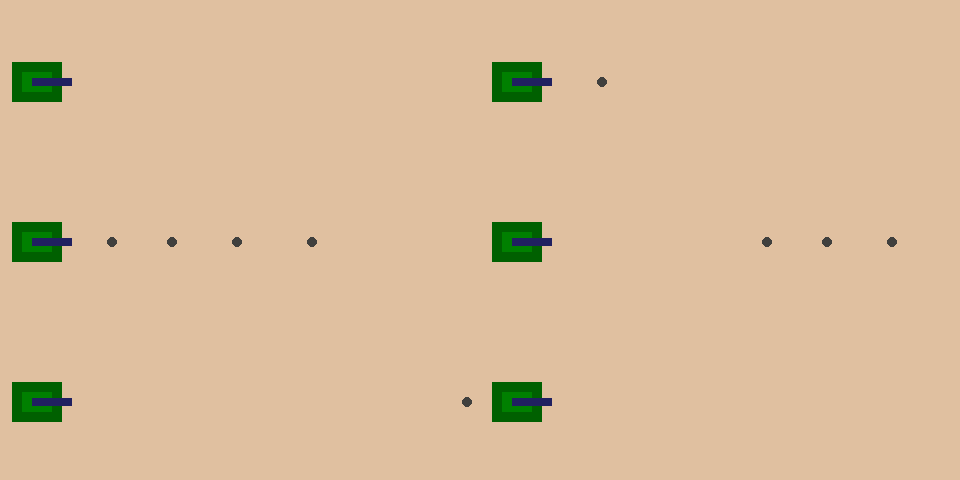
import pygame
pygame.init()

window = pygame.display.set_mode((500, 200))
clock = pygame.time.Clock()

tank_surf = pygame.Surface((60, 40), pygame.SRCALPHA)
pygame.draw.rect(tank_surf, (0, 96, 0), (0, 00, 50, 40))
pygame.draw.rect(tank_surf, (0, 128, 0), (10, 10, 30, 20))
pygame.draw.rect(tank_surf, (32, 32, 96), (20, 16, 40, 8))
tank_rect = tank_surf.get_rect(midleft = (20, window.get_height() // 2))

bullet_surf = pygame.Surface((10, 10), pygame.SRCALPHA)
pygame.draw.circle(bullet_surf, (64, 64, 62), bullet_surf.get_rect().center, bullet_surf.get_width() // 2)
bullet_list = []
max_bullets = 4
next_bullet_time = 0
bullet_delta_time = 200 # milliseconds

run = True
while run:
    clock.tick(60)
    current_time = pygame.time.get_ticks()
    for event in pygame.event.get():
        if event.type == pygame.QUIT:
            run = False

        if event.type == pygame.KEYDOWN:
            if len(bullet_list) < max_bullets and current_time >= next_bullet_time:
                next_bullet_time = current_time + bullet_delta_time
                bullet_list.insert(0, tank_rect.midright)

    for i, bullet_pos in enumerate(bullet_list):
        bullet_list[i] = bullet_pos[0] + 5, bullet_pos[1]
        if bullet_surf.get_rect(center = bullet_pos).left > window.get_width():
            del bullet_list[i:]
            break

    window.fill((224, 192, 160))
    window.blit(tank_surf, tank_rect)
    for bullet_pos in bullet_list:
        window.blit(bullet_surf, bullet_surf.get_rect(center = bullet_pos))
    pygame.display.flip()

pygame.quit()
exit()
All methods was sourced from stackoverflow.com or stackexchange.com, is licensed under cc by-sa 2.5, cc by-sa 3.0 and cc by-sa 4.0