PIL’s Image.transform has a perspective-mode which requires an 8-tuple of data but I can’t figure out how to convert let’s say a right tilt of 30 degrees to that tuple.
Can anyone explain it?
Answers:
Thank you for visiting the Q&A section on Magenaut. Please note that all the answers may not help you solve the issue immediately. So please treat them as advisements. If you found the post helpful (or not), leave a comment & I’ll get back to you as soon as possible.
Method 1
To apply a perspective transformation you first have to know four points in a plane A that will be mapped to four points in a plane B. With those points, you can derive the homographic transform. By doing this, you obtain your 8 coefficients and the transformation can take place.
The site http://xenia.media.mit.edu/~cwren/interpolator/ (mirror: WebArchive), as well as many other texts, describes how those coefficients can be determined. To make things easy, here is a direct implementation according from the mentioned link:
import numpy

def find_coeffs(pa, pb):
    matrix = []
    for p1, p2 in zip(pa, pb):
        matrix.append([p1[0], p1[1], 1, 0, 0, 0, -p2[0]*p1[0], -p2[0]*p1[1]])
        matrix.append([0, 0, 0, p1[0], p1[1], 1, -p2[1]*p1[0], -p2[1]*p1[1]])

    A = numpy.matrix(matrix, dtype=numpy.float)
    B = numpy.array(pb).reshape(8)

    res = numpy.dot(numpy.linalg.inv(A.T * A) * A.T, B)
    return numpy.array(res).reshape(8)
where pb is the four vertices in the current plane, and pa contains four vertices in the resulting plane.
So, suppose we transform an image as in:
import sys
from PIL import Image

img = Image.open(sys.argv[1])
width, height = img.size
m = -0.5
xshift = abs(m) * width
new_width = width + int(round(xshift))
img = img.transform((new_width, height), Image.AFFINE,
        (1, m, -xshift if m > 0 else 0, 0, 1, 0), Image.BICUBIC)
img.save(sys.argv[2])
Here is a sample input and output with the code above:


We can continue on the last code and perform a perspective transformation to revert the shear:
coeffs = find_coeffs(
        [(0, 0), (256, 0), (256, 256), (0, 256)],
        [(0, 0), (256, 0), (new_width, height), (xshift, height)])

img.transform((width, height), Image.PERSPECTIVE, coeffs,
        Image.BICUBIC).save(sys.argv[3])
Resulting in:
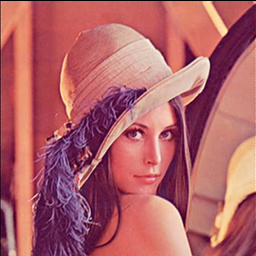
You can also have some fun with the destination points:


Method 2
I’m going to hijack this question just a tiny bit because it’s the only thing on Google pertaining to perspective transformations in Python. Here is some slightly more general code based on the above which creates a perspective transform matrix and generates a function which will run that transform on arbitrary points:
import numpy as np

def create_perspective_transform_matrix(src, dst):
    """ Creates a perspective transformation matrix which transforms points
        in quadrilateral ``src`` to the corresponding points on quadrilateral
        ``dst``.

        Will raise a ``np.linalg.LinAlgError`` on invalid input.
        """
    # See:
    # * http://xenia.media.mit.edu/~cwren/interpolator/
    # * http://stackoverflow.com/a/14178717/71522
    in_matrix = []
    for (x, y), (X, Y) in zip(src, dst):
        in_matrix.extend([
            [x, y, 1, 0, 0, 0, -X * x, -X * y],
            [0, 0, 0, x, y, 1, -Y * x, -Y * y],
        ])

    A = np.matrix(in_matrix, dtype=np.float)
    B = np.array(dst).reshape(8)
    af = np.dot(np.linalg.inv(A.T * A) * A.T, B)
    return np.append(np.array(af).reshape(8), 1).reshape((3, 3))


def create_perspective_transform(src, dst, round=False, splat_args=False):
    """ Returns a function which will transform points in quadrilateral
        ``src`` to the corresponding points on quadrilateral ``dst``::

            >>> transform = create_perspective_transform(
            ...     [(0, 0), (10, 0), (10, 10), (0, 10)],
            ...     [(50, 50), (100, 50), (100, 100), (50, 100)],
            ... )
            >>> transform((5, 5))
            (74.99999999999639, 74.999999999999957)

        If ``round`` is ``True`` then points will be rounded to the nearest
        integer and integer values will be returned.

            >>> transform = create_perspective_transform(
            ...     [(0, 0), (10, 0), (10, 10), (0, 10)],
            ...     [(50, 50), (100, 50), (100, 100), (50, 100)],
            ...     round=True,
            ... )
            >>> transform((5, 5))
            (75, 75)

        If ``splat_args`` is ``True`` the function will accept two arguments
        instead of a tuple.

            >>> transform = create_perspective_transform(
            ...     [(0, 0), (10, 0), (10, 10), (0, 10)],
            ...     [(50, 50), (100, 50), (100, 100), (50, 100)],
            ...     splat_args=True,
            ... )
            >>> transform(5, 5)
            (74.99999999999639, 74.999999999999957)

        If the input values yield an invalid transformation matrix an identity
        function will be returned and the ``error`` attribute will be set to a
        description of the error::

            >>> tranform = create_perspective_transform(
            ...     np.zeros((4, 2)),
            ...     np.zeros((4, 2)),
            ... )
            >>> transform((5, 5))
            (5.0, 5.0)
            >>> transform.error
            'invalid input quads (...): Singular matrix
        """
    try:
        transform_matrix = create_perspective_transform_matrix(src, dst)
        error = None
    except np.linalg.LinAlgError as e:
        transform_matrix = np.identity(3, dtype=np.float)
        error = "invalid input quads (%s and %s): %s" %(src, dst, e)
        error = error.replace("n", "")

    to_eval = "def perspective_transform(%s):n" %(
        splat_args and "*pt" or "pt",
    )
    to_eval += "  res = np.dot(transform_matrix, ((pt[0], ), (pt[1], ), (1, )))n"
    to_eval += "  res = res / res[2]n"
    if round:
        to_eval += "  return (int(round(res[0][0])), int(round(res[1][0])))n"
    else:
        to_eval += "  return (res[0][0], res[1][0])n"
    locals = {
        "transform_matrix": transform_matrix,
    }
    locals.update(globals())
    exec to_eval in locals, locals
    res = locals["perspective_transform"]
    res.matrix = transform_matrix
    res.error = error
    return res
Method 3
The 8 transform coefficients (a, b, c, d, e, f, g, h) correspond to the following transformation:
x’ = (ax + by + c) / (gx + hy + 1)
y’ = (dx + ey + f) / (gx + hy + 1)
These 8 coefficients can in general be found from solving 8 (linear) equations that define how 4 points on the plane transform (4 points in 2D -> 8 equations), see the answer by mmgp for a code that solves this, although you might find it a tad more accurate to change the line
res = numpy.dot(numpy.linalg.inv(A.T * A) * A.T, B)
to
res = numpy.linalg.solve(A, B)
i.e., there is no real reason to actually invert the A matrix there, or to multiply it by its transpose and losing a bit of accuracy, in order to solve the equations.
As for your question, for a simple tilt of theta degrees around (x0, y0), the coefficients you are looking for are:
def find_rotation_coeffs(theta, x0, y0):
    ct = cos(theta)
    st = sin(theta)
    return np.array([ct, -st, x0*(1-ct) + y0*st, st, ct, y0*(1-ct)-x0*st,0,0])
And in general any Affine transformation must have (g, h) equal to zero. Hope that helps!
Method 4
Here is a pure-Python version of generating the transform coefficients (as I’ve seen this requested by several). I made and used it for making the PyDraw pure-Python image drawing package.
If using it for your own project, note that the calculations requires several advanced matrix operations which means that this function requires another, luckily pure-Python, matrix library called matfunc originally written by Raymond Hettinger and which you can download here or here.
import matfunc as mt

def perspective_coefficients(self, oldplane, newplane):
    """
    Calculates and returns the transform coefficients needed for a perspective
    transform, ie tilting an image in 3D.
    Note: it is not very obvious how to set the oldplane and newplane arguments
    in order to tilt an image the way one wants. Need to make the arguments more
    user-friendly and handle the oldplane/newplane behind the scenes.
    Some hints on how to do that at http://www.cs.utexas.edu/~fussell/courses/cs384g/lectures/lecture20-Z_buffer_pipeline.pdf

    | **option** | **description**
    | --- | ---
    | oldplane | a list of four old xy coordinate pairs
    | newplane | four points in the new plane corresponding to the old points

    """
    # first find the transform coefficients, thanks to http://stackoverflow.com/questions/14177744/how-does-perspective-transformation-work-in-pil
    pb,pa = oldplane,newplane
    grid = []
    for p1,p2 in zip(pa, pb):
        grid.append([p1[0], p1[1], 1, 0, 0, 0, -p2[0]*p1[0], -p2[0]*p1[1]])
        grid.append([0, 0, 0, p1[0], p1[1], 1, -p2[1]*p1[0], -p2[1]*p1[1]])

    # then do some matrix magic
    A = mt.Matrix(grid)
    B = mt.Vec([xory for xy in pb for xory in xy])
    AT = A.tr()
    ATA = AT.mmul(A)
    gridinv = ATA.inverse()
    invAT = gridinv.mmul(AT)
    res = invAT.mmul(B)
    a,b,c,d,e,f,g,h = res.flatten()

    # finito
    return a,b,c,d,e,f,g,h
All methods was sourced from stackoverflow.com or stackexchange.com, is licensed under cc by-sa 2.5, cc by-sa 3.0 and cc by-sa 4.0