Is there a page somewhere that details exactly how WordPress generates slugs for URLs? I’m writing a script that needs to generate URL slugs identical to the ones WordPress generates.
Answers:
Thank you for visiting the Q&A section on Magenaut. Please note that all the answers may not help you solve the issue immediately. So please treat them as advisements. If you found the post helpful (or not), leave a comment & I’ll get back to you as soon as possible.
Method 1
As per @SinisterBeard‘s very valid comment to the question already a couple of years back now, this answer has long been outdated and the mentioned function(s) hence been replaced by a newer API:
See wp_unique_post_slug.
Original Answer
Off the bat, I can’t give you a page/tutorial/documentation on how WP slugs are generated, but take a look at the sanitize_title() function.
Don’t get a wrong impression by the function name, it is not meant to sanitize a title for further usage as a page/post title. It takes a title string and returns it to be used in a URL:
- strips HTML & PHP
- strips special chars
- converts all characters to lowercaps
- replaces whitespaces, underscores and periods by hyphens/dashes
- reduces multiple consecutive dashes to one
There might be edge cases where the core does something additional (you’d have to look at the source to verify that sanitize_title() will always suffice in generating exactly the same you expect), but this should cover at least 99%, if not all, cases.
Method 2
You can use this function:
static public function slugify($text)
{
  // replace non letter or digits by -
  $text = preg_replace('~[^pLd]+~u', '-', $text);

  // transliterate
  $text = iconv('utf-8', 'us-ascii//TRANSLIT', $text);

  // remove unwanted characters
  $text = preg_replace('~[^-w]+~', '', $text);

  // trim
  $text = trim($text, '-');

  // remove duplicate -
  $text = preg_replace('~-+~', '-', $text);

  // lowercase
  $text = strtolower($text);

  if (empty($text)) {
    return 'n-a';
  }

  return $text;
}
Its kind of exactly how the wp url sanitize function works.
Method 3
Core at your service
There’s no developer mode built into WordPress aside from WP_DEBUG, which doesn’t help you too much in this case. Basically WP uses the “Rewrite API”, which is a function based, low level wrapper for the WP_Rewrite class, which you can read about in Codex. The global $wp_rewrite object stands at your service to inspect it or interact with the class.
Plugins that help looking into it.
Toschos “T5 Rewrite”-Plugin and Jan Fabrys “Monkeyman Rewrite Analyzer”-Plugin will guide you your way. I’ve written a small extension for “T5 Rewrite” to smoothly integrate it with the “Monkeyman Rewrite Analyzer”, which you can find in the “T5 Rewrite” repos wikie here on GitHub.
The “Monkeyman”-plugin adds a new page, filed in the admin UI menu under Tools. The “T5 Rewrite”-plugin adds a new help tab to the Settings > Permalinks page. My extension adds the help tabs to the mentioned Tools-page too.
Here’s a screenshot of what the “T5 Rewrite”-plugins help tab content looks like.
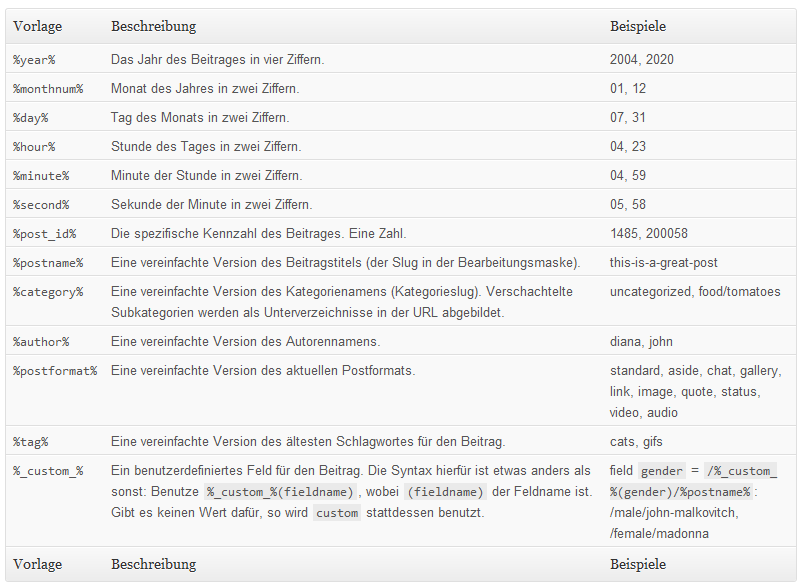
Vorlage = Pattern | Beschreibung = Explanation | Beispiele = Examples
Notes
The “T5 Rewrite”-plugin does a wonderful job with helping you inspect the rewrite object. And it does even more: It adds new possibilities. Therefore it’s (at least in my installations) part of my basic plugins package.
Method 4
Actually, if you look core function wp_insert_post (post.php), you will see that it does the following:
$data['post_name'] = wp_unique_post_slug( sanitize_title( $data['post_title'], $post_ID ), $post_ID, $data['post_status'], $post_type, $post_parent );

$wpdb->update( $wpdb->posts, array( 'post_name' => $data['post_name'] ), $where );
The key thing to note is that uses both wp_unique_post_slug and sanitize_title:
wp_unique_post_slug( sanitize_title(
Method 5
Forgive for resuming an old question, but I had the same necessity as found out this method works perfectly for me:
$some_string = "DON'T STOP ME NOW!";
$slug = sanitize_title(sanitize_title($some_string, '', 'save'), '', 'query');
echo $slug; // dont-stop-me-now
This method uses a double sanitization.
The first one uses the save mode, where HTML and PHP tags are stripped, and accents are removed (accented characters are replaced with non-accented equivalents).
The second query mode ensures all spaces are replaced with dashes - and other punctuation removed.
Hope this helps someone! 🙂
All methods was sourced from stackoverflow.com or stackexchange.com, is licensed under cc by-sa 2.5, cc by-sa 3.0 and cc by-sa 4.0