I need add another image in the standard “Text and Full Image(text right) layout” in WordPress. This layout by default has a field for an image. I located the php file that renders this page which is text-and-full-image-text-right.php Is there a way I can add a new image field in this standard layout? The Screenshot below shows you where I need to place my new image. I know how to use custom fields in a template, but not sure how to use them in the layouts/rows in the edit screen?
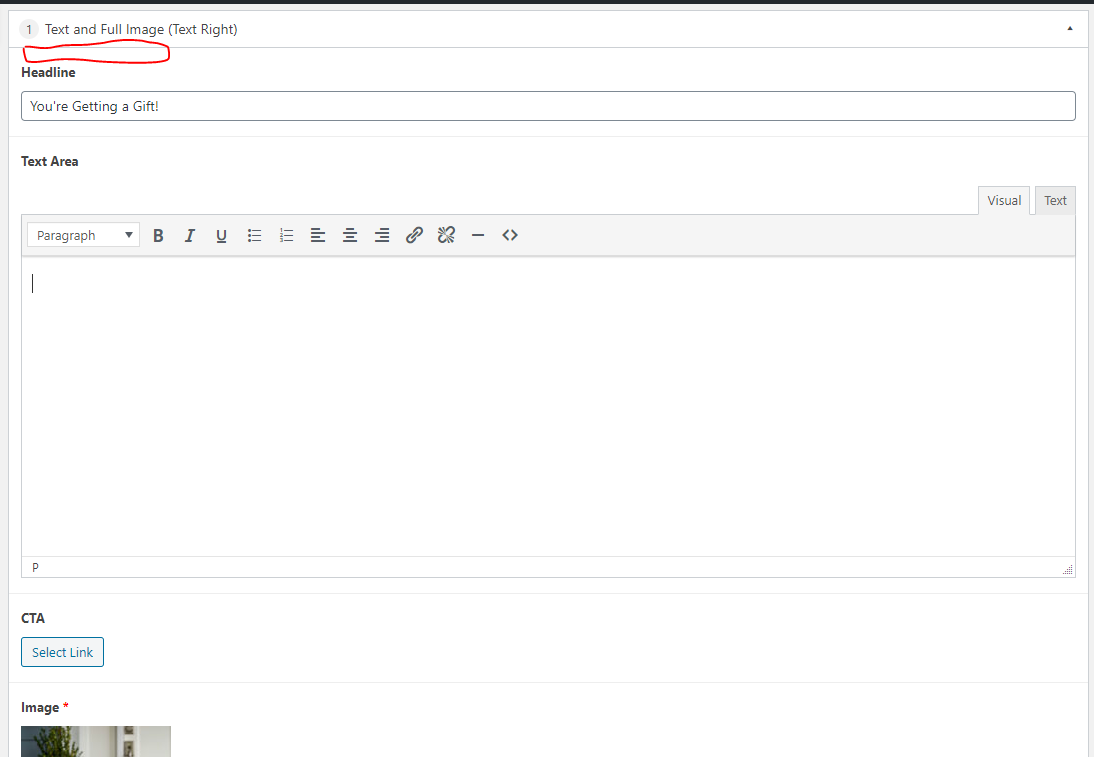
How to override the following WordPress core file to add a custom image field in the layout shown by the image above.
<?php
$headline = get_sub_field( 'headline' );
$text_area = get_sub_field( 'text_area' );
$link = get_sub_field( 'cta' );
$image = get_sub_field( 'image' );
?>

<div class="bg-white-base">
  <div class="wrap-x">
    <div class="inside">
      <div class="row middle-xs mb0">

        <?php if($image): ?>
        <div class="col col-xs-12 col-md-6 mb0 col-img ">
          <picture>
            <source media="(max-width: 360px)" srcset="<?php echo($image['sizes']['xsmall']); ?>">
            <source media="(max-width: 668px)" srcset="<?php echo($image['sizes']['small']); ?>">
            <source media="(max-width: 1024px)" srcset="<?php echo($image['sizes']['medium']); ?>">
            <source media="(max-width: 1280px)" srcset="<?php echo($image['sizes']['large']); ?>">
            <source srcset="<?php echo($image['sizes']['xlarge']); ?>">
            <img src="<?php echo($image['sizes']['xlarge']); ?>" alt="<?php echo $image['alt']; ?>" class="m-auto" />
          </picture>
        </div>
        <?php endif; ?>

        <div class="col col-xs-12 col-md-6 mb0">
          <div class="pt2x"></div>

          <?php if($headline): ?>
          <h2 class="mb0 color-tan-darkest alt-heading h5">
            <?php echo $headline; ?>
          </h2>
          <?php endif; ?>

          <?php if($text_area): ?>
          <article class="body-area mt">
            <?php echo $text_area; ?>
          </article>
          <?php endif; ?>

          <?php if($link): ?>
          <div class="mt2x">
            <a href="<?php echo $link['url']; ?>" target="<?php echo $link['target']; ?>" class="btn btn-tan" role="button">
              <?php echo $link['title']; ?>
            </a>
          </div>
          <?php endif; ?>

          <div class="pb2x"></div>
        </div>


      </div>
    </div>
  </div>
</div>
Answers:
Thank you for visiting the Q&A section on Magenaut. Please note that all the answers may not help you solve the issue immediately. So please treat them as advisements. If you found the post helpful (or not), leave a comment & I’ll get back to you as soon as possible.
Method 1
I had to copy the existing flexible layout to add two new fields using the Advanced Custom Fields plugin. It is also required to have the relevant PHP file copied and modified to display the new field contents.
All methods was sourced from stackoverflow.com or stackexchange.com, is licensed under cc by-sa 2.5, cc by-sa 3.0 and cc by-sa 4.0