I have a very simple question. I need to have a second x-axis on my plot and I want that this axis has a certain number of tics that correspond to certain position of the first axis.
Let’s try with an example. Here I am plotting the dark matter mass as a function of the expansion factor, defined as 1/(1+z), that ranges from 0 to 1.
semilogy(1/(1+z),mass_acc_massive,'-',label='DM')
xlim(0,1)
ylim(1e8,5e12)
I would like to have another x-axis, on the top of my plot, showing the corresponding z for some values of the expansion factor. Is that possible? If yes, how can I have xtics ax
Answers:
Thank you for visiting the Q&A section on Magenaut. Please note that all the answers may not help you solve the issue immediately. So please treat them as advisements. If you found the post helpful (or not), leave a comment & I’ll get back to you as soon as possible.
Method 1
I’m taking a cue from the comments in @Dhara’s answer, it sounds like you want to set a list of new_tick_locations by a function from the old x-axis to the new x-axis. The tick_function below takes in a numpy array of points, maps them to a new value and formats them:
import numpy as np
import matplotlib.pyplot as plt

fig = plt.figure()
ax1 = fig.add_subplot(111)
ax2 = ax1.twiny()

X = np.linspace(0,1,1000)
Y = np.cos(X*20)

ax1.plot(X,Y)
ax1.set_xlabel(r"Original x-axis: $X$")

new_tick_locations = np.array([.2, .5, .9])

def tick_function(X):
    V = 1/(1+X)
    return ["%.3f" % z for z in V]

ax2.set_xlim(ax1.get_xlim())
ax2.set_xticks(new_tick_locations)
ax2.set_xticklabels(tick_function(new_tick_locations))
ax2.set_xlabel(r"Modified x-axis: $1/(1+X)$")
plt.show()
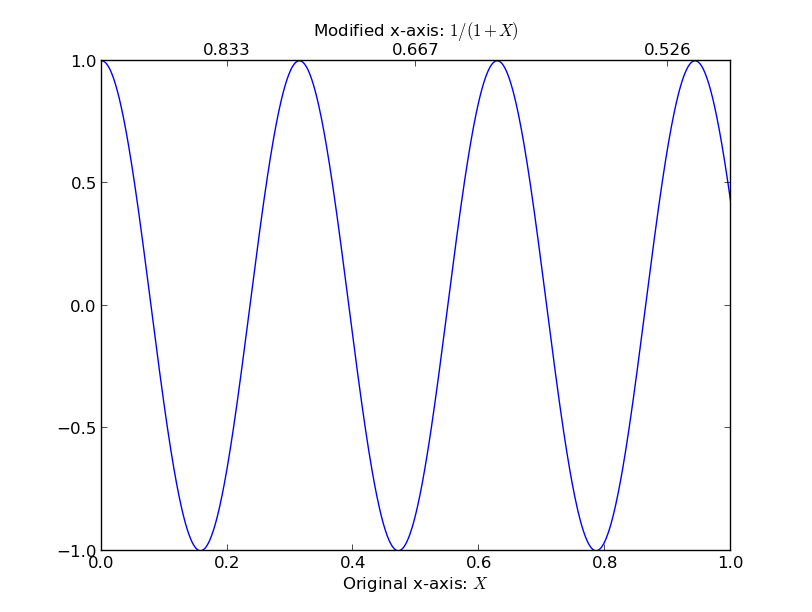
Method 2
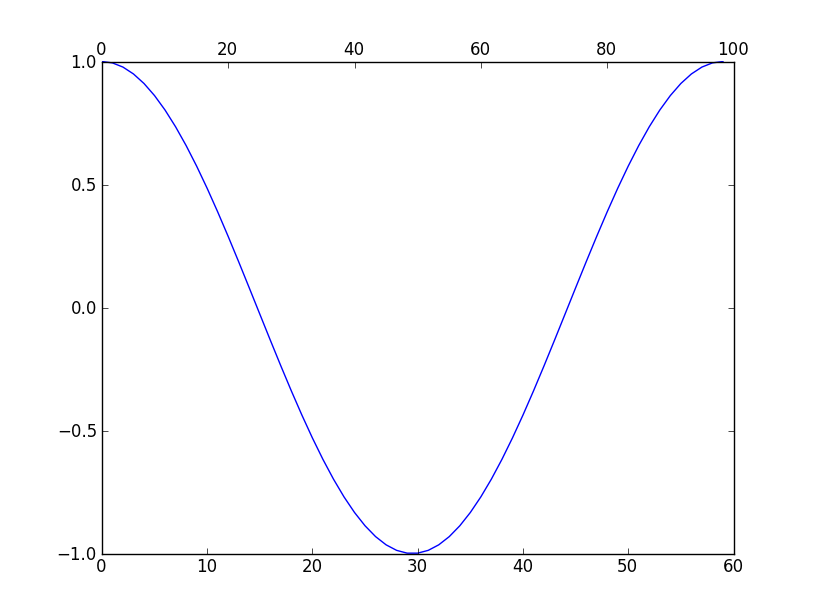
You can use twiny to create 2 x-axis scales. For Example:
import numpy as np
import matplotlib.pyplot as plt

fig = plt.figure()
ax1 = fig.add_subplot(111)
ax2 = ax1.twiny()

a = np.cos(2*np.pi*np.linspace(0, 1, 60.))

ax1.plot(range(60), a)
ax2.plot(range(100), np.ones(100)) # Create a dummy plot
ax2.cla()
plt.show()
Ref: http://matplotlib.sourceforge.net/faq/howto_faq.html#multiple-y-axis-scales
Output:
Method 3
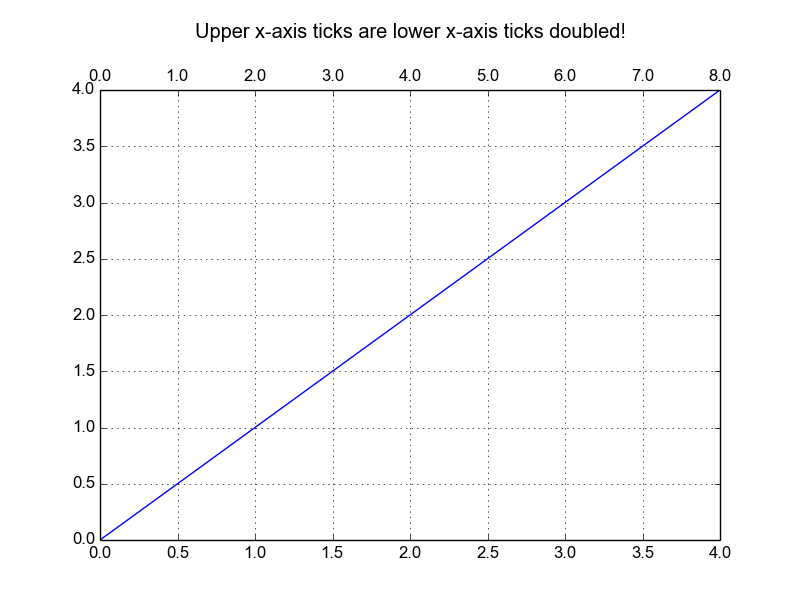
If You want your upper axis to be a function of the lower axis tick-values you can do as below. Please note: sometimes get_xticks() will have a ticks outside of the visible range, which you have to allow for when converting.
import matplotlib.pyplot as plt

fig, ax1 = plt.subplots()

ax1 = fig.add_subplot(111)

ax1.plot(range(5), range(5))

ax1.grid(True)

ax2 = ax1.twiny()
ax2.set_xticks( ax1.get_xticks() )
ax2.set_xbound(ax1.get_xbound())
ax2.set_xticklabels([x * 2 for x in ax1.get_xticks()])

title = ax1.set_title("Upper x-axis ticks are lower x-axis ticks doubled!")
title.set_y(1.1)
fig.subplots_adjust(top=0.85)

fig.savefig("1.png")
Gives:
Method 4
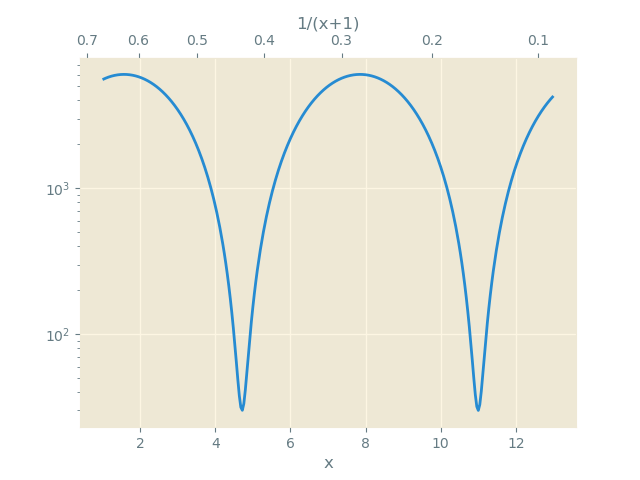
From matplotlib 3.1 onwards you may use ax.secondary_xaxis
import numpy as np
import matplotlib.pyplot as plt

x = np.linspace(1,13, num=301)
y = (np.sin(x)+1.01)*3000

# Define function and its inverse
f = lambda x: 1/(1+x)
g = lambda x: 1/x-1

fig, ax = plt.subplots()
ax.semilogy(x, y, label='DM')

ax2 = ax.secondary_xaxis("top", functions=(f,g))

ax2.set_xlabel("1/(x+1)")
ax.set_xlabel("x")
plt.show()
Method 5
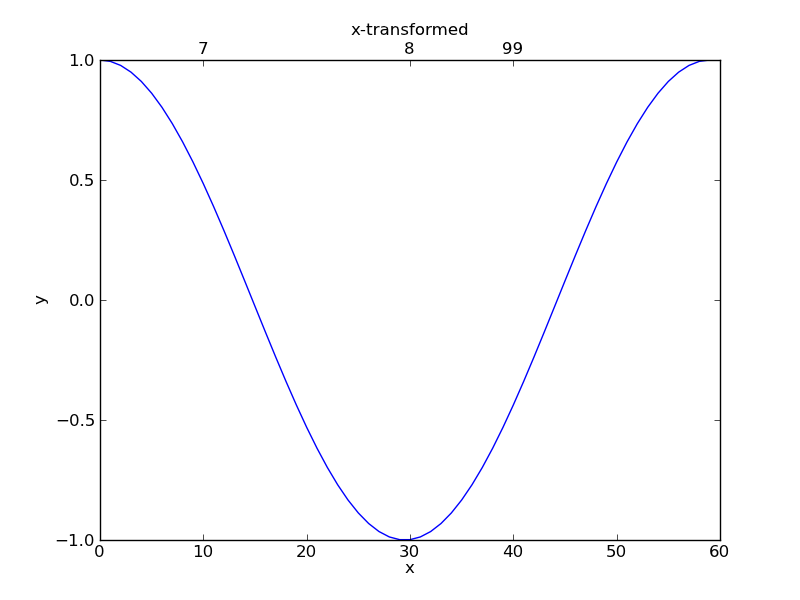
Answering your question in Dhara’s answer comments: “I would like on the second x-axis these tics: (7,8,99) corresponding to the x-axis position 10, 30, 40. Is that possible in some way?”
Yes, it is.
import numpy as np
import matplotlib.pyplot as plt

fig = plt.figure()
ax1 = fig.add_subplot(111)

a = np.cos(2*np.pi*np.linspace(0, 1, 60.))
ax1.plot(range(60), a)

ax1.set_xlim(0, 60)
ax1.set_xlabel("x")
ax1.set_ylabel("y")

ax2 = ax1.twiny()
ax2.set_xlabel("x-transformed")
ax2.set_xlim(0, 60)
ax2.set_xticks([10, 30, 40])
ax2.set_xticklabels(['7','8','99'])

plt.show()
You’ll get:
Method 6
I’m forced to post this as an answer instead of a comment due to low reputation.
I had a similar problem to Matteo. The difference being that I had no map from my first x-axis to my second x-axis, only the x-values themselves. So I wanted to set the data on my second x-axis directly, not the ticks, however, there is no axes.set_xdata. I was able to use Dhara’s answer to do this with a modification:
ax2.lines = []
instead of using:
ax2.cla()
When in use also cleared my plot from ax1.
All methods was sourced from stackoverflow.com or stackexchange.com, is licensed under cc by-sa 2.5, cc by-sa 3.0 and cc by-sa 4.0