How to make any plugin icon in wordpress post? The code I want to insert in plugin code and will appear in post bar [wp-admin/post.php].
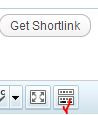
Like this image:
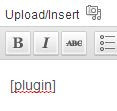
Output: If I click the icon it automatically writes [plugin] to the post content like this:
Answers:
Thank you for visiting the Q&A section on Magenaut. Please note that all the answers may not help you solve the issue immediately. So please treat them as advisements. If you found the post helpful (or not), leave a comment & I’ll get back to you as soon as possible.
Method 1
To add our button to the TinyMCE editor we need to do several things:
- Add our button to the toolbar
- Register a TinyMCE plugin
- Create that TinyMCE plug-in which tells TinyMCE what to do when our button is clicked.
Steps #1 and #2
In these steps we register our TinyMCE plug-in which will live inside a javascript file at 'path/to/shortcode.js' (see wpse72394_register_tinymce_plugin() below)
 // init process for registering our button
 add_action('init', 'wpse72394_shortcode_button_init');
 function wpse72394_shortcode_button_init() {

      //Abort early if the user will never see TinyMCE
      if ( ! current_user_can('edit_posts') && ! current_user_can('edit_pages') && get_user_option('rich_editing') == 'true')
           return;

      //Add a callback to regiser our tinymce plugin
      add_filter("mce_external_plugins", "wpse72394_register_tinymce_plugin");

      // Add a callback to add our button to the TinyMCE toolbar
      add_filter('mce_buttons', 'wpse72394_add_tinymce_button');
}


//This callback registers our plug-in
function wpse72394_register_tinymce_plugin($plugin_array) {
    $plugin_array['wpse72394_button'] = 'path/to/shortcode.js';
    return $plugin_array;
}

//This callback adds our button to the toolbar
function wpse72394_add_tinymce_button($buttons) {
            //Add the button ID to the $button array
    $buttons[] = "wpse72394_button";
    return $buttons;
}
Step #3
Now we need to create our TinyMCE plug-in. This will go in a file 'path/to/shortcode.js' (as specified in the early steps).
jQuery(document).ready(function($) {

    tinymce.create('tinymce.plugins.wpse72394_plugin', {
        init : function(ed, url) {
                // Register command for when button is clicked
                ed.addCommand('wpse72394_insert_shortcode', function() {
                    selected = tinyMCE.activeEditor.selection.getContent();

                    if( selected ){
                        //If text is selected when button is clicked
                        //Wrap shortcode around it.
                        content =  '[shortcode]'+selected+'[/shortcode]';
                    }else{
                        content =  '[shortcode]';
                    }

                    tinymce.execCommand('mceInsertContent', false, content);
                });

            // Register buttons - trigger above command when clicked
            ed.addButton('wpse72394_button', {title : 'Insert shortcode', cmd : 'wpse72394_insert_shortcode', image: url + '/path/to/image.png' });
        },
    });

    // Register our TinyMCE plugin
    // first parameter is the button ID1
    // second parameter must match the first parameter of the tinymce.create() function above
    tinymce.PluginManager.add('wpse72394_button', tinymce.plugins.wpse72394_plugin);
});
Method 2
There’s too much to put the whole answer here so checkout this guide: http://wp.smashingmagazine.com/2012/05/01/wordpress-shortcodes-complete-guide/
You have to create a Javascript file that takes action from the button you register through WordPress that inserts the TinyMCE button into the editor.
All methods was sourced from stackoverflow.com or stackexchange.com, is licensed under cc by-sa 2.5, cc by-sa 3.0 and cc by-sa 4.0