I would like to add percent values – in addition to counts – to my pandas barplot. However, I am not able to do so. My code is shown below and thus far I can get count values to display. Can somebody please help me add relative % values next to/below the count values displayed for each bar?
import matplotlib
import matplotlib.pyplot as plt
%matplotlib inline
plt.style.use('ggplot')

import seaborn as sns
sns.set_style("white")

fig = plt.figure()
fig.set_figheight(5)
fig.set_figwidth(10)

ax = fig.add_subplot(111)

counts = [29227, 102492,  53269, 504028, 802994]

y_ax = ('A','B','C','D','E')
y_tick = np.arange(len(y_ax))

ax.barh(range(len(counts)), counts, align = "center", color = "tab:blue")
ax.set_yticks(y_tick)
ax.set_yticklabels(y_ax, size = 8)

#annotate bar plot with values
for i in ax.patches:
    ax.text(i.get_width()+.09, i.get_y()+.3, str(round((i.get_width()), 1)), fontsize=8)

sns.despine()
plt.show();
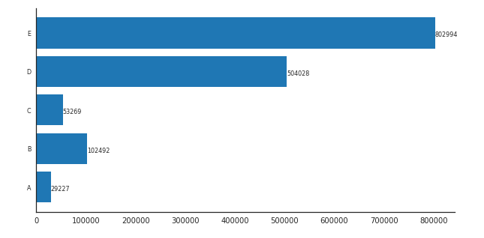
The output of my code is shown below. How can one add % values next to each count value displayed?
Answers:
Thank you for visiting the Q&A section on Magenaut. Please note that all the answers may not help you solve the issue immediately. So please treat them as advisements. If you found the post helpful (or not), leave a comment & I’ll get back to you as soon as possible.
Method 1
With pandas
- Tested with
pandas v1.2.4
Imports and Load Data
import pandas as pd
import matplotlib.pyplot as plt

# create the dataframe from values in the OP
counts = [29227, 102492,  53269, 504028, 802994]
df = pd.DataFrame(data=counts, columns=['counts'], index=['A','B','C','D','E'])

# add a percent column
df['%'] = df.counts.div(df.counts.sum()).mul(100).round(2)

# display(df)
   counts      %
A   29227   1.96
B  102492   6.87
C   53269   3.57
D  504028  33.78
E  802994  53.82
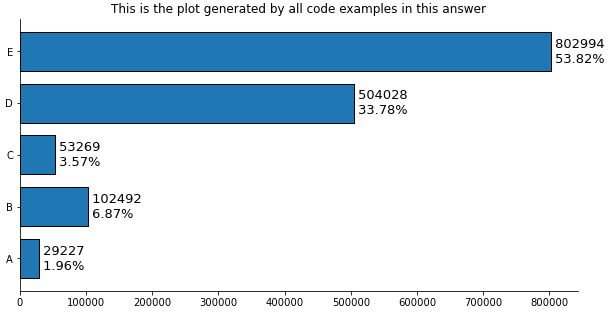
Plot use matplotlib from version 3.4.2
- Use
matplotlib.pyplot.bar_label - See How to add value labels on a bar chart for additional details and examples with
.bar_label. - Tested with
pandas v1.2.4, which is usingmatplotlibas the plot engine. - Some formatting can be done with the
fmtparameter, but more sophisticated formatting should be done with thelabelsparameter.
ax = df.plot(kind='barh', y='counts', figsize=(10, 5), legend=False, width=.75,
             title='This is the plot generated by all code examples in this answer')

# customize the label to include the percent
labels = [f' {v.get_width()}n {df.iloc[i, 1]}%' for i, v in enumerate(ax.containers[0])]

# set the bar label
ax.bar_label(ax.containers[0], labels=labels, label_type='edge', size=13)

ax.spines['right'].set_visible(False)
ax.spines['top'].set_visible(False)
plt.show()
Plot use matplotlib before version 3.4.2
# plot the dataframe
ax = df.plot(kind='barh', y='counts', figsize=(10, 5), legend=False, width=.75)
for i, y in enumerate(ax.patches):

    # get the percent label
    label_per = df.iloc[i, 1]

    # add the value label
    ax.text(y.get_width()+.09, y.get_y()+.3, str(round((y.get_width()), 1)), fontsize=10)

    # add the percent label here
    ax.text(y.get_width()+.09, y.get_y()+.1, str(f'{round((label_per), 2)}%'), fontsize=10)

ax.spines['right'].set_visible(False)
ax.spines['top'].set_visible(False)
plt.show()
Original Answer without pandas
- Tested with
matplotlib v3.3.4
import matplotlib.pyplot as plt

fig, ax = plt.subplots(figsize=(10, 5))

counts = [29227, 102492,  53269, 504028, 802994]

# calculate percents
percents = [100*x/sum(counts) for x in counts]

y_ax = ('A','B','C','D','E')
y_tick = np.arange(len(y_ax))

ax.barh(range(len(counts)), counts, align = "center", color = "tab:blue")
ax.set_yticks(y_tick)
ax.set_yticklabels(y_ax, size = 8)

#annotate bar plot with values
for i, y in enumerate(ax.patches):
    label_per = percents[i]
    ax.text(y.get_width()+.09, y.get_y()+.3, str(round((y.get_width()), 1)), fontsize=10)
    # add the percent label here
    # ax.text(y.get_width()+.09, y.get_y()+.3, str(round((label_per), 2)), ha='right', va='center', fontsize=10)
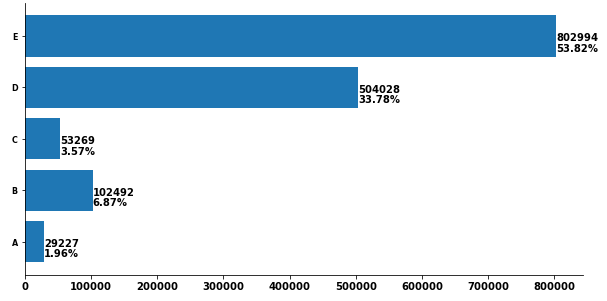
    ax.text(y.get_width()+.09, y.get_y()+.1, str(f'{round((label_per), 2)}%'), fontsize=10)

ax.spines['right'].set_visible(False)
ax.spines['top'].set_visible(False)
plt.show()
- You can play with the positioning.
- Other formatting options mentioned by JohanC
- Print both parts of the text in one string with a
nin between to get a “natural” line spacing: str(f'{round((y.get_width()), 1)}n{round((label_per), 2)}%')ax.text(..., va='center')to vertically center and be able to use a slightly larger font.ax.set_xlim(0, max(counts) * 1.18)to get a bit more space for the text.- Start each line of text with a space to get a natural “horizontal” padding.
str(f' {round((label_per), 2)}%'), note the space before{.y.get_width()+.09is extremely close toy.get_width()when these values are in the tens of thousands.
All methods was sourced from stackoverflow.com or stackexchange.com, is licensed under cc by-sa 2.5, cc by-sa 3.0 and cc by-sa 4.0