Given the following count plot how do I place percentages on top of the bars?
import seaborn as sns
sns.set(style="darkgrid")
titanic = sns.load_dataset("titanic")
ax = sns.countplot(x="class", hue="who", data=titanic)
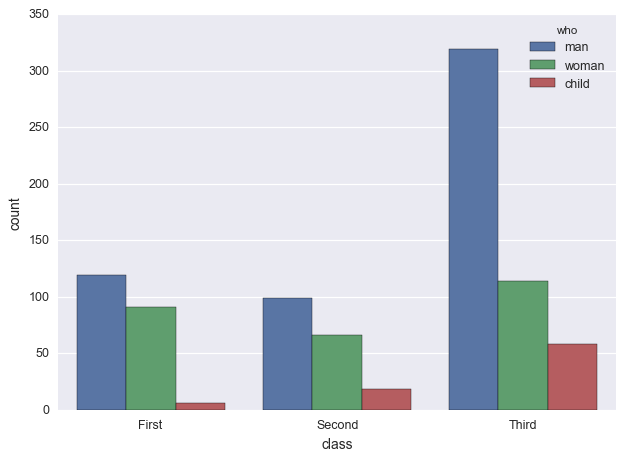
For example for “First” I want total First men/total First, total First women/total First, and total First children/total First on top of their respective bars.
Answers:
Thank you for visiting the Q&A section on Magenaut. Please note that all the answers may not help you solve the issue immediately. So please treat them as advisements. If you found the post helpful (or not), leave a comment & I’ll get back to you as soon as possible.
Method 1
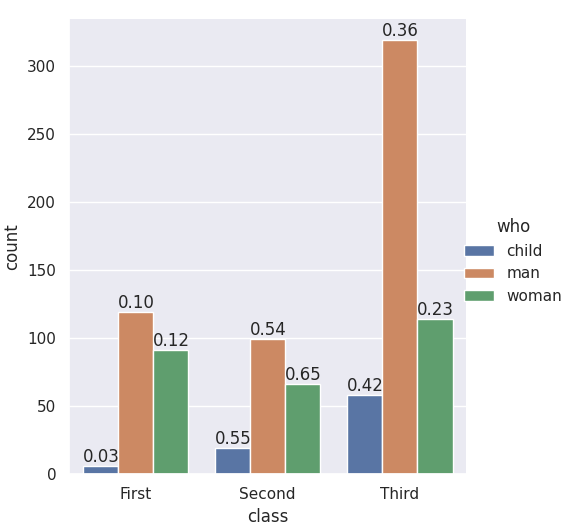
The seaborn.catplot organizing function returns a FacetGrid, which gives you access to the fig, the ax, and its patches. If you add the labels when nothing else has been plotted you know which bar-patches came from which variables. From @LordZsolt’s answer I picked up the order argument to catplot: I like making that explicit because now we aren’t relying on the barplot function using the order we think of as default.
import seaborn as sns
from itertools import product

titanic = sns.load_dataset("titanic")

class_order = ['First','Second','Third']
hue_order = ['child', 'man', 'woman']
bar_order = product(class_order, hue_order)

catp = sns.catplot(data=titanic, kind='count',
                   x='class', hue='who',
                   order = class_order,
                   hue_order = hue_order )

# As long as we haven't plotted anything else into this axis,
# we know the rectangles in it are our barplot bars
# and we know the order, so we can match up graphic and calculations:

spots = zip(catp.ax.patches, bar_order)
for spot in spots:
    class_total = len(titanic[titanic['class']==spot[1][0]])
    class_who_total = len(titanic[(titanic['class']==spot[1][0]) &
        (titanic['who']==spot[1][1])])
    height = spot[0].get_height()
    catp.ax.text(spot[0].get_x(), height+3, '{:1.2f}'.format(class_who_total/class_total))

    #checking the patch order, not for final:
    #catp.ax.text(spot[0].get_x(), -3, spot[1][0][0]+spot[1][1][0])
produces
An alternate approach is to do the sub-summing explicitly, e.g. with the excellent pandas, and plot with matplotlib, and also do the styling yourself. (Though you can get quite a lot of styling from sns context even when using matplotlib plotting functions. Try it out — )
Method 2
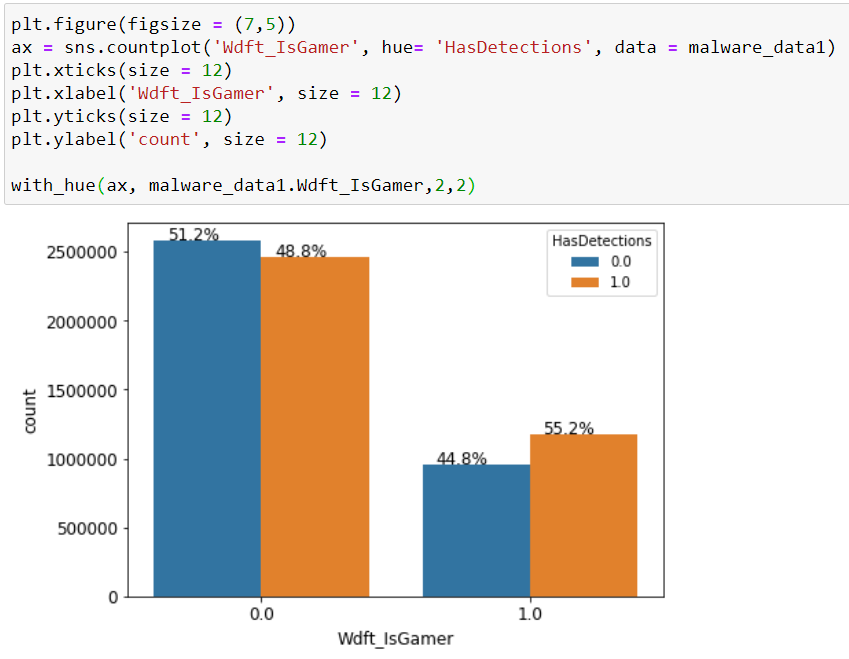
with_hue function will plot percentages on the bar graphs if you have the ‘hue’ parameter in your plots. It takes the actual graph, feature, Number_of_categories in feature, and hue_categories(number of categories in hue feature) as a parameter.
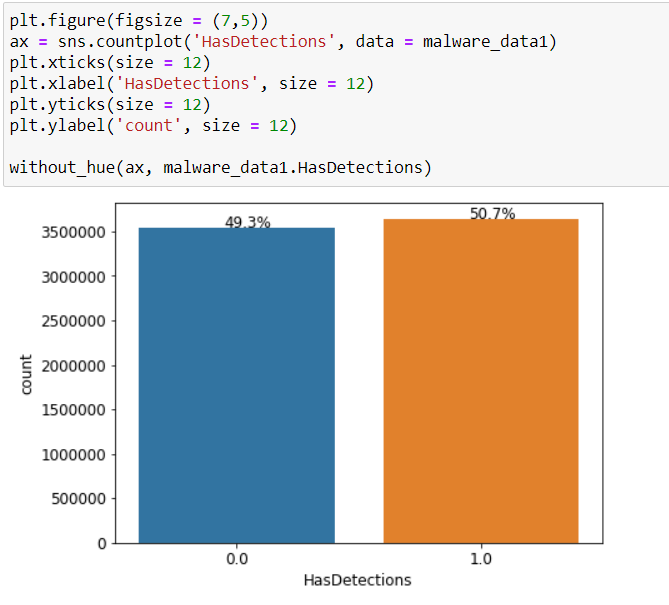
without_hue function will plot percentages on the bar graphs if you have a normal plot. It takes the actual graph and feature as a parameter.
def with_hue(ax, feature, Number_of_categories, hue_categories):
    a = [p.get_height() for p in ax.patches]
    patch = [p for p in ax.patches]
    for i in range(Number_of_categories):
        total = feature.value_counts().values[i]
        for j in range(hue_categories):
            percentage = '{:.1f}%'.format(100 * a[(j*Number_of_categories + i)]/total)
            x = patch[(j*Number_of_categories + i)].get_x() + patch[(j*Number_of_categories + i)].get_width() / 2 - 0.15
            y = patch[(j*Number_of_categories + i)].get_y() + patch[(j*Number_of_categories + i)].get_height()
            ax.annotate(percentage, (x, y), size = 12)

def without_hue(ax, feature):
    total = len(feature)
    for p in ax.patches:
        percentage = '{:.1f}%'.format(100 * p.get_height()/total)
        x = p.get_x() + p.get_width() / 2 - 0.05
        y = p.get_y() + p.get_height()
        ax.annotate(percentage, (x, y), size = 12)
Method 3
With the help of cphlewis’s solution, I managed to put the correct percentages on top of the chart, so the classes sum up to one.
for index, category in enumerate(categorical):
    plt.subplot(plot_count, 1, index + 1)

    order = sorted(data[category].unique())
    ax = sns.countplot(category, data=data, hue="churn", order=order)
    ax.set_ylabel('')

    bars = ax.patches
    half = int(len(bars)/2)
    left_bars = bars[:half]
    right_bars = bars[half:]

    for left, right in zip(left_bars, right_bars):
        height_l = left.get_height()
        height_r = right.get_height()
        total = height_l + height_r

        ax.text(left.get_x() + left.get_width()/2., height_l + 40, '{0:.0%}'.format(height_l/total), ha="center")
        ax.text(right.get_x() + right.get_width()/2., height_r + 40, '{0:.0%}'.format(height_r/total), ha="center")
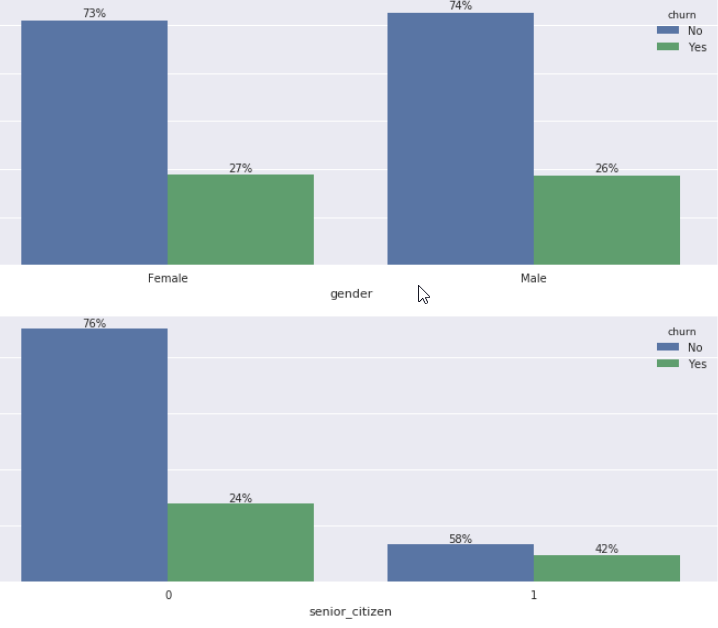
However, the solution assumes there are 2 options (man, woman) as opposed to 3 (man, woman, child).
Since Axes.patches are ordered in a weird way (first all the blue bars, then all the green bars, then all red bars), you would have to split them and zip them back together accordingly.
Method 4
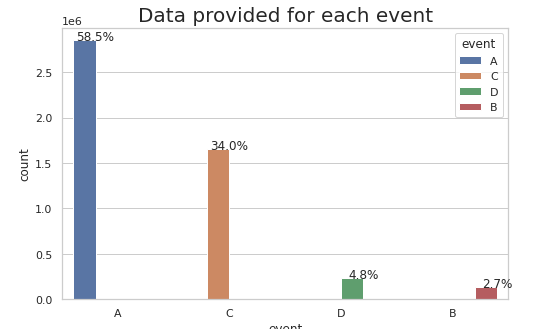
Answer is inspire from jrjc and cphlewis answer as above but more simple and understandable
sns.set(style="whitegrid")
plt.figure(figsize=(8,5))
total = float(len(train_df))
ax = sns.countplot(x="event", hue="event", data=train_df)
plt.title('Data provided for each event', fontsize=20)
for p in ax.patches:
    percentage = '{:.1f}%'.format(100 * p.get_height()/total)
    x = p.get_x() + p.get_width()
    y = p.get_height()
    ax.annotate(percentage, (x, y),ha='center')
plt.show()
Method 5
- The easiest option beginning with
matplotlib 3.4.2is to usematplotlib.pyplot.bar_label. - See this answer for more options and information about using
.bar_label. - The list comprehension for
labelsuses an assignment expression (:=), which requirespython >= 3.8. This can be rewritten as a standard for loop.labels = [f'{v.get_height()/data.who.count()*100:0.1f}' for v in c]works without an assignment expression.- Annotations for horizontal bars should use
v.get_width().
- The annotations in the example are percent of the total. For adding annotations based upon the total of a group, see this answer.
- Also see How to plot percentage with seaborn distplot / histplot / displot
Imports and Sample DataFrame
import matplotlib.pyplot as plt
import seaborn as sns

# load the data
data = sns.load_dataset('titanic')[['survived', 'class', 'who']]

   survived  class    who
0         0  Third    man
1         1  First  woman
2         1  Third  woman
Axes Level Plot
- Works with
seaborn.countplotorseaborn.barplot
# plot
ax = sns.countplot(x="class", hue="who", data=data)
ax.set(ylabel='Bar Count', title='Bar Count and Percent of Total')

# add annotations
for c in ax.containers:

    # custom label calculates percent and add an empty string so 0 value bars don't have a number
    labels = [f'{h/data.who.count()*100:0.1f}%' if (h := v.get_height()) > 0 else '' for v in c]

    ax.bar_label(c, labels=labels, label_type='edge')

plt.show()
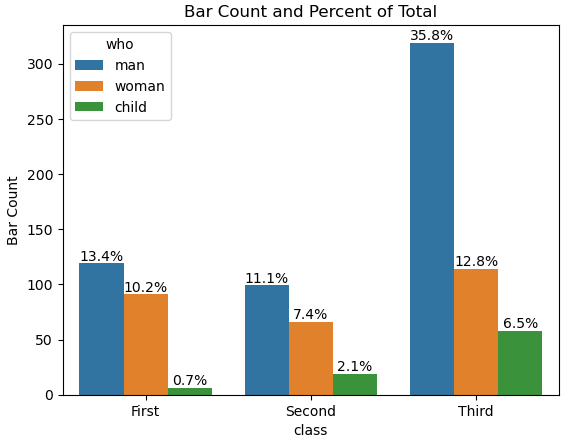
Figure Level Plot
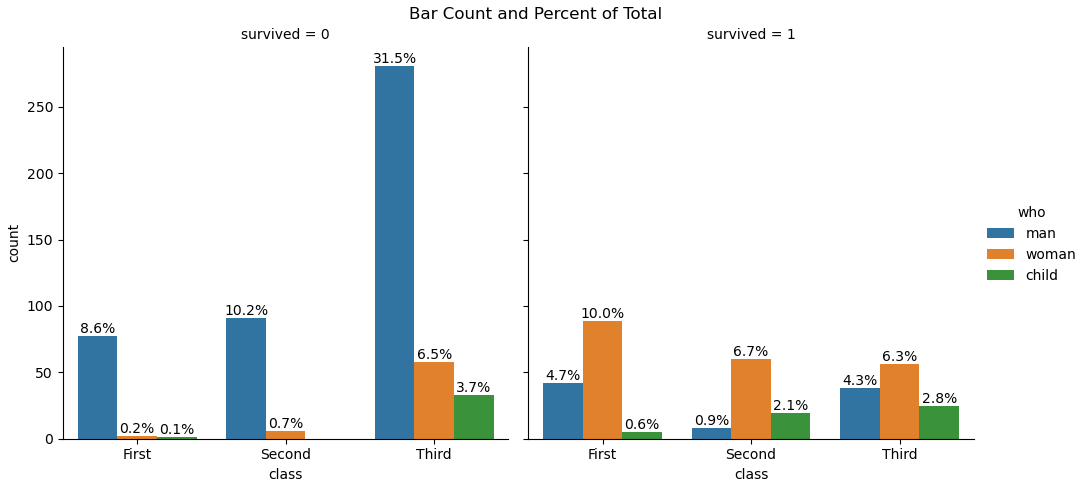
fg = sns.catplot(data=data, kind='count', x='class', hue='who', col='survived')
fg.fig.subplots_adjust(top=0.9)
fg.fig.suptitle('Bar Count and Percent of Total')

for ax in fg.axes.ravel():

    # add annotations
    for c in ax.containers:

        # custom label calculates percent and add an empty string so 0 value bars don't have a number
        labels = [f'{h/data.who.count()*100:0.1f}%' if (h := v.get_height()) > 0 else '' for v in c]

        ax.bar_label(c, labels=labels, label_type='edge')

plt.show()
Method 6
If there are more than 2 hue categories, I couldn’t get these approaches to work.
I used the approach of @Lord Zsolt , augmented for any number of hue categories.
def barPerc(df,xVar,ax):
    '''
    barPerc(): Add percentage for hues to bar plots
    args:
        df: pandas dataframe
        xVar: (string) X variable
        ax: Axes object (for Seaborn Countplot/Bar plot or
                         pandas bar plot)
    '''
    # 1. how many X categories
    ##   check for NaN and remove
    numX=len([x for x in df[xVar].unique() if x==x])

    # 2. The bars are created in hue order, organize them
    bars = ax.patches
    ## 2a. For each X variable
    for ind in range(numX):
        ## 2b. Get every hue bar
        ##     ex. 8 X categories, 4 hues =>
        ##    [0, 8, 16, 24] are hue bars for 1st X category
        hueBars=bars[ind:][::numX]
        ## 2c. Get the total height (for percentages)
        total = sum([x.get_height() for x in hueBars])

        # 3. Print the percentage on the bars
        for bar in hueBars:
            ax.text(bar.get_x() + bar.get_width()/2.,
                    bar.get_height(),
                    f'{bar.get_height()/total:.0%}',
                    ha="center",va="bottom")
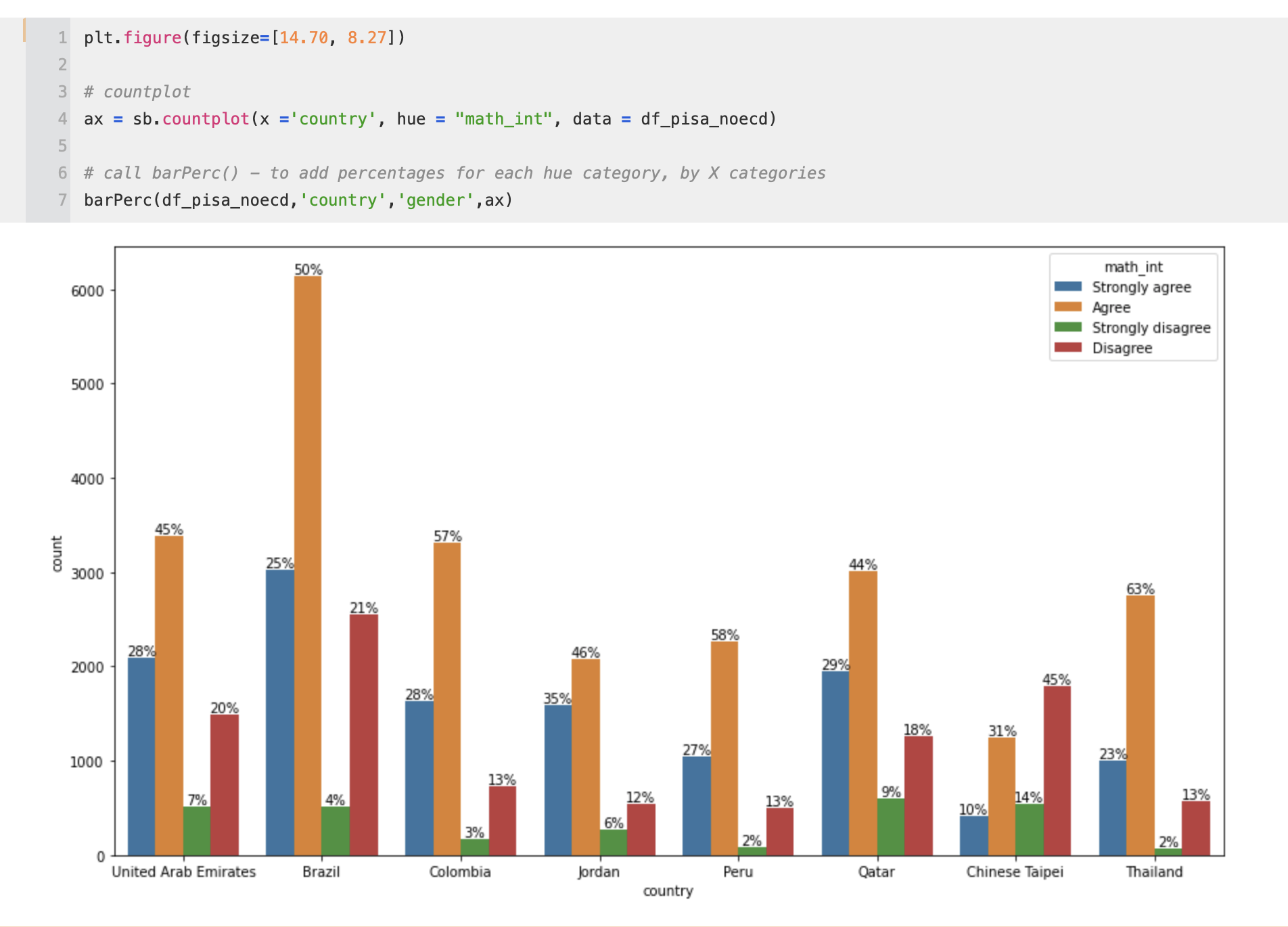
As you can see, this approach does what the original poster requested:
I want total First men/total First, total First women/total First, and total First children/total First on top of their respective bars.
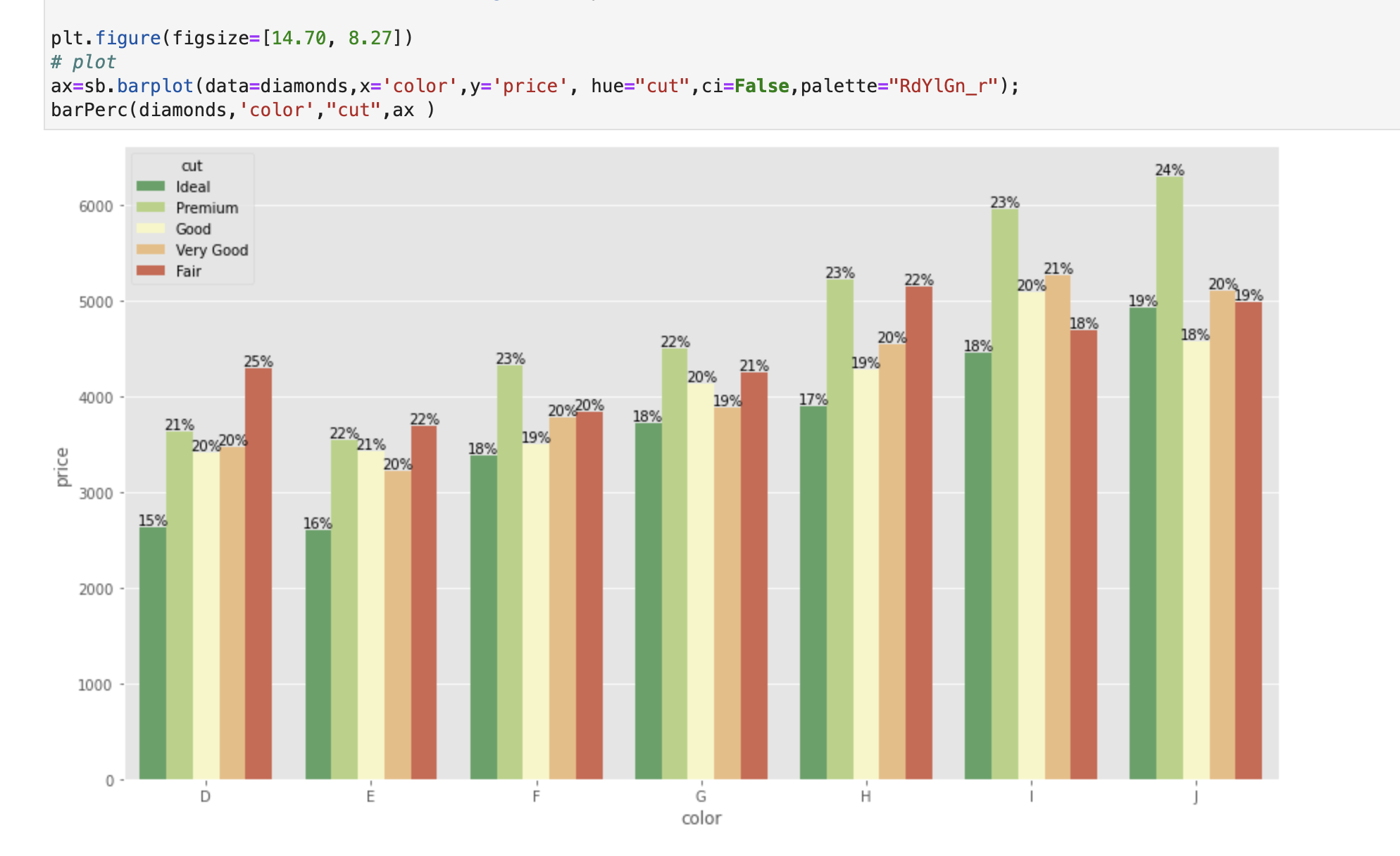
That is, the values added are the Percentage of each Hue (for each X category) – so that for each X category the percentages add to 100%
(This also works with Seaborn’s .barplot())
All methods was sourced from stackoverflow.com or stackexchange.com, is licensed under cc by-sa 2.5, cc by-sa 3.0 and cc by-sa 4.0