I have a project that I made in Asp.net with Entity Framework.
Now I want to add one or more tables in the database and one or more stored procedures.
But entities not shows the new table.
How to show this?
Answers:
Thank you for visiting the Q&A section on Magenaut. Please note that all the answers may not help you solve the issue immediately. So please treat them as advisements. If you found the post helpful (or not), leave a comment & I’ll get back to you as soon as possible.
Method 1
Open edmx file, right click anywhere in the modal and select “Update Model from Database” and follow the instructions and choose the desired tables and SPs.
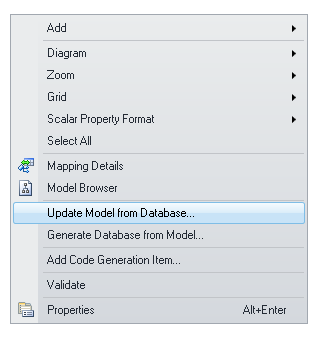
Sometimes even after following these steps, your model will not get updated, close Visual Studio and restart it again. This has happened many times for me.
Method 2
Sharique’s answer is the good one. But I noticed a thing: when the Mapping Details window is active(near Error List, Output) and if you are trying to add a new Entity (right click the design surface, Add -> Entity), the popup dialog, “Add Entity” it won’t show.
All methods was sourced from stackoverflow.com or stackexchange.com, is licensed under cc by-sa 2.5, cc by-sa 3.0 and cc by-sa 4.0