I’m not able to click on Allow button of access camera authentication pop up.
Here is the look of pop up.
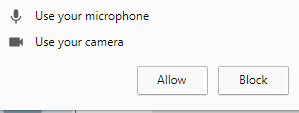
Answers:
Thank you for visiting the Q&A section on Magenaut. Please note that all the answers may not help you solve the issue immediately. So please treat them as advisements. If you found the post helpful (or not), leave a comment & I’ll get back to you as soon as possible.
Method 1
To Allow or Block the notification of Microphone, Camera, GeoLocation, Notification access using Selenium you have to use ChromeOptions Class as follows :
from selenium import webdriver
from selenium.webdriver.chrome.options import Options

opt = Options()
opt.add_argument("--disable-infobars")
opt.add_argument("start-maximized")
opt.add_argument("--disable-extensions")
# Pass the argument 1 to allow and 2 to block
opt.add_experimental_option("prefs", {
    "profile.default_content_setting_values.media_stream_mic": 1,
    "profile.default_content_setting_values.media_stream_camera": 1,
    "profile.default_content_setting_values.geolocation": 1,
    "profile.default_content_setting_values.notifications": 1
  })

driver = webdriver.Chrome(chrome_options=opt, executable_path=r'C:UtilityBrowserDriverschromedriver.exe')
driver.get('https://www.google.co.in')
print("Page Title is : %s" %driver.title)
driver.quit()
Method 2
This java code helped me
public WebDriver initWebDriver() {
     ChromeOptions options = new ChromeOptions();
     options.addArguments("use-fake-device-for-media-stream");
     options.addArguments("use-fake-ui-for-media-stream");
     prefs = new HashMap<String, Object>();
     prefs.put("profile.default_content_setting_values.media_stream_mic", 1);
     prefs.put("profile.default_content_setting_values.media_stream_camera", 1);
     prefs.put("profile.default_content_setting_values.geolocation", 1);
     prefs.put("profile.default_content_setting_values.notifications", 1);
     options.setExperimentalOption("prefs", prefs);
     System.setProperty(CHROME_DRIVER, DRIVER_PATH);
     return new ChromeDriver(options);
 }
All methods was sourced from stackoverflow.com or stackexchange.com, is licensed under cc by-sa 2.5, cc by-sa 3.0 and cc by-sa 4.0