I want to sort the products by their type, using dropdownlist.
products by types isn’t working when i select it in dropdown list.
stored procedure of ProductByType:
Public List<Product> GetProductsByType(int typeId)
    {
        try
        {
            using (GarageDBEntities db = new GarageDBEntities())
            {
                //select * from table where condition is required type
                List<Product> products = (from x in db.Products
                                          where x.TypeId == typeId
                                          select x).ToList();
                return products;
            }
        }
        catch (Exception)
        {
            return null;
        }
    }
Index page code to display products:
using System;
using System.Collections.Generic;
using System.Data;
using System.Data.SqlClient;
using System.Linq;
using System.Web;
using System.Web.UI;
using System.Web.UI.WebControls;

public partial class Index : System.Web.UI.Page
{
    protected void Page_Load(object sender, EventArgs e)
    {
        FillPage();
    }

    private void FillPage()
    {
        //Get a lsit of all products in DB
        ProductModel productModel = new ProductModel();
        List<Product> products = productModel.GetAllProducts();

        //Make sure products exists in the database
        if (products != null)
        {
            //Create a new Panel with an ImageButton and 2 labels for each Product
            foreach (Product product in products)
            {
                Panel productPanel = new Panel();
                ImageButton imageButton = new ImageButton();
                Label lblName = new Label();
                Label lblPrice = new Label();

                //Set childControls properties
                imageButton.ImageUrl = "~/Images/Products/" + product.Image;
                imageButton.CssClass = "productImage";
                imageButton.PostBackUrl = "~/Pages/Product.aspx?id=" + product.Id;

                lblName.Text = product.Name;
                lblName.CssClass = "productName";

                lblPrice.Text = "₹" + product.Price;
                lblPrice.CssClass = "productPrice";

                //Add child controls to Panel
                productPanel.Controls.Add(imageButton);
                productPanel.Controls.Add(new Literal { Text = "<br />" });
                productPanel.Controls.Add(lblName);
                productPanel.Controls.Add(new Literal { Text = "<br />" });
                productPanel.Controls.Add(lblPrice);

                //Add dynamic Panels to static Parent panel
                pnlProducts.Controls.Add(productPanel);
            }
        }
        else
        {
            //No products found
            pnlProducts.Controls.Add(new Literal { Text = "No Products Found!" });
        }
    }

    protected void DropDownList1_SelectedIndexChanged(object sender, EventArgs e)
    {
        ProductModel productModel = new ProductModel();
        List<Product> products = productModel.GetProductsByType(Convert.ToInt32(DropDownList1.SelectedItem.Value));

            foreach (Product product in products)
            {
                Panel productPanel = new Panel();
                ImageButton imageButton = new ImageButton();
                Label lblName = new Label();
                Label lblPrice = new Label();

                //Set childControls properties
                imageButton.ImageUrl = "~/Images/Products/" + product.Image;
                imageButton.CssClass = "productImage";
                imageButton.PostBackUrl = "~/Pages/Product.aspx?id=" + product.Id;

                lblName.Text = product.Name;
                lblName.CssClass = "productName";

                lblPrice.Text = "₹" + product.Price;
                lblPrice.CssClass = "productPrice";

                //Add child controls to Panel
                productPanel.Controls.Add(imageButton);
                productPanel.Controls.Add(new Literal { Text = "<br />" });
                productPanel.Controls.Add(lblName);
                productPanel.Controls.Add(new Literal { Text = "<br />" });
                productPanel.Controls.Add(lblPrice);

                //Add dynamic Panels to static Parent panel
                pnlProducts.Controls.Add(productPanel);
            }
    }
}
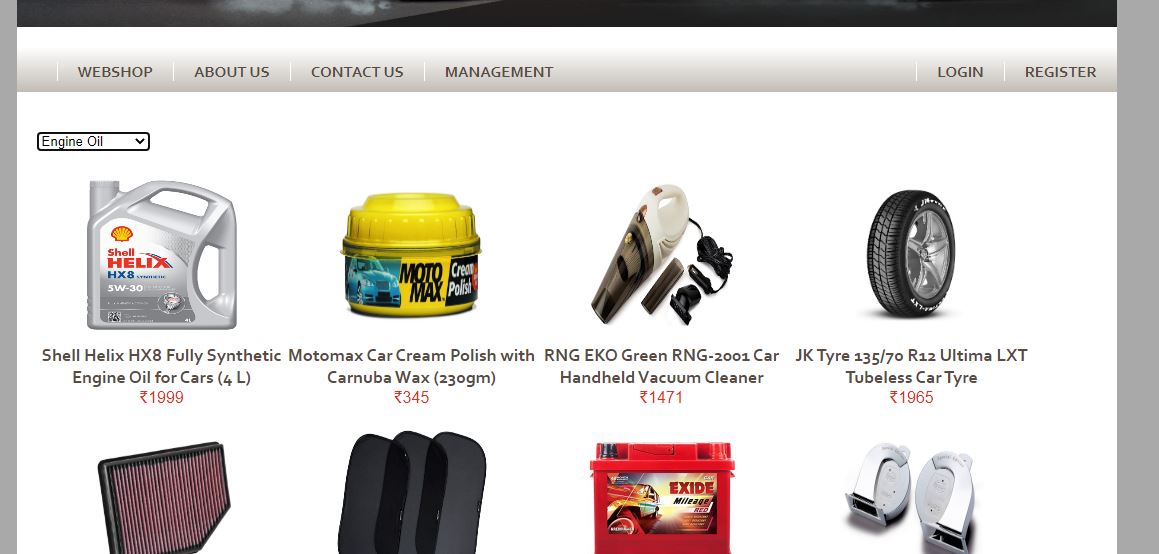
It always showing all the products even tho when I select product type.
As shown in image, I selected “Engine Oil” but it showing all the products.
I want it to show particular products only of the selected product type chosen in dropdownlist.
Answers:
Thank you for visiting the Q&A section on Magenaut. Please note that all the answers may not help you solve the issue immediately. So please treat them as advisements. If you found the post helpful (or not), leave a comment & I’ll get back to you as soon as possible.
Method 1
Try add the PostBack validation in your Page_Load event:
C# Code:
protected void Page_Load(object sender, EventArgs e)
{
    if (!IsPostBack)
    {
        FillPage();
    }
}
Most likely, when selecting an item in the dropdownlist, a postback is generated which will call PageLoad and reload all the products, to avoid this the PostBack validation is usually set
Make sure to use the AutoPostBack="True" flag in the <asp:DropDownList /> control
All methods was sourced from stackoverflow.com or stackexchange.com, is licensed under cc by-sa 2.5, cc by-sa 3.0 and cc by-sa 4.0