I have 2 variables (x,y) that change with time (t). I want to plot x vs. t and color the ticks based on the value of y. e.g. for highest values of y the tick color is dark green, for lowest value is dark red, and for intermediate values the color will be scaled in between green and red.
Can this be done with matplotlib in python?
Answers:
Thank you for visiting the Q&A section on Magenaut. Please note that all the answers may not help you solve the issue immediately. So please treat them as advisements. If you found the post helpful (or not), leave a comment & I’ll get back to you as soon as possible.
Method 1
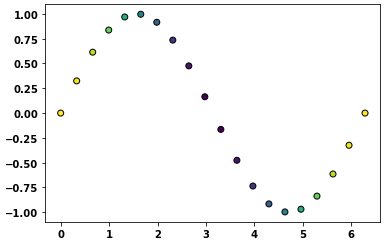
This is what matplotlib.pyplot.scatter is for.
If no colormap is specified, scatter will use whatever the default colormap is set to. To specify which colormap scatter should use, use the cmap kwarg (e.g. cmap="jet").
As a quick example:
import matplotlib.pyplot as plt
import matplotlib.colors as mcolors
import numpy as np

# Generate data...
t = np.linspace(0, 2 * np.pi, 20)
x = np.sin(t)
y = np.cos(t)

plt.scatter(t, x, c=y, ec='k')
plt.show()
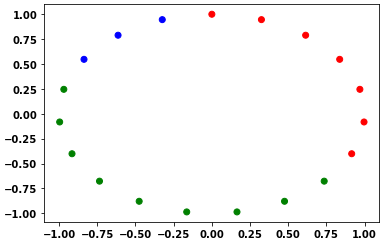
One may specify a custom color map and norm
cmap, norm = mcolors.from_levels_and_colors([0, 2, 5, 6], ['red', 'green', 'blue'])
plt.scatter(x, y, c=t, cmap=cmap, norm=norm)
Method 2
If you want to plot lines instead of points, see this example, modified here to plot good/bad points representing a function as a black/red as appropriate:
def plot(xx, yy, good):
    """Plot data

    Good parts are plotted as black, bad parts as red.

    Parameters
    ----------
    xx, yy : 1D arrays
        Data to plot.
    good : `numpy.ndarray`, boolean
        Boolean array indicating if point is good.
    """
    import numpy as np
    import matplotlib.pyplot as plt
    fig, ax = plt.subplots()
    from matplotlib.colors import from_levels_and_colors
    from matplotlib.collections import LineCollection
    cmap, norm = from_levels_and_colors([0.0, 0.5, 1.5], ['red', 'black'])
    points = np.array([xx, yy]).T.reshape(-1, 1, 2)
    segments = np.concatenate([points[:-1], points[1:]], axis=1)
    lines = LineCollection(segments, cmap=cmap, norm=norm)
    lines.set_array(good.astype(int))
    ax.add_collection(lines)
    plt.show()
All methods was sourced from stackoverflow.com or stackexchange.com, is licensed under cc by-sa 2.5, cc by-sa 3.0 and cc by-sa 4.0