I’ve been googleing to find if it’s possible to change only the color of a bar in a graph made by matplotlib.
Imagine this graph:

let’s say I’ve evaluation 1 to 10 and for each one I’ve a graph generate when the user choice the evaluation. For each evaluation one of this boys will win.
So for each graph, I would like to leave the winner bar in a different color, let’s say Jim won evaluation1. Jim bar would be red, and the others blue.
I have a dictionary with the values, what I tried to do was something like this:
for value in dictionary.keys(): # keys are the names of the boys
    if winner == value:
        facecolor = 'red'
    else:
        facecolor = 'blue'

ax.bar(ind, num, width, facecolor=facecolor)
Anyone knows a way of doing this?
Thanks in advance 🙂
Answers:
Thank you for visiting the Q&A section on Magenaut. Please note that all the answers may not help you solve the issue immediately. So please treat them as advisements. If you found the post helpful (or not), leave a comment & I’ll get back to you as soon as possible.
Method 1
You need to use color instead of facecolor. You can also specify color as a list instead of a scalar value. So for your example, you could have color=['r','b','b','b','b']
For example,
import numpy as np
import matplotlib.pyplot as plt

fig = plt.figure()
ax = fig.add_subplot(111)

N = 5
ind = np.arange(N)
width = 0.5
vals = [1,2,3,4,5]
colors = ['r','b','b','b','b']
ax.barh(ind, vals, width, color=colors)

plt.show()
is a full example showing you what you want.
To answer your comment:
colors = []
for value in dictionary.keys(): # keys are the names of the boys
    if winner == value:
        colors.append('r')
    else:
        colors.append('b')

bar(ind,num,width,color=colors)
Method 2
for seaborn you can do something like this:
values = np.array([2,5,3,6,4,7,1])
idx = np.array(list('abcdefg'))
clrs = ['grey' if (x < max(values)) else 'red' for x in values ]
sb.barplot(x=idx, y=values, palette=clrs) # color=clrs)
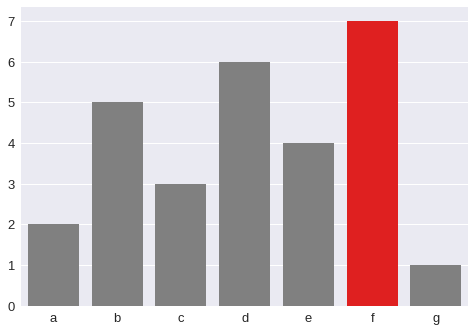
for matplotlib:
values = np.array([2,5,3,6,4,7,1])
idx = np.array(list('abcdefg'))
clrs = ['grey' if (x < max(values)) else 'red' for x in values ]
plt.bar(idx, values, color=clrs, width=0.4)
plt.show()
All methods was sourced from stackoverflow.com or stackexchange.com, is licensed under cc by-sa 2.5, cc by-sa 3.0 and cc by-sa 4.0