I have one DataTable which has four columns such as
 StudentID        CourseID          SubjectCode            Marks
------------     ----------        -------------          --------
    1               100              MT400                  80
    2               100              MT400                  79
    3               100              MT400                  88
Here I am inserting this Datatable into the Sql server table by passing this datatable as an XML Table.
I just want to Change the DataTable Column Name “Marks” as “SubjectMarks” and pass this DataTable as an XML Table.
I know how to pass the DataTable as an XML Table. But I dont know, How to change the DataTable Column Name “Marks” as “SubjectMarks”.
Answers:
Thank you for visiting the Q&A section on Magenaut. Please note that all the answers may not help you solve the issue immediately. So please treat them as advisements. If you found the post helpful (or not), leave a comment & I’ll get back to you as soon as possible.
Method 1
Try this:
dataTable.Columns["Marks"].ColumnName = "SubjectMarks";
Method 2
Rename the Column by doing the following:
dataTable.Columns["ColumnName"].ColumnName = "newColumnName";
Method 3
 dtTempColumn.Columns["EXCELCOLUMNS"].ColumnName = "COLUMN_NAME";
 dtTempColumn.AcceptChanges();
Method 4
Use:
dt.Columns["Name"].ColumnName = "xyz";
dt.AcceptChanges();
or
dt.Columns[0].ColumnName = "xyz";
dt.AcceptChanges();
Method 5
after generating XML you can just Replace your XML <Marks>... content here </Marks> tags with <SubjectMarks>... content here </SubjectMarks>tag. and pass updated XML to your DB.
Edit: I here explain complete process here.
Your XML Generate Like as below.
<NewDataSet>
      <StudentMarks>
          <StudentID>1</StudentID>
          <CourseID>100</CourseID>
          <SubjectCode>MT400</SubjectCode>
          <Marks>80</Marks>
      </StudentMarks>
      <StudentMarks>
          <StudentID>1</StudentID>
          <CourseID>100</CourseID>
          <SubjectCode>MT400</SubjectCode>
          <Marks>79</Marks>
      </StudentMarks>
      <StudentMarks>
          <StudentID>1</StudentID>
          <CourseID>100</CourseID>
          <SubjectCode>MT400</SubjectCode>
          <Marks>88</Marks>
      </StudentMarks>
  </NewDataSet>
Here you can assign XML to string variable like as
string strXML = DataSet.GetXML();

strXML = strXML.Replace ("<Marks>","<SubjectMarks>");
strXML = strXML.Replace ("<Marks/>","<SubjectMarks/>");
and now pass strXML To your DB.
Hope it will help for you.
Method 6
Use this
dataTable.Columns["OldColumnName"].ColumnName = "NewColumnName";
Method 7
try this
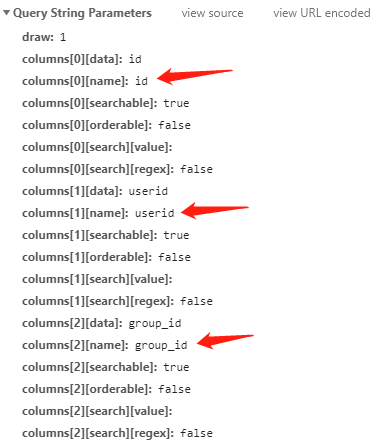
"columns": [
{data: "id", name: "aaa", sortable: false},
{data: "userid", name: "userid", sortable: false},
{data: "group_id", name: "group_id", sortable: false},
{data: "group_name", name: "group_name", sortable: false},
{data: "group_member", name: "group_member"},
{data: "group_fee", name: "group_fee"},
{data: "dynamic_type", name: "dynamic_type"},
{data: "dynamic_id", name: "dynamic_id"},
{data: "content", name: "content", sortable: false},
{data: "images", name: "images", sortable: false},
{data: "money", name: "money"},
{data: "is_audit", name: "is_audit", sortable: false},
{data: "audited_at", name: "audited_at", sortable: false}
]
All methods was sourced from stackoverflow.com or stackexchange.com, is licensed under cc by-sa 2.5, cc by-sa 3.0 and cc by-sa 4.0