I have an RDLC file in which I want to make an expression.
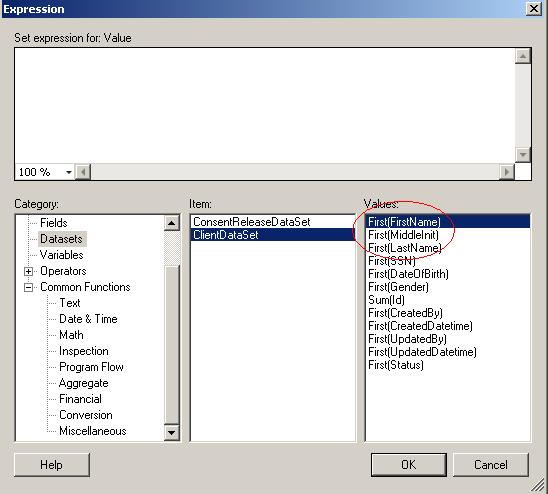
Here is the image of properties of expression. I need to concatenate First Name, Last name and Middle Init.
Answers:
Thank you for visiting the Q&A section on Magenaut. Please note that all the answers may not help you solve the issue immediately. So please treat them as advisements. If you found the post helpful (or not), leave a comment & I’ll get back to you as soon as possible.
Method 1
The following examples works for me:
=Fields!FirstName.Value & " " & Fields!LastName.Value
or
="$ " & Sum(Round((Fields!QTD_ORDER.Value - Fields!QTD_RETURN.Value) * Fields!PRICE.Value,2), "Entity_orderItens")
Have a look at MSDN
Method 2
Check this : http://blogs.msdn.com/b/mosharaf/archive/2005/12/20/localreportcustomcode.aspx
it is possible to do in a different way in the rdlc report you can use VB code. Just click on the report with right mouse button. When the context menu from where you enter parameters go to Proprties. When clicking it you should see a tab control witch few tab pages. Go to tab page “Code” an there right you VB function it must be something like this
     Public Function concatestring(ByVal val1 As Object,ByVal val2 As Object,ByVal val3 As Object ) As String
//         return val1 + ' ' + val2 + ' ' + val3 -- just string cocate in vb will do your task
        End Function
Then call the function in your textbox like this
= Code.concatestring(Fields!MyField_1.Value,Fields!MyField_2.Value,Fields!MyField_3.Value )
P.S. I am not very sure if the VB code is working correctly just test it and if it is needed rewrite. If any other error occurs please post it to see what is the problem
All methods was sourced from stackoverflow.com or stackexchange.com, is licensed under cc by-sa 2.5, cc by-sa 3.0 and cc by-sa 4.0