In Python, I have an ndarray y
that is printed as array([0, 0, 0, 1, 0, 1, 1, 0, 0, 0, 0, 1])
I’m trying to count how many 0s and how many 1s are there in this array.
But when I type y.count(0) or y.count(1), it says
numpy.ndarrayobject has no attributecount
What should I do?
Answers:
Thank you for visiting the Q&A section on Magenaut. Please note that all the answers may not help you solve the issue immediately. So please treat them as advisements. If you found the post helpful (or not), leave a comment & I’ll get back to you as soon as possible.
Method 1
a = numpy.array([0, 3, 0, 1, 0, 1, 2, 1, 0, 0, 0, 0, 1, 3, 4])
unique, counts = numpy.unique(a, return_counts=True)
dict(zip(unique, counts))

# {0: 7, 1: 4, 2: 1, 3: 2, 4: 1}
Non-numpy way:
Use collections.Counter;
import collections, numpy
a = numpy.array([0, 3, 0, 1, 0, 1, 2, 1, 0, 0, 0, 0, 1, 3, 4])
collections.Counter(a)

# Counter({0: 7, 1: 4, 3: 2, 2: 1, 4: 1})
Method 2
What about using numpy.count_nonzero, something like
>>> import numpy as np
>>> y = np.array([1, 2, 2, 2, 2, 0, 2, 3, 3, 3, 0, 0, 2, 2, 0])

>>> np.count_nonzero(y == 1)
1
>>> np.count_nonzero(y == 2)
7
>>> np.count_nonzero(y == 3)
3
Method 3
Personally, I’d go for:
(y == 0).sum() and (y == 1).sum()
E.g.
import numpy as np
y = np.array([0, 0, 0, 1, 0, 1, 1, 0, 0, 0, 0, 1])
num_zeros = (y == 0).sum()
num_ones = (y == 1).sum()
Method 4
For your case you could also look into numpy.bincount
In [56]: a = np.array([0, 0, 0, 1, 0, 1, 1, 0, 0, 0, 0, 1])

In [57]: np.bincount(a)
Out[57]: array([8, 4])  #count of zeros is at index 0 : 8
                        #count of ones is at index 1 : 4
Method 5
y = np.array([0, 0, 0, 1, 0, 1, 1, 0, 0, 0, 0, 1])
If you know that they are just 0 and 1:
np.sum(y)
gives you the number of ones. np.sum(1-y) gives the zeroes.
For slight generality, if you want to count 0 and not zero (but possibly 2 or 3):
np.count_nonzero(y)
gives the number of nonzero.
But if you need something more complicated, I don’t think numpy will provide a nice count option. In that case, go to collections:
import collections
collections.Counter(y)
> Counter({0: 8, 1: 4})
This behaves like a dict
collections.Counter(y)[0]
> 8
Method 6
Convert your array y to list l and then do l.count(1) and l.count(0)
>>> y = numpy.array([0, 0, 0, 1, 0, 1, 1, 0, 0, 0, 0, 1])
>>> l = list(y)
>>> l.count(1)
4
>>> l.count(0)
8
Method 7
If you know exactly which number you’re looking for, you can use the following;
lst = np.array([1,1,2,3,3,6,6,6,3,2,1])
(lst == 2).sum()
returns how many times 2 is occurred in your array.
Method 8
Filter and use len
Using len could be another option.
A = np.array([1,0,1,0,1,0,1])
Say we want the number of occurrences of 0.
A[A==0] # Return the array where item is 0, array([0, 0, 0])
Now, wrap it around with len.
len(A[A==0])  # 3
len(A[A==1])  # 4
len(A[A==7])  # 0, because there isn't such item.
Method 9
Honestly I find it easiest to convert to a pandas Series or DataFrame:
import pandas as pd
import numpy as np

df = pd.DataFrame({'data':np.array([0, 0, 0, 1, 0, 1, 1, 0, 0, 0, 0, 1])})
print df['data'].value_counts()
Or this nice one-liner suggested by Robert Muil:
pd.Series([0, 0, 0, 1, 0, 1, 1, 0, 0, 0, 0, 1]).value_counts()
Method 10
No one suggested to use numpy.bincount(input, minlength) with minlength = np.size(input), but it seems to be a good solution, and definitely the fastest:
In [1]: choices = np.random.randint(0, 100, 10000)

In [2]: %timeit [ np.sum(choices == k) for k in range(min(choices), max(choices)+1) ]
100 loops, best of 3: 2.67 ms per loop

In [3]: %timeit np.unique(choices, return_counts=True)
1000 loops, best of 3: 388 µs per loop

In [4]: %timeit np.bincount(choices, minlength=np.size(choices))
100000 loops, best of 3: 16.3 µs per loop
That’s a crazy speedup between numpy.unique(x, return_counts=True) and numpy.bincount(x, minlength=np.max(x)) !
Method 11
I’d use np.where:
how_many_0 = len(np.where(a==0.)[0])
how_many_1 = len(np.where(a==1.)[0])
Method 12
y.tolist().count(val)
with val 0 or 1
Since a python list has a native function count, converting to list before using that function is a simple solution.
Method 13
To count the number of occurrences, you can use np.unique(array, return_counts=True):
In [75]: boo = np.array([0, 0, 0, 1, 0, 1, 1, 0, 0, 0, 0, 1])

# use bool value `True` or equivalently `1`
In [77]: uniq, cnts = np.unique(boo, return_counts=1)
In [81]: uniq
Out[81]: array([0, 1])   #unique elements in input array are: 0, 1

In [82]: cnts
Out[82]: array([8, 4])   # 0 occurs 8 times, 1 occurs 4 times
Method 14
If you are interested in the fastest execution, you know in advance which value(s) to look for, and your array is 1D, or you are otherwise interested in the result on the flattened array (in which case the input of the function should be np.ravel(arr) rather than just arr), then Numba is your friend:
import numba as nb


@nb.jit
def count_nb(arr, value):
    result = 0
    for x in arr:
        if x == value:
            result += 1
    return result
or, for very large arrays where parallelization may be beneficial:
@nb.jit(parallel=True)
def count_nbp(arr, value):
    result = 0
    for i in nb.prange(arr.size):
        if arr[i] == value:
            result += 1
    return result
Benchmarking these against np.count_nonzero() (which also has a problem of creating a temporary array which may be avoided) and np.unique()-based solution
import numpy as np


def count_np(arr, value):
    return np.count_nonzero(arr == value)
import numpy as np


def count_np2(arr, value):
    uniques, counts = np.unique(a, return_counts=True)
    counter = dict(zip(uniques, counts))
    return counter[value] if value in counter else 0
for input generated with:
def gen_input(n, a=0, b=100):
    return np.random.randint(a, b, n)
the following plots are obtained (the second row of plots is a zoom on the faster approach):
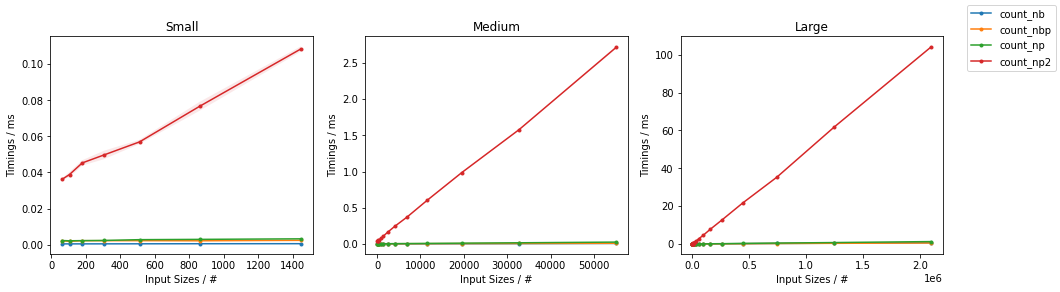
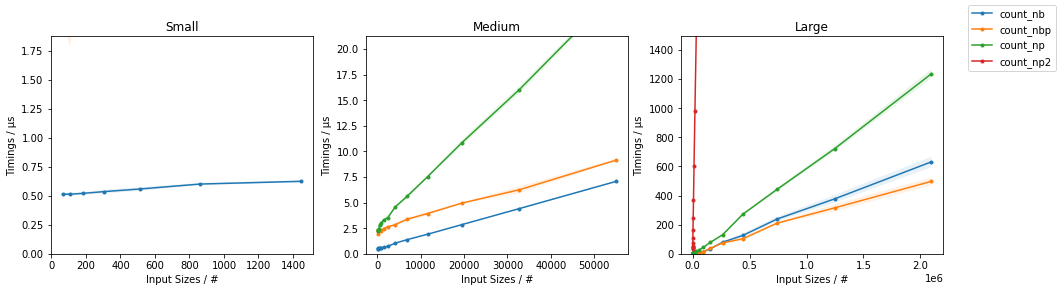
Showing that Numba-based solution are noticeably faster than the NumPy counterparts, and, for very large inputs, the parallel approach is faster than the naive one.
Full code available here.
Method 15
Yet another simple solution might be to use numpy.count_nonzero():
import numpy as np
y = np.array([0, 0, 0, 1, 0, 1, 1, 0, 0, 0, 0, 1])
y_nonzero_num = np.count_nonzero(y==1)
y_zero_num = np.count_nonzero(y==0)
y_nonzero_num
4
y_zero_num
8
Don’t let the name mislead you, if you use it with the boolean just like in the example, it will do the trick.
Method 16
Try this:
a = np.array([0, 0, 0, 1, 0, 1, 1, 0, 0, 0, 0, 1])
list(a).count(1)
Method 17
take advantage of the methods offered by a Series:
>>> import pandas as pd
>>> y = [0, 0, 0, 1, 0, 1, 1, 0, 0, 0, 0, 1]
>>> pd.Series(y).value_counts()
0    8
1    4
dtype: int64
Method 18
You can use dictionary comprehension to create a neat one-liner. More about dictionary comprehension can be found here
>>>counts = {int(value): list(y).count(value) for value in set(y)}
>>>print(counts)
{0: 8, 1: 4}
This will create a dictionary with the values in your ndarray as keys, and the counts of the values as the values for the keys respectively.
This will work whenever you want to count occurences of a value in arrays of this format.
Method 19
It involves one more step, but a more flexible solution which would also work for 2d arrays and more complicated filters is to create a boolean mask and then use .sum() on the mask.
>>>>y = np.array([0, 0, 0, 1, 0, 1, 1, 0, 0, 0, 0, 1])
>>>>mask = y == 0
>>>>mask.sum()
8
Method 20
A general and simple answer would be:
numpy.sum(MyArray==x) # sum of a binary list of the occurence of x (=0 or 1) in MyArray
which would result into this full code as exemple
import numpy
MyArray=numpy.array([0, 0, 0, 1, 0, 1, 1, 0, 0, 0, 0, 1])  # array we want to search in
x=0   # the value I want to count (can be iterator, in a list, etc.)
numpy.sum(MyArray==0)   # sum of a binary list of the occurence of x in MyArray
Now if MyArray is in multiple dimensions and you want to count the occurence of a distribution of values in line (= pattern hereafter)
MyArray=numpy.array([[6, 1],[4, 5],[0, 7],[5, 1],[2, 5],[1, 2],[3, 2],[0, 2],[2, 5],[5, 1],[3, 0]])
x=numpy.array([5,1])   # the value I want to count (can be iterator, in a list, etc.)
temp = numpy.ascontiguousarray(MyArray).view(numpy.dtype((numpy.void, MyArray.dtype.itemsize * MyArray.shape[1])))  # convert the 2d-array into an array of analyzable patterns
xt=numpy.ascontiguousarray(x).view(numpy.dtype((numpy.void, x.dtype.itemsize * x.shape[0])))  # convert what you search into one analyzable pattern
numpy.sum(temp==xt)  # count of the searched pattern in the list of patterns
Method 21
You have a special array with only 1 and 0 here. So a trick is to use
np.mean(x)
which gives you the percentage of 1s in your array. Alternatively, use
np.sum(x)
np.sum(1-x)
will give you the absolute number of 1 and 0 in your array.
Method 22
dict(zip(*numpy.unique(y, return_counts=True)))
Just copied Seppo Enarvi’s comment here which deserves to be a proper answer
Method 23
This can be done easily in the following method
y = np.array([0, 0, 0, 1, 0, 1, 1, 0, 0, 0, 0, 1])
y.tolist().count(1)
Method 24
Since your ndarray contains only 0 and 1,
you can use sum() to get the occurrence of 1s
and len()-sum() to get the occurrence of 0s.
num_of_ones = sum(array)
num_of_zeros = len(array)-sum(array)
Method 25
For generic entries:
x = np.array([11, 2, 3, 5, 3, 2, 16, 10, 10, 3, 11, 4, 5, 16, 3, 11, 4])
n = {i:len([j for j in np.where(x==i)[0]]) for i in set(x)}
ix = {i:[j for j in np.where(x==i)[0]] for i in set(x)}
Will output a count:
{2: 2, 3: 4, 4: 2, 5: 2, 10: 2, 11: 3, 16: 2}
And indices:
{2: [1, 5],
3: [2, 4, 9, 14],
4: [11, 16],
5: [3, 12],
10: [7, 8],
11: [0, 10, 15],
16: [6, 13]}
Method 26
If you don’t want to use numpy or a collections module you can use a dictionary:
d = dict()
a = [0, 0, 0, 1, 0, 1, 1, 0, 0, 0, 0, 1]
for item in a:
    try:
        d[item]+=1
    except KeyError:
        d[item]=1
result:
>>>d
{0: 8, 1: 4}
Of course you can also use an if/else statement.
I think the Counter function does almost the same thing but this is more transparant.
Method 27
here I have something, through which you can count the number of occurrence of a particular number:
according to your code
count_of_zero=list(y[y==0]).count(0)
print(count_of_zero)
// according to the match there will be boolean values and according to True value the number 0 will be return
Method 28
if you are dealing with very large arrays using generators could be an option. The nice thing here it that this approach works fine for both arrays and lists and you dont need any additional package. Additionally, you are not using that much memory.
my_array = np.array([0, 0, 0, 1, 0, 1, 1, 0, 0, 0, 0, 1])
sum(1 for val in my_array if val==0)
Out: 8
Method 29
This funktion returns the number of occurences of a variable in an array:
def count(array,variable):
    number = 0
    for i in range(array.shape[0]):
        for j in range(array.shape[1]):
            if array[i,j] == variable:
                number += 1
    return number
Method 30
Numpy has a module for this. Just a small hack. Put your input array as bins.
numpy.histogram(y, bins=y)
The output are 2 arrays. One with the values itself, other with the corresponding frequencies.
All methods was sourced from stackoverflow.com or stackexchange.com, is licensed under cc by-sa 2.5, cc by-sa 3.0 and cc by-sa 4.0