Is there a way to print a spinning cursor in a terminal using Python?
Answers:
Thank you for visiting the Q&A section on Magenaut. Please note that all the answers may not help you solve the issue immediately. So please treat them as advisements. If you found the post helpful (or not), leave a comment & I’ll get back to you as soon as possible.
Method 1
Something like this, assuming your terminal handles b
import sys
import time

def spinning_cursor():
    while True:
        for cursor in '|/-\':
            yield cursor

spinner = spinning_cursor()
for _ in range(50):
    sys.stdout.write(next(spinner))
    sys.stdout.flush()
    time.sleep(0.1)
    sys.stdout.write('b')
Method 2
Easy to use API (this will run the spinner in a separate thread):
import sys
import time
import threading

class Spinner:
    busy = False
    delay = 0.1

    @staticmethod
    def spinning_cursor():
        while 1:
            for cursor in '|/-\': yield cursor

    def __init__(self, delay=None):
        self.spinner_generator = self.spinning_cursor()
        if delay and float(delay): self.delay = delay

    def spinner_task(self):
        while self.busy:
            sys.stdout.write(next(self.spinner_generator))
            sys.stdout.flush()
            time.sleep(self.delay)
            sys.stdout.write('b')
            sys.stdout.flush()

    def __enter__(self):
        self.busy = True
        threading.Thread(target=self.spinner_task).start()

    def __exit__(self, exception, value, tb):
        self.busy = False
        time.sleep(self.delay)
        if exception is not None:
            return False
Now use it in a with block anywhere in the code:
with Spinner():
  # ... some long-running operations
  # time.sleep(3)
Method 3
A nice pythonic way is to use itertools.cycle:
import itertools, sys
spinner = itertools.cycle(['-', '/', '|', '\'])
while True:
    sys.stdout.write(next(spinner))   # write the next character
    sys.stdout.flush()                # flush stdout buffer (actual character display)
    sys.stdout.write('b')            # erase the last written char
Also, you might want to use threading to display the spinner during a long function call, as in http://www.interclasse.com/scripts/spin.php
Method 4
For completeness I want to add the great package halo. It offers a lot of preset spinners and higher level customization options.
Extract from their readme
from halo import Halo

spinner = Halo(text='Loading', spinner='dots')
spinner.start()

# Run time consuming work here
# You can also change properties for spinner as and when you want

spinner.stop()
Alternatively, you can use halo with Python’s with statement:
from halo import Halo

with Halo(text='Loading', spinner='dots'):
    # Run time consuming work here
Finally, you can use halo as a decorator:
from halo import Halo

@Halo(text='Loading', spinner='dots')
def long_running_function():
    # Run time consuming work here
    pass

long_running_function()
Method 5
A solution:
import sys
import time

print "processing...\",
syms = ['\', '|', '/', '-']
bs = 'b'

for _ in range(10):
    for sym in syms:
        sys.stdout.write("b%s" % sym)
        sys.stdout.flush()
        time.sleep(.5)
The key is to use the backspace character ‘b’ and flush stdout.
Method 6
Improved version from @Victor Moyseenko
as the original version had few issues
- was leaving spinner’s characters after spinning is complete
- and sometimes lead to removing following output’s first character too
- avoids a rare race condition by putting threading.Lock() on output
- falls back to simpler output when no tty is available (no spinning)
import sys
import threading
import itertools
import time

class Spinner:

    def __init__(self, message, delay=0.1):
        self.spinner = itertools.cycle(['-', '/', '|', '\'])
        self.delay = delay
        self.busy = False
        self.spinner_visible = False
        sys.stdout.write(message)

    def write_next(self):
        with self._screen_lock:
            if not self.spinner_visible:
                sys.stdout.write(next(self.spinner))
                self.spinner_visible = True
                sys.stdout.flush()

    def remove_spinner(self, cleanup=False):
        with self._screen_lock:
            if self.spinner_visible:
                sys.stdout.write('b')
                self.spinner_visible = False
                if cleanup:
                    sys.stdout.write(' ')       # overwrite spinner with blank
                    sys.stdout.write('r')      # move to next line
                sys.stdout.flush()

    def spinner_task(self):
        while self.busy:
            self.write_next()
            time.sleep(self.delay)
            self.remove_spinner()

    def __enter__(self):
        if sys.stdout.isatty():
            self._screen_lock = threading.Lock()
            self.busy = True
            self.thread = threading.Thread(target=self.spinner_task)
            self.thread.start()

    def __exit__(self, exception, value, tb):
        if sys.stdout.isatty():
            self.busy = False
            self.remove_spinner(cleanup=True)
        else:
            sys.stdout.write('r')
example of usage of the Spinner class above:
with Spinner("just waiting a bit.. "):

        time.sleep(3)
uploaded code to https://github.com/Tagar/stuff/blob/master/spinner.py
Method 7
Nice, simple, and clean…
while True:
    for i in '|\-/':
        print('b' + i, end='')
Method 8
Sure, it’s possible. It’s just a question of printing the backspace character (b) in between the four characters that would make the “cursor” look like it’s spinning ( -, , |, /).
Method 9
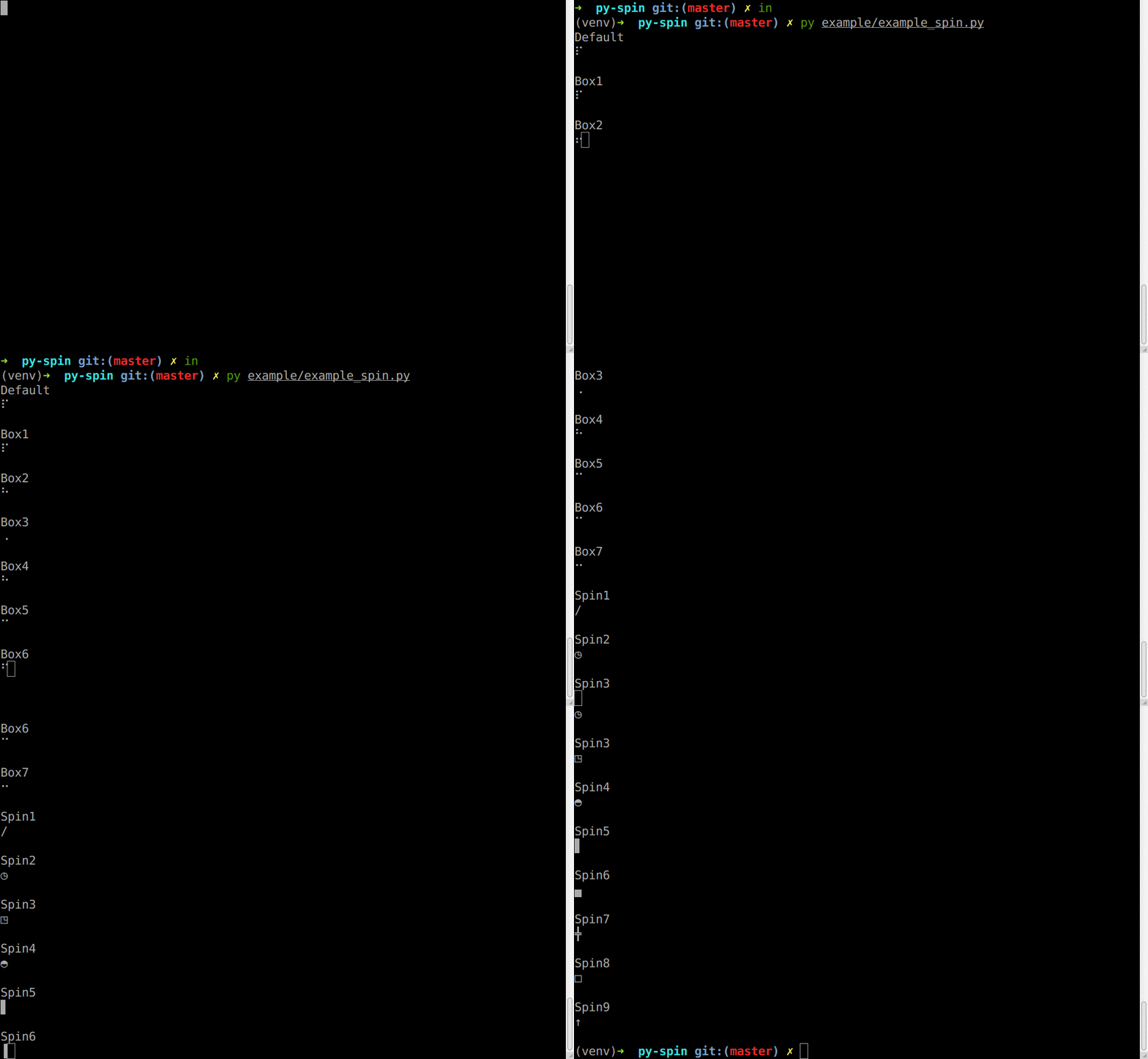
I have found py-spin package on GitHub. It has many nice spinning Styles. Here are some sample about how to use, Spin1 is the -/ style:
from __future__ import print_function

import time

from pyspin.spin import make_spin, Spin1

# Choose a spin style and the words when showing the spin.
@make_spin(Spin1, "Downloading...")
def download_video():
    time.sleep(10)

if __name__ == '__main__':
    print("I'm going to download a video, and it'll cost much time.")
    download_video()
    print("Done!")
    time.sleep(0.1)
It is also possible to control the spin manualy:
from __future__ import print_function

import sys
import time

from pyspin.spin import Spin1, Spinner

# Choose a spin style.
spin = Spinner(Spin1)
# Spin it now.
for i in range(50):
    print(u"r{0}".format(spin.next()), end="")
    sys.stdout.flush()
    time.sleep(0.1)
Other styles in the below gif.
Method 10
Grab the awesome progressbar module – http://code.google.com/p/python-progressbar/
use RotatingMarker.
Method 11
curses module. i’d have a look at the addstr() and addch() functions. Never used it though.
Method 12
For more advanced console manipulations, on unix you can use the curses python module, and on windows, you can use WConio which provides equivalent functionality of the curses library.
Method 13
You can write 'r33[K' to clear the current line. And the following is a example modified from @nos.
import sys
import time

def spinning_cursor():
    while True:
        for cursor in '|/-\':
            yield cursor

spinner = spinning_cursor()

for _ in range(1, 10):
    content = f'r{next(spinner)} Downloading...'
    print(content, end="")
    time.sleep(0.1)
    print('r33[K', end="")
For anyone who interested in nodejs, I also write a nodejs example.
function* makeSpinner(start = 0, end = 100, step = 1) {
  let iterationCount = 0;
  while (true) {
    for (const char of '|/-\') {
      yield char;
    }
  }
  return iterationCount;
}

async function sleep(seconds) {
  return new Promise((resolve) => {
    setTimeout(resolve, seconds * 1000);
  });
}

(async () => {
  const spinner = makeSpinner();
  for (let i = 0; i < 10; i++) {
    content = `r${spinner.next().value} Downloading...`;
    process.stdout.write(content);
    await sleep(0.1);
    process.stdout.write('r33[K');
  }
})();
Method 14
#!/usr/bin/env python

import sys

chars = '|/-\'

for i in xrange(1,1000):
    for c in chars:
        sys.stdout.write(c)
        sys.stdout.write('b')
        sys.stdout.flush()
CAVEATS:
In my experience this doesn’t work in all terminals. A more robust way to do this under Unix/Linux, be it more complicated is to use the curses module, which doesn’t work under Windows.
You probably want to slow it down some how with actual processing that is going on in the background.
Method 15
Here ya go – simple and clear.
import sys
import time

idx = 0
cursor = ['|','/','-','\'] #frames of an animated cursor

while True:
    sys.stdout.write(cursor[idx])
    sys.stdout.write('b')
    idx = idx + 1

    if idx > 3:
        idx = 0

    time.sleep(.1)
Method 16
Crude but simple solution:
import sys
import time
cursor = ['|','/','-','\']
for count in range(0,1000):
  sys.stdout.write('b{}'.format(cursor[count%4]))
  sys.stdout.flush()
  # replace time.sleep() with some logic
  time.sleep(.1)
There are obvious limitations, but again, crude.
Method 17
I propose a solution using decorators
from itertools import cycle
import functools
import threading
import time


def spinner(message, spinner_symbols: list = None):
    spinner_symbols = spinner_symbols or list("|/-\")
    spinner_symbols = cycle(spinner_symbols)
    global spinner_event
    spinner_event = True

    def start():
        global spinner_event
        while spinner_event:
            symbol = next(spinner_symbols)
            print("r{message} {symbol}".format(message=message, symbol=symbol), end="")
            time.sleep(0.3)

    def stop():
        global spinner_event
        spinner_event = False
        print("r", end="")

    def external(fct):
        @functools.wraps(fct)
        def wrapper(*args):
            spinner_thread = threading.Thread(target=start, daemon=True)
            spinner_thread.start()
            result = fct(*args)
            stop()
            spinner_thread.join()

            return result

        return wrapper

    return external
Simple usage
@spinner("Downloading")
def f():
    time.sleep(10)
Method 18
I built a generic Singleton, shared by the entire application
from itertools import cycle
import threading
import time


class Spinner:
    __default_spinner_symbols_list = ['|-----|', '|#----|', '|-#---|', '|--#--|', '|---#-|', '|----#|']

    def __init__(self, spinner_symbols_list: [str] = None):
        spinner_symbols_list = spinner_symbols_list if spinner_symbols_list else Spinner.__default_spinner_symbols_list
        self.__screen_lock = threading.Event()
        self.__spinner = cycle(spinner_symbols_list)
        self.__stop_event = False
        self.__thread = None

    def get_spin(self):
        return self.__spinner

    def start(self, spinner_message: str):
        self.__stop_event = False
        time.sleep(0.3)

        def run_spinner(message):
            while not self.__stop_event:
                print("r{message} {spinner}".format(message=message, spinner=next(self.__spinner)), end="")
                time.sleep(0.3)

            self.__screen_lock.set()

        self.__thread = threading.Thread(target=run_spinner, args=(spinner_message,), daemon=True)
        self.__thread.start()

    def stop(self):
        self.__stop_event = True
        if self.__screen_lock.is_set():
            self.__screen_lock.wait()
            self.__screen_lock.clear()
            print("r", end="")

        print("r", end="")

if __name__ == '__main__':
    import time
    # Testing
    spinner = Spinner()
    spinner.start("Downloading")
    # Make actions
    time.sleep(5) # Simulate a process
    #
    spinner.stop()
Method 19
import sys
def DrowWaitCursor(counter):
    if counter % 4 == 0:
        print("/",end = "")
    elif counter % 4 == 1:
        print("-",end = "")
    elif counter % 4 == 2:
        print("\",end = "")
    elif counter % 4 == 3:
        print("|",end = "")
    sys.stdout.flush()
    sys.stdout.write('b')
This can be also another solution using a function with a parameter.
Method 20
I just started with python about a week ago and found this posting. I’ve combined a bit of what I found here with stuff I learned about threads and queues elsewhere to provide a much better implementation in my opinion. In my solution, writing to the screen is handled by a thread that checks a queue for content. If that queue has content, the cursor spinning thread knows to stop. On the flipside, the cursor spinning thread uses a queue as a lock so the printing thread knows not to print until a full pass of the spinner code is complete. This prevents race conditions and a lot of excess code people are using to keep the console clean.
See below:
import threading, queue, itertools, sys, time # all required for my version of spinner
import datetime #not required for spinning cursor solution, only my example

console_queue = queue.Queue() # this queue should be initialized before functions
screenlock = queue.Queue()    # this queue too...


def main():
    threading.Thread(target=spinner).start()
    threading.Thread(target=consoleprint).start()

    while True:
        # instead of invoking print or stdout.write, we just add items to the console_queue
        # The next three lines are an example of my code in practice.
        time.sleep(.5) # wait half a second
        currenttime = "[" + datetime.datetime.now().strftime("%d/%m/%Y %H:%M:%S") + "] "
        console_queue.put(currenttime) # The most important part.  Substitute your print and stdout functions with this.


def spinner(console_queue = console_queue, screenlock = screenlock):
    spinnerlist = itertools.cycle(['|', '/', '-', '\'])
    while True:
        if console_queue.empty():
            screenlock.put("locked")
            sys.stdout.write(next(spinnerlist))
            sys.stdout.flush()
            sys.stdout.write('b')
            sys.stdout.flush()
            screenlock.get()
            time.sleep(.1)


def consoleprint(console_queue = console_queue, screenlock = screenlock):
    while True:
        if not console_queue.empty():
            while screenlock.empty() == False:
                time.sleep(.1)
            sys.stdout.flush()
            print(console_queue.get())
            sys.stdout.flush()


if __name__ == "__main__":
    main()
Having said all I said and written all I’ve written, I’ve only been doing python stuff for a week. If there are cleaner ways of doing this or I missed some best practices I’d love to learn. Thanks.
Method 21
if you wanna python text spinner you can look picture
Simple:
print_spinner("Hayatta en hakiki mürşit ilimdir.")
Method 22
import requests
import time
import sys

weathercity = input("What city are you in? ")
weather = requests.get('http://api.openweathermap.org/data/2.5/weather?q='+weathercity+'&appid=886705b4c1182eb1c69f28eb8c520e20')
url = ('http://api.openweathermap.org/data/2.5/weather?q='+weathercity+'&appid=886705b4c1182eb1c69f28eb8c520e20')


def spinning_cursor():
    while True:
        for cursor in '|/-\':
            yield cursor


data = weather.json()

temp = data['main']['temp']
description = data['weather'][0]['description']
weatherprint ="In {}, it is currently {}°C with {}."
spinner = spinning_cursor()
for _ in range(25):
    sys.stdout.write(next(spinner))
    sys.stdout.flush()
    time.sleep(0.1)
    sys.stdout.write('b')

convert = int(temp - 273.15)
print(weatherprint.format(weathercity, convert, description))
Method 23
Here is the simplest loading spinner for python:
import  time
spin=["loading...... ", "|", "/","-", ""]
for i in spin:
  print("b"+i, end=" ")
  time.sleep (0.2)
Output:
loading...... |
All methods was sourced from stackoverflow.com or stackexchange.com, is licensed under cc by-sa 2.5, cc by-sa 3.0 and cc by-sa 4.0