I’m coding a plugin. I want to put a Tools menu item on the Network Admin dashboard when the plugin is installed on a multisite WordPress instance.
How do I do that?
Full Working Example <?php /** * Plugin Name: WPSE 391799 * Description: Network Admin custom "Tools" menus * Version: 1.0 */ // Adds the custom Network Admin menus. add_action( 'network_admin_menu', 'wpse_391799_add_network_admin_menus' ); function wpse_391799_add_network_admin_menus() { add_submenu_page( 'index.php', // parent slug or file name of a standard WordPress admin page 'My Tools Page', // menu page title 'My Tools (Submenu)', // menu title 'manage_network', // user capability required to access the menu (and its page) 'my-tools-page', // menu slug that's used with the "page" query, e.g. ?page=menu-slug 'wpse_391799_render_tools_page' // the function which outputs the page content ); add_menu_page( 'My Tools Page', // menu page title 'My Tools (Top-Level)', // menu title 'manage_network', // user capability required to access the menu (and its page) 'my-tools-page2', // menu slug to that's with the "page" query, e.g. ?page=menu-slug 'wpse_391799_render_tools_page', // the function which outputs the page content 'dashicons-admin-tools', // menu icon (in this case, I'm using a Dashicons icon's CSS class) 24 // menu position; 24 would place the menu above the "Settings" menu ); add_submenu_page( 'my-tools-page2', 'My Tools Submenu Page', 'My Tools Submenu', 'manage_network', 'my-tools-submenu-page', 'wpse_391799_render_tools_submenu_page' ); } // Outputs the content for the "My Tools (Submenu)" and "My Tools (Top-Level)" pages. function wpse_391799_render_tools_page() { ?> <div class="wrap my-tools-parent"> <h1><?php echo esc_html( get_admin_page_title() ); ?></h1> <p>Foo bar. Bla bla. Your content here.</p> </div> <?php } // Outputs the content for the "My Tools Submenu" page. function wpse_391799_render_tools_submenu_page() { ?> <div class="wrap my-tools-submenu"> <h1><?php echo esc_html( get_admin_page_title() ); ?></h1> <p>Foo bar. Bla bla. Your content here.</p> </div> <?php } Method 2
Answers:
Thank you for visiting the Q&A section on Magenaut. Please note that all the answers may not help you solve the issue immediately. So please treat them as advisements. If you found the post helpful (or not), leave a comment & I’ll get back to you as soon as possible.
Method 1
I want to put a Tools menu item on the Network Admin dashboard
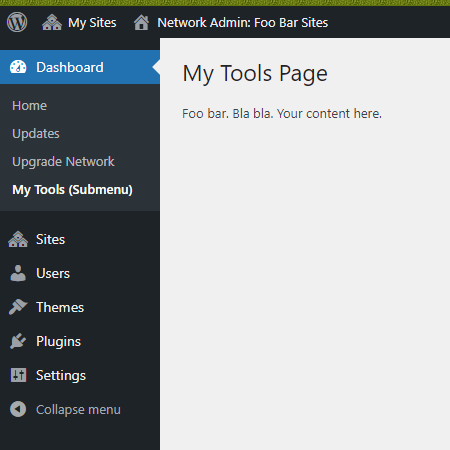
If you meant under the core top-level “Dashboard” menu as seen on the following screenshot, then you can use the network_admin_menu hook along with add_submenu_page() to add your menu item.
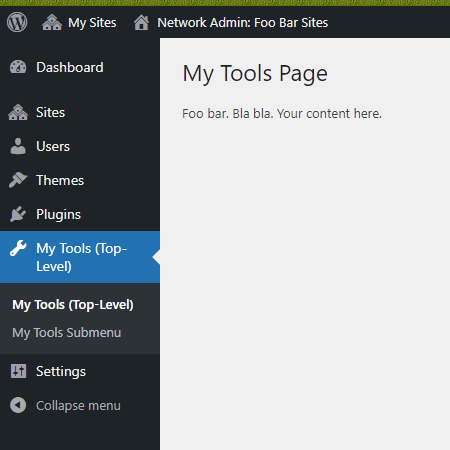
Or if you wanted a top-level menu like the following, then use the same hook as above, but use add_menu_page() to add the menu, and then use add_submenu_page() to add menu items (i.e. submenus) to that top-level menu.
Full Working Example
<?php
/**
 * Plugin Name: WPSE 391799
 * Description: Network Admin custom "Tools" menus
 * Version: 1.0
 */

// Adds the custom Network Admin menus.
add_action( 'network_admin_menu', 'wpse_391799_add_network_admin_menus' );
function wpse_391799_add_network_admin_menus() {
    add_submenu_page( 'index.php',      // parent slug or file name of a standard WordPress admin page
        'My Tools Page',                // menu page title
        'My Tools (Submenu)',           // menu title
        'manage_network',               // user capability required to access the menu (and its page)
        'my-tools-page',                // menu slug that's used with the "page" query, e.g. ?page=menu-slug
        'wpse_391799_render_tools_page' // the function which outputs the page content
    );

    add_menu_page( 'My Tools Page',      // menu page title
        'My Tools (Top-Level)',          // menu title
        'manage_network',                // user capability required to access the menu (and its page)
        'my-tools-page2',                // menu slug to that's with the "page" query, e.g. ?page=menu-slug
        'wpse_391799_render_tools_page', // the function which outputs the page content
        'dashicons-admin-tools',         // menu icon (in this case, I'm using a Dashicons icon's CSS class)
        24                               // menu position; 24 would place the menu above the "Settings" menu
    );

    add_submenu_page( 'my-tools-page2',
        'My Tools Submenu Page',
        'My Tools Submenu',
        'manage_network',
        'my-tools-submenu-page',
        'wpse_391799_render_tools_submenu_page'
    );
}

// Outputs the content for the "My Tools (Submenu)" and "My Tools (Top-Level)" pages.
function wpse_391799_render_tools_page() {
    ?>
        <div class="wrap my-tools-parent">
            <h1><?php echo esc_html( get_admin_page_title() ); ?></h1>
            <p>Foo bar. Bla bla. Your content here.</p>
        </div>
    <?php
}

// Outputs the content for the "My Tools Submenu" page.
function wpse_391799_render_tools_submenu_page() {
    ?>
        <div class="wrap my-tools-submenu">
            <h1><?php echo esc_html( get_admin_page_title() ); ?></h1>
            <p>Foo bar. Bla bla. Your content here.</p>
        </div>
    <?php
}
Method 2
With this code on functions.php we make a dashboard tab with 3 pages (that should be created on the theme path in this case inside a folder called inc).
On the plugin should be something very similar but with the code on the plugin files.
if a explanation is needed it, only in a few hours when I arrive home. thanks.
function tc_editor(){
  add_menu_page('tiago's', 'Procamiao', 'manage_options', 'editor_tiagos', 'tc_definicoes', home_url().'/wp-content/themes/procamiao/inc/mini_logo.png', 4);
  add_submenu_page('editor_tiagos', 'separador_definicoes', 'Definições', 'manage_options', 'editor_tiagos');
  add_submenu_page('editor_tiagos', 'separador_banners', 'Banners', 'manage_options','editor_banners', 'tc_banners');
  add_submenu_page('editor_tiagos', 'separador_default', 'Default', 'manage_options','editor_tabelas', 'tc_default');
}
add_action('admin_menu', 'tc_editor');

function tc_definicoes(){require_once plugin_dir_path(__FILE__).'inc/definicoes.php';}
function tc_banners(){require_once plugin_dir_path(__FILE__).'inc/banners.php';}
function tc_default(){require_once plugin_dir_path(__FILE__).'inc/default.php';}
All methods was sourced from stackoverflow.com or stackexchange.com, is licensed under cc by-sa 2.5, cc by-sa 3.0 and cc by-sa 4.0