I am using PyQt4, and I am trying to create a collapsible box where it will contains a couple of child widgets where the child widgets are already created and layout using a QVboxLayout
How do I go about creating it? Currently I am unable to find any commands eg. QCollapseBox etc.
If it is not expanded:
+ Collapsible Box Header
If expanded:
- Collapsible Box Header
|- Widget01
|- Widget02
Where there is a + or – sign, or an arrow sign that can helps determine if it has been expanded or not
Answers:
Thank you for visiting the Q&A section on Magenaut. Please note that all the answers may not help you solve the issue immediately. So please treat them as advisements. If you found the post helpful (or not), leave a comment & I’ll get back to you as soon as possible.
Method 1
Using as base the logic that is implemented in the solution of @xsquared modifying certain parts we obtain the following:
PyQt4 version
from PyQt4 import QtCore, QtGui


class CollapsibleBox(QtGui.QWidget):
    def __init__(self, title="", parent=None):
        super(CollapsibleBox, self).__init__(parent)

        self.toggle_button = QtGui.QToolButton(
            text=title, checkable=True, checked=False
        )
        self.toggle_button.setStyleSheet("QToolButton { border: none; }")
        self.toggle_button.setToolButtonStyle(
            QtCore.Qt.ToolButtonTextBesideIcon
        )
        self.toggle_button.setArrowType(QtCore.Qt.RightArrow)
        self.toggle_button.pressed.connect(self.on_pressed)

        self.toggle_animation = QtCore.QParallelAnimationGroup(self)

        self.content_area = QtGui.QScrollArea(maximumHeight=0, minimumHeight=0)
        self.content_area.setSizePolicy(
            QtGui.QSizePolicy.Expanding, QtGui.QSizePolicy.Fixed
        )
        self.content_area.setFrameShape(QtGui.QFrame.NoFrame)

        lay = QtGui.QVBoxLayout(self)
        lay.setSpacing(0)
        lay.setContentsMargins(0, 0, 0, 0)
        lay.addWidget(self.toggle_button)
        lay.addWidget(self.content_area)

        self.toggle_animation.addAnimation(
            QtCore.QPropertyAnimation(self, b"minimumHeight")
        )
        self.toggle_animation.addAnimation(
            QtCore.QPropertyAnimation(self, b"maximumHeight")
        )
        self.toggle_animation.addAnimation(
            QtCore.QPropertyAnimation(self.content_area, b"maximumHeight")
        )

    @QtCore.pyqtSlot()
    def on_pressed(self):
        checked = self.toggle_button.isChecked()
        self.toggle_button.setArrowType(
            QtCore.Qt.DownArrow if not checked else QtCore.Qt.RightArrow
        )
        self.toggle_animation.setDirection(
            QtCore.QAbstractAnimation.Forward
            if not checked
            else QtCore.QAbstractAnimation.Backward
        )
        self.toggle_animation.start()

    def setContentLayout(self, layout):
        lay = self.content_area.layout()
        del lay
        self.content_area.setLayout(layout)
        collapsed_height = (
            self.sizeHint().height() - self.content_area.maximumHeight()
        )
        content_height = layout.sizeHint().height()
        for i in range(self.toggle_animation.animationCount()):
            animation = self.toggle_animation.animationAt(i)
            animation.setDuration(500)
            animation.setStartValue(collapsed_height)
            animation.setEndValue(collapsed_height + content_height)

        content_animation = self.toggle_animation.animationAt(
            self.toggle_animation.animationCount() - 1
        )
        content_animation.setDuration(500)
        content_animation.setStartValue(0)
        content_animation.setEndValue(content_height)


if __name__ == "__main__":
    import sys
    import random

    app = QtGui.QApplication(sys.argv)

    w = QtGui.QMainWindow()
    w.setCentralWidget(QtGui.QWidget())
    dock = QtGui.QDockWidget("Collapsible Demo")
    w.addDockWidget(QtCore.Qt.LeftDockWidgetArea, dock)
    scroll = QtGui.QScrollArea()
    dock.setWidget(scroll)
    content = QtGui.QWidget()
    scroll.setWidget(content)
    scroll.setWidgetResizable(True)

    vlay = QtGui.QVBoxLayout(content)

    for i in range(10):
        box = CollapsibleBox("Collapsible Box Header-{}".format(i))
        vlay.addWidget(box)
        lay = QtGui.QVBoxLayout()
        for j in range(8):
            label = QtGui.QLabel("{}".format(j))
            color = QtGui.QColor(*[random.randint(0, 255) for _ in range(3)])
            label.setStyleSheet(
                "background-color: {}; color : white;".format(color.name())
            )
            label.setAlignment(QtCore.Qt.AlignCenter)
            lay.addWidget(label)

        box.setContentLayout(lay)
    vlay.addStretch()
    w.resize(640, 480)
    w.show()

    sys.exit(app.exec_())
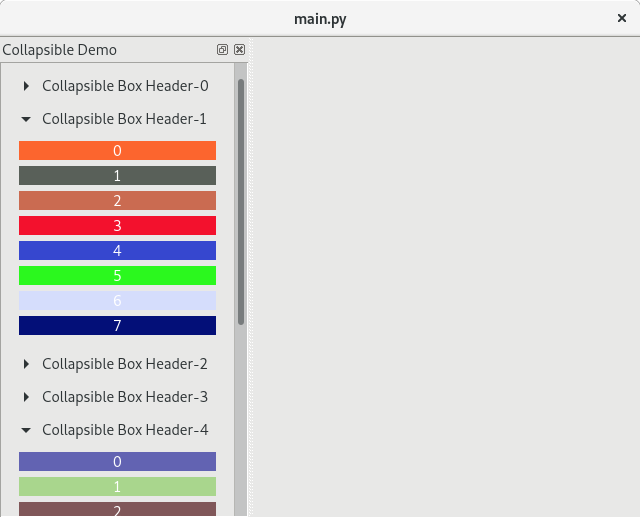
PyQt5 version
from PyQt5 import QtCore, QtGui, QtWidgets


class CollapsibleBox(QtWidgets.QWidget):
    def __init__(self, title="", parent=None):
        super(CollapsibleBox, self).__init__(parent)

        self.toggle_button = QtWidgets.QToolButton(
            text=title, checkable=True, checked=False
        )
        self.toggle_button.setStyleSheet("QToolButton { border: none; }")
        self.toggle_button.setToolButtonStyle(
            QtCore.Qt.ToolButtonTextBesideIcon
        )
        self.toggle_button.setArrowType(QtCore.Qt.RightArrow)
        self.toggle_button.pressed.connect(self.on_pressed)

        self.toggle_animation = QtCore.QParallelAnimationGroup(self)

        self.content_area = QtWidgets.QScrollArea(
            maximumHeight=0, minimumHeight=0
        )
        self.content_area.setSizePolicy(
            QtWidgets.QSizePolicy.Expanding, QtWidgets.QSizePolicy.Fixed
        )
        self.content_area.setFrameShape(QtWidgets.QFrame.NoFrame)

        lay = QtWidgets.QVBoxLayout(self)
        lay.setSpacing(0)
        lay.setContentsMargins(0, 0, 0, 0)
        lay.addWidget(self.toggle_button)
        lay.addWidget(self.content_area)

        self.toggle_animation.addAnimation(
            QtCore.QPropertyAnimation(self, b"minimumHeight")
        )
        self.toggle_animation.addAnimation(
            QtCore.QPropertyAnimation(self, b"maximumHeight")
        )
        self.toggle_animation.addAnimation(
            QtCore.QPropertyAnimation(self.content_area, b"maximumHeight")
        )

    @QtCore.pyqtSlot()
    def on_pressed(self):
        checked = self.toggle_button.isChecked()
        self.toggle_button.setArrowType(
            QtCore.Qt.DownArrow if not checked else QtCore.Qt.RightArrow
        )
        self.toggle_animation.setDirection(
            QtCore.QAbstractAnimation.Forward
            if not checked
            else QtCore.QAbstractAnimation.Backward
        )
        self.toggle_animation.start()

    def setContentLayout(self, layout):
        lay = self.content_area.layout()
        del lay
        self.content_area.setLayout(layout)
        collapsed_height = (
            self.sizeHint().height() - self.content_area.maximumHeight()
        )
        content_height = layout.sizeHint().height()
        for i in range(self.toggle_animation.animationCount()):
            animation = self.toggle_animation.animationAt(i)
            animation.setDuration(500)
            animation.setStartValue(collapsed_height)
            animation.setEndValue(collapsed_height + content_height)

        content_animation = self.toggle_animation.animationAt(
            self.toggle_animation.animationCount() - 1
        )
        content_animation.setDuration(500)
        content_animation.setStartValue(0)
        content_animation.setEndValue(content_height)


if __name__ == "__main__":
    import sys
    import random

    app = QtWidgets.QApplication(sys.argv)

    w = QtWidgets.QMainWindow()
    w.setCentralWidget(QtWidgets.QWidget())
    dock = QtWidgets.QDockWidget("Collapsible Demo")
    w.addDockWidget(QtCore.Qt.LeftDockWidgetArea, dock)
    scroll = QtWidgets.QScrollArea()
    dock.setWidget(scroll)
    content = QtWidgets.QWidget()
    scroll.setWidget(content)
    scroll.setWidgetResizable(True)
    vlay = QtWidgets.QVBoxLayout(content)
    for i in range(10):
        box = CollapsibleBox("Collapsible Box Header-{}".format(i))
        vlay.addWidget(box)
        lay = QtWidgets.QVBoxLayout()
        for j in range(8):
            label = QtWidgets.QLabel("{}".format(j))
            color = QtGui.QColor(*[random.randint(0, 255) for _ in range(3)])
            label.setStyleSheet(
                "background-color: {}; color : white;".format(color.name())
            )
            label.setAlignment(QtCore.Qt.AlignCenter)
            lay.addWidget(label)

        box.setContentLayout(lay)
    vlay.addStretch()
    w.resize(640, 480)
    w.show()
    sys.exit(app.exec_())
All methods was sourced from stackoverflow.com or stackexchange.com, is licensed under cc by-sa 2.5, cc by-sa 3.0 and cc by-sa 4.0