I want to put my math notes on a WordPress blog. I always write my notes using Pages and they always have the following format:
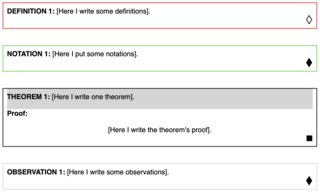
Is it possible to replicate the above format in a WordPress post?
Unfortunately I don’t know CSS or HTML. The only thing I could do in WordPress was the following:

The most important thing for me is to delimit a theorem and its proof by a box. In addition, I would like the statement of the theorem to be highlighted in relation to its proof.
Thank you for your attention!
EDIT:
Below is the solution I found based on Valter Ekholm’s answer:
<div style="border: 1.5px solid black; background-color:#f0f0f0">

   <b>THEOREM 1:</b> [...]
   <br>

   <p style="background-color:#FFFFFF">
       <b>Proof:</b><br>

       [...]

       <br><br>
   </p>
</div>
With the above code you get the following result:

Answers:
Thank you for visiting the Q&A section on Magenaut. Please note that all the answers may not help you solve the issue immediately. So please treat them as advisements. If you found the post helpful (or not), leave a comment & I’ll get back to you as soon as possible.
Method 1
In the page editor, switch to code-editor. Now your text will be within tags… probably a <p> tag.
Add css to the tag so it reads:
<p style="border: 1px solid gray"> ... </p>
Currently, to switch to code-editor, click the 3-dot-menu-button in the right top of the screen/window and then “Code Editor”.
All methods was sourced from stackoverflow.com or stackexchange.com, is licensed under cc by-sa 2.5, cc by-sa 3.0 and cc by-sa 4.0