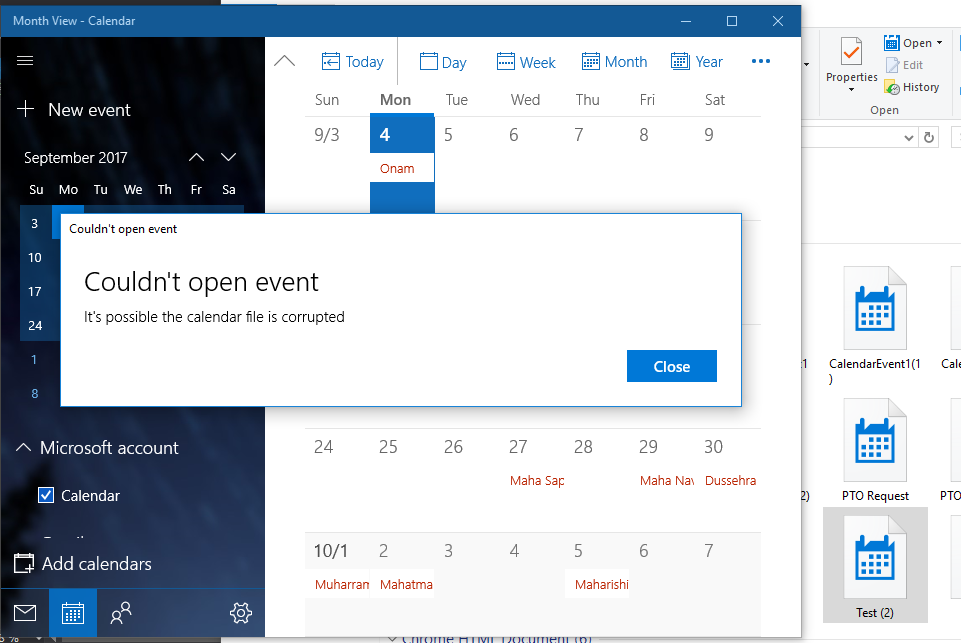
 I used below code for creating .ics file but it’s not working can any one help me,where its going wrong.
System.Text.StringBuilder sbICSFile = new System.Text.StringBuilder();
sbICSFile.AppendLine("BEGIN:VCALENDAR");
sbICSFile.AppendLine("VERSION:2.0");
sbICSFile.AppendLine("PRODID:-//ICSTestCS/");
sbICSFile.AppendLine("CALSCALE:GREGORIAN");
sbICSFile.AppendLine("BEGIN:VTIMEZONE");

----------
----------
Response.ContentType = "text/calendar";
Response.ContentEncoding = Encoding.UTF8;
Response.Charset = "utf-8";
Response.AddHeader("Content-Disposition", "attachment;filename=Test.ics");
Response.Write(sbICSFile);
Response.End();
Answers:
Thank you for visiting the Q&A section on Magenaut. Please note that all the answers may not help you solve the issue immediately. So please treat them as advisements. If you found the post helpful (or not), leave a comment & I’ll get back to you as soon as possible.
Method 1
This is how I usually create .ics files.
//some variables for demo purposes
DateTime DateStart = DateTime.Now;
DateTime DateEnd = DateStart.AddMinutes(105);
string Summary = "Small summary text";
string Location = "Event location";
string Description = "Lorem ipsum dolor sit amet, consectetuer adipiscing elit.";
string FileName = "CalendarItem";

//create a new stringbuilder instance
StringBuilder sb = new StringBuilder();

//start the calendar item
sb.AppendLine("BEGIN:VCALENDAR");
sb.AppendLine("VERSION:2.0");
sb.AppendLine("PRODID:stackoverflow.com");
sb.AppendLine("CALSCALE:GREGORIAN");
sb.AppendLine("METHOD:PUBLISH");

//create a time zone if needed, TZID to be used in the event itself
sb.AppendLine("BEGIN:VTIMEZONE");
sb.AppendLine("TZID:Europe/Amsterdam");
sb.AppendLine("BEGIN:STANDARD");
sb.AppendLine("TZOFFSETTO:+0100");
sb.AppendLine("TZOFFSETFROM:+0100");
sb.AppendLine("END:STANDARD");
sb.AppendLine("END:VTIMEZONE");

//add the event
sb.AppendLine("BEGIN:VEVENT");

//with time zone specified
sb.AppendLine("DTSTART;TZID=Europe/Amsterdam:" + DateStart.ToString("yyyyMMddTHHmm00"));
sb.AppendLine("DTEND;TZID=Europe/Amsterdam:" + DateEnd.ToString("yyyyMMddTHHmm00"));
//or without
sb.AppendLine("DTSTART:" + DateStart.ToString("yyyyMMddTHHmm00"));
sb.AppendLine("DTEND:" + DateEnd.ToString("yyyyMMddTHHmm00"));

sb.AppendLine("SUMMARY:" + Summary + "");
sb.AppendLine("LOCATION:" + Location + "");
sb.AppendLine("DESCRIPTION:" + Description + "");
sb.AppendLine("PRIORITY:3");
sb.AppendLine("END:VEVENT");

//end calendar item
sb.AppendLine("END:VCALENDAR");

//create a string from the stringbuilder
string CalendarItem = sb.ToString();

//send the calendar item to the browser
Response.ClearHeaders();
Response.Clear();
Response.Buffer = true;
Response.ContentType = "text/calendar";
Response.AddHeader("content-length", CalendarItem.Length.ToString());
Response.AddHeader("content-disposition", "attachment; filename="" + FileName + ".ics"");
Response.Write(CalendarItem);
Response.Flush();
HttpContext.Current.ApplicationInstance.CompleteRequest();
Method 2
In addition to the accepted answer, you must also add UID and DTSTAMP to work for google calendar.
Here’s what I added:
sb.AppendLine("UID:" + (Guid.NewGuid().ToString() + DateTime.Now.ToString("yyyyMMddTHHmm00")));
sb.AppendLine("DTSTAMP:" + DateTime.Now.ToString("yyyyMMddTHHmm00"));
You can also test your content here.
Method 3
I thrashed on building ics files that supported timezones. I ended up going with ical.Net to produce the files. Their wiki has a basic example of how to produce the file. Here is what it looks like when you need timezone support.
var startDate = DateTime.Now;
var endDate = startDate.AddHours(1);
var calendar = new Calendar
               {
                  Method = "PUBLISH",
               };
calendar.AddTimeZone("America/Chicago");
var calendarEvent = new CalendarEvent
        {
            Description = "Your description here",
            End = new CalDateTime(endDate, "America/Chicago"),
            Location = "Your location here",
            Start = new CalDateTime(startDate, "America/Chicago"),
            Summary = "Your summary here"
        };
calendar.Events.Add(calendarEvent);
Then to get the ics file as a string:
var serializer = new CalendarSerializer();
var iscFile = serializer.SerializeToString(calendar);
Finally I’d recommend validating your results with this tool.
Hope that saves someone some time.
All methods was sourced from stackoverflow.com or stackexchange.com, is licensed under cc by-sa 2.5, cc by-sa 3.0 and cc by-sa 4.0