I have a 3-dimensional numpy array. I’d like to display (in matplotlib) a nice 3D plot of an isosurface of this array (or more strictly, display an isosurface of the 3D scalar field defined by interpolating between the sample points).
matplotlib’s mplot3D part provides nice 3D plot support, but (so far as I can see) its API doesn’t have anything which will simply take a 3D array of scalar values and display an isosurface. However, it does support displaying a collection of polygons, so presumably I could implement the marching cubes algorithm to generate such polygons.
It does seem quite likely that a scipy-friendly marching cubes has already been implemented somewhere and that I haven’t found it, or that I’m missing some easy way of doing this. Alternatively I’d welcome any pointers to other tools for visualising 3D array data easily usable from the Python/numpy/scipy world.
Answers:
Thank you for visiting the Q&A section on Magenaut. Please note that all the answers may not help you solve the issue immediately. So please treat them as advisements. If you found the post helpful (or not), leave a comment & I’ll get back to you as soon as possible.
Method 1
Just to elaborate on my comment above, matplotlib’s 3D plotting really isn’t intended for something as complex as isosurfaces. It’s meant to produce nice, publication-quality vector output for really simple 3D plots. It can’t handle complex 3D polygons, so even if implemented marching cubes yourself to create the isosurface, it wouldn’t render it properly.
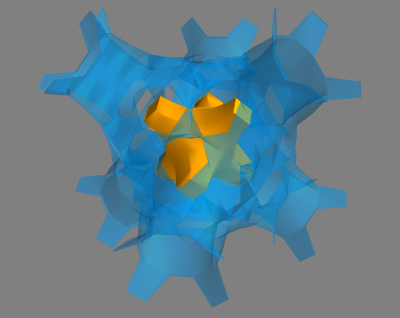
However, what you can do instead is use mayavi (it’s mlab API is a bit more convenient than directly using mayavi), which uses VTK to process and visualize multi-dimensional data.
As a quick example (modified from one of the mayavi gallery examples):
import numpy as np
from enthought.mayavi import mlab

x, y, z = np.ogrid[-10:10:20j, -10:10:20j, -10:10:20j]
s = np.sin(x*y*z)/(x*y*z)

src = mlab.pipeline.scalar_field(s)
mlab.pipeline.iso_surface(src, contours=[s.min()+0.1*s.ptp(), ], opacity=0.3)
mlab.pipeline.iso_surface(src, contours=[s.max()-0.1*s.ptp(), ],)

mlab.show()
Method 2
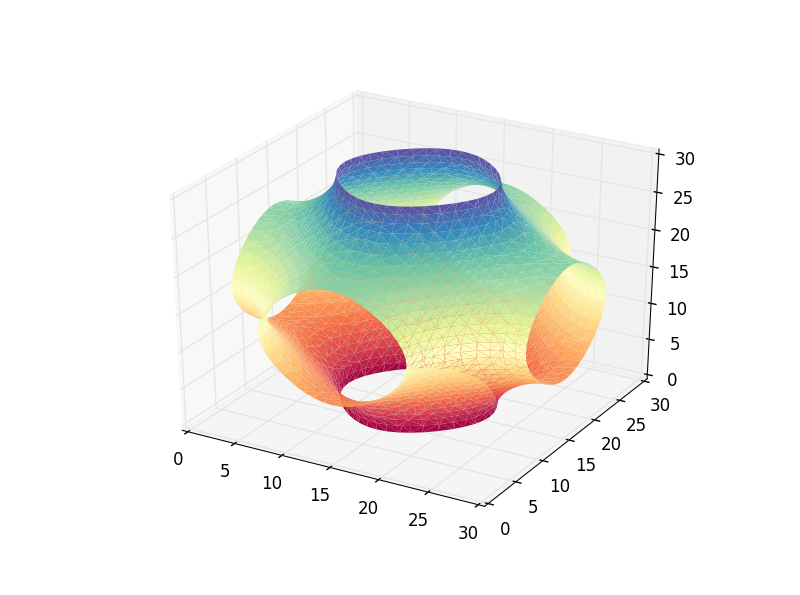
Complementing the answer of @DanHickstein, you can also use trisurf to visualize the polygons obtained in the marching cubes phase.
import numpy as np
from numpy import sin, cos, pi
from skimage import measure
import matplotlib.pyplot as plt
from mpl_toolkits.mplot3d import Axes3D


def fun(x, y, z):
    return cos(x) + cos(y) + cos(z)

x, y, z = pi*np.mgrid[-1:1:31j, -1:1:31j, -1:1:31j]
vol = fun(x, y, z)
iso_val=0.0
verts, faces = measure.marching_cubes(vol, iso_val, spacing=(0.1, 0.1, 0.1))

fig = plt.figure()
ax = fig.add_subplot(111, projection='3d')
ax.plot_trisurf(verts[:, 0], verts[:,1], faces, verts[:, 2],
                cmap='Spectral', lw=1)
plt.show()
Update: May 11, 2018
As mentioned by @DrBwts, now marching_cubes return 4 values. The following code works.
import numpy as np
from numpy import sin, cos, pi
from skimage import measure
import matplotlib.pyplot as plt
from mpl_toolkits.mplot3d import Axes3D


def fun(x, y, z):
    return cos(x) + cos(y) + cos(z)

x, y, z = pi*np.mgrid[-1:1:31j, -1:1:31j, -1:1:31j]
vol = fun(x, y, z)
iso_val=0.0
verts, faces, _, _ = measure.marching_cubes(vol, iso_val, spacing=(0.1, 0.1, 0.1))

fig = plt.figure()
ax = fig.add_subplot(111, projection='3d')
ax.plot_trisurf(verts[:, 0], verts[:,1], faces, verts[:, 2],
                cmap='Spectral', lw=1)
plt.show()
Update: February 2, 2020
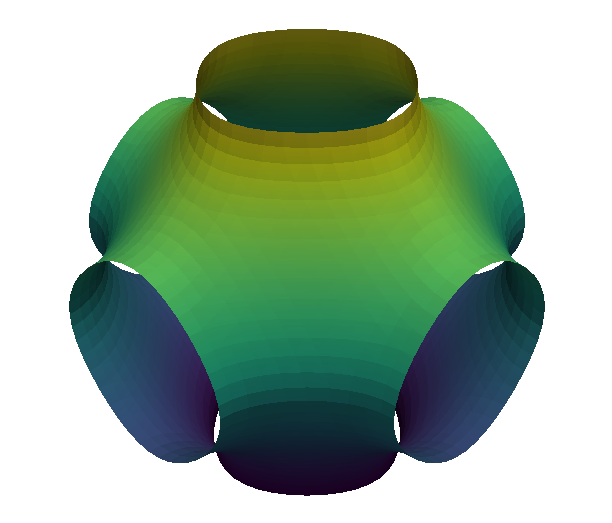
Adding to my previous answer, I should mention that since then PyVista has been released, and it makes this
kind of tasks somewhat effortless.
Following the same example as before.
from numpy import cos, pi, mgrid
import pyvista as pv

#%% Data
x, y, z = pi*mgrid[-1:1:31j, -1:1:31j, -1:1:31j]
vol = cos(x) + cos(y) + cos(z)
grid = pv.StructuredGrid(x, y, z)
grid["vol"] = vol.flatten()
contours = grid.contour([0])

#%% Visualization
pv.set_plot_theme('document')
p = pv.Plotter()
p.add_mesh(contours, scalars=contours.points[:, 2], show_scalar_bar=False)
p.show()
With the following result
Update: February 24, 2020
As mentioned by @HenriMenke, marching_cubes has been renamed to marching_cubes_lewiner. The “new” snippet is the following.
import numpy as np
from numpy import cos, pi
from skimage.measure import marching_cubes_lewiner
import matplotlib.pyplot as plt
from mpl_toolkits.mplot3d import Axes3D

x, y, z = pi*np.mgrid[-1:1:31j, -1:1:31j, -1:1:31j]
vol = cos(x) + cos(y) + cos(z)
iso_val=0.0
verts, faces, _, _ = marching_cubes_lewiner(vol, iso_val, spacing=(0.1, 0.1, 0.1))

fig = plt.figure()
ax = fig.add_subplot(111, projection='3d')
ax.plot_trisurf(verts[:, 0], verts[:,1], faces, verts[:, 2], cmap='Spectral',
                lw=1)
plt.show()
Method 3
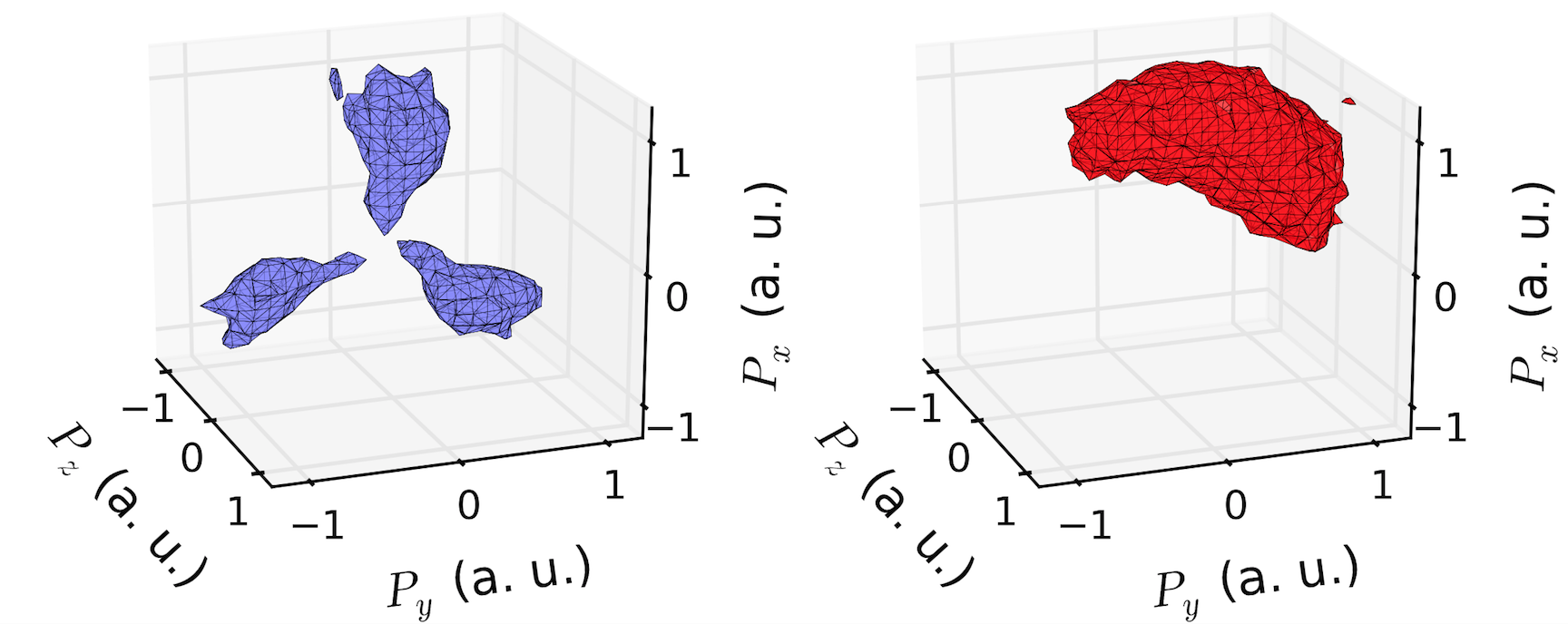
If you want to keep your plots in matplotlib (much easier to produce publication-quality images than mayavi in my opinion), then you can use the marching_cubes function implemented in skimage and then plot the results in matplotlib using
mpl_toolkits.mplot3d.art3d.Poly3DCollection
as shown in the link above. Matplotlib does a pretty good job of rendering the isosurface. Here is an example that I made of some real tomography data:
All methods was sourced from stackoverflow.com or stackexchange.com, is licensed under cc by-sa 2.5, cc by-sa 3.0 and cc by-sa 4.0