I have a page with a simple dropdown and repeater control in page.on submit repeater control is bound to datasource1 which has 3 columns.
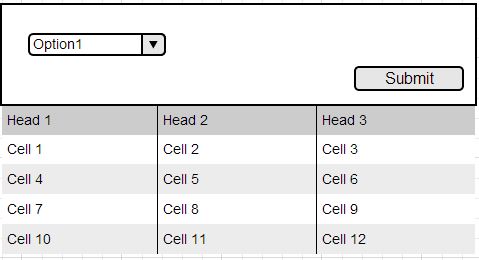
Now my requirement is if i select option2 , it should bind to datasource2 which contains 4 columns.

<asp:Repeater ID="Repeater1" runat="server" OnItemDataBound="Repeater1_ItemDataBound">
<HeaderTemplate>
    <tr>
        <th align="left">Header1</th>
        <th align="left">Header3</th>
        <th align="left">Header2</th>
    </tr>
</HeaderTemplate>
<ItemTemplate>
    <tr>
        <td>
            <asp:Label ID="Header1" runat="server" /></td>
        <td>
            <asp:Label ID="Header3" runat="server" /></td>
        <td>
            <asp:Label ID="Header2" runat="server" /></td>
    </tr>
</ItemTemplate>
Is it possible for the same repeater to dynamically bind to heterogeneous data sources?How can i specify the header template and item templates at run- time? Can this scenario be implemented with just one repeater control and multiple heterogeneous data sources?
Answers:
Thank you for visiting the Q&A section on Magenaut. Please note that all the answers may not help you solve the issue immediately. So please treat them as advisements. If you found the post helpful (or not), leave a comment & I’ll get back to you as soon as possible.
Method 1
Feels below code will help you .
<asp:Repeater ID="Repeater1" runat="server" OnItemDataBound="Repeater1_ItemDataBound">
    <HeaderTemplate>
        <tr class="">
            <asp:Repeater ID="Header1" runat="server">
                <ItemTemplate>
                    <th align="left"><%# Container.DataItem %>
                    </th>
                </ItemTemplate>
            </asp:Repeater>
        </tr>
    </HeaderTemplate>
    <ItemTemplate>
        <tr class="">
            <asp:Repeater ID="Item1" runat="server">
                <ItemTemplate>
                    <td><%# Container.DataItem %>
                    </td>
                </ItemTemplate>
            </asp:Repeater>
        </tr>
    </ItemTemplate>
</asp:Repeater>


protected void Repeater1_ItemDataBound(object sender, RepeaterItemEventArgs e)
    {
        if (e.Item.ItemType == ListItemType.Header)
        {
            Repeater headerRepeater = e.Item.FindControl("Header1") as Repeater;
            headerRepeater.DataSource = dt.Columns;
            headerRepeater.DataBind();
        }

       if (e.Item.ItemType == ListItemType.Item || e.Item.ItemType == ListItemType.AlternatingItem)
        {
            Repeater columnRepeater = e.Item.FindControl("Item1") as Repeater;
            var row = e.Item.DataItem as System.Data.DataRowView;
            columnRepeater.DataSource = row.Row.ItemArray;
            columnRepeater.DataBind();
        }
    }
or in other way using 2 different User control.First user control contain repeater1, second contain repeater2.Then dynamic add these repeaters to your page, at code behind
Method 2
You can simply use like this –
protected void DropDownList1_SelectedIndexChanged(object sender, EventArgs e)
{
   using (SqlConnection con = new SqlConnection(System.Configuration.ConfigurationManager.ConnectionStrings["RBConnectionString"].ConnectionString))
   {
      SqlCommand cmd = new SqlCommand("select * from Customers", con);
      cmd.CommandType = CommandType.StoredProcedure;
      SqlDataAdapter adpt = new SqlDataAdapter(cmd);
      DataTable dt = new DataTable();
      adpt.Fill(dt);
      repeaterObj.DataSource = dt;
      repeaterObj.DataBind();
      cmd.Dispose();
    }
 }
Method 3
Try settings AutoPostback=true on your dropdownlist. Then, have a “selectedindexchanged” event handler on your codebehind setup to read the value and set the datasource accordingly, something similar to:
repeater1.DataSource=<yourdatasource>
repeater1.DataBind()
If your datasource is always using the same columns for your presentation, then this shouldn’t be an issue. If your datasources will vary in the columns of data that they return, then Kashif’s comment in your question may help you some. Otherwise, you just need to fill in the logic above to set the Datasource property of your repeater to whatever your datasource is…
Hope this helps
Method 4
        <HeaderTemplate>
            <table id="masterDataTable" class="reportTable list issues" width="100%">
                <thead>
                    <tr>
                        <asp:Literal ID="literalHeader" runat="server"></asp:Literal>
                    </tr>
                </thead>
                <tbody>
        </HeaderTemplate>
        <ItemTemplate>
            <tr>
                <asp:Literal ID="literals" runat="server"></asp:Literal>
            </tr>
        </ItemTemplate>
        <FooterTemplate>
            </tbody> </table>
        </FooterTemplate>
    </asp:Repeater>
  // javascript Function

    <script type="text/javascript">
   $(document).ready(function () {
  $('#ddlReport').removeClass('required');
   $('.sort').click(function () {
    $('#hdnColumnName').val($(this).text());
    $('#hdnColumnOrder').val($(this).attr('class'));
    $(this).toggleClass("desc asc");
    $("#lnkSort").click();
     });
  }  );

  // Bind repeater

     DataTable dt = objReport.GetCustomRecord();
   fn = new List<string>();
   for (int i = 0; i < dt.Columns.Count; i++)
  {
    if (dt.Columns[i].ColumnName != "Maxcount" )
    {
        fn.Add(dt.Columns[i].ColumnName);
    }
}

Repeater1.DataSource = dt;
Repeater1.DataBind();


      protected void Repeater1_databinding(object sender,   RepeaterItemEventArgs e)
{
   if (e.Item.ItemType == ListItemType.Header)
 {
   if (e.Item.FindControl("literalHeader") != null)
   {
          StringBuilder sb = new StringBuilder();
         Literal li = e.Item.FindControl("literalHeader") as Literal;

         fieldName().ForEach(delegate(string fn)
           {
           if (hdnColumnName.Value != fn.ToString())
             {
                sb.Append("<th width="10%"> <a id="btnCustomerName" class="sort desc" onclick="btnSorts_onclick()" style="cursor:pointer;text-decoration: none !important;" >"
                + fn.ToString() + "</a></th>");
             }
            else
            {
               if (hdnColumnOrder.Value == "sort asc")
                sb.Append("<th width="10%"> <a id="btnCustomerName" class="sort desc"  onclick="btnSorts_onclick()" style="cursor:pointer;text-decoration: none !important;" >"
               + fn.ToString() + "</a></th>");
            else
                sb.Append("<th width="10%"> <a id="btnCustomerName" class="sort asc" onclick="btnSorts_onclick()" style="cursor:pointer;text-decoration: none !important;">"
                                           + fn.ToString() + "</a></th>");
        }
    });
    li.Text = sb.ToString();

   }

 }
    if (e.Item.ItemType == ListItemType.Item || e.Item.ItemType == ListItemType.AlternatingItem)
 {
 if (e.Item.FindControl("literals") != null)
 {
    DataRowView drv = (DataRowView)e.Item.DataItem;
    Literal li = e.Item.FindControl("literals") as Literal;
    StringBuilder sb = new StringBuilder();
    fieldName().ForEach(delegate(string fn)
    {
        sb.Append("<td>" + drv[fn.ToString()] + "</td>");
    });
    li.Text = sb.ToString();
 }
  }
 }
Method 5
With bootstrap and datatables.net plugins
protected void rptReport_ItemDataBound(object sender, RepeaterItemEventArgs e)
        {
            if (e.Item.ItemType == ListItemType.Header)
            {
                Repeater headerRepeater = e.Item.FindControl("Header1") as Repeater;
                headerRepeater.DataSource = dtOrder.Columns;
                headerRepeater.DataBind();
            }

            if (e.Item.ItemType == ListItemType.Item || e.Item.ItemType == ListItemType.AlternatingItem)
            {
                Repeater columnRepeater = e.Item.FindControl("Item1") as Repeater;
                var row = e.Item.DataItem as System.Data.DataRowView;
                columnRepeater.DataSource = row.Row.ItemArray;
                columnRepeater.DataBind();
            }
        }

<link href="/datatables/datatables.min.css" rel="nofollow noreferrer noopener" rel="stylesheet" type="text/css" />
    <link href="/bootstrap/datatables.bootstrap.css" rel="nofollow noreferrer noopener" rel="stylesheet" type="text/css" />

    <div class="row">
        <div class="col-md-12">
            <asp:Panel runat="server" ID="pnlReport">
                <div class="portlet light bordered">
                    <div class="portlet-title">
                        <div class="caption font-dark">
                            <i class="icon-settings font-dark"></i>
                            <span class="caption-subject bold">Sonuçlar </span>
                        </div>
                        <div class="tools"></div>
                    </div>
                    <div class="portlet-body">
                        <asp:Repeater ID="rptReport" runat="server" OnItemDataBound="rptReport_ItemDataBound">
                            <HeaderTemplate>
                                <table class="table table-striped table-bordered table-hover" id="tblReport">
                                    <thead>
                                        <tr>
                                            <asp:Repeater ID="Header1" runat="server">
                                                <ItemTemplate>
                                                    <th><%# Container.DataItem %></th>
                                                </ItemTemplate>
                                            </asp:Repeater>
                                        </tr>
                                    </thead>
                                    <tbody>
                            </HeaderTemplate>
                            <ItemTemplate>
                                <tr>
                                    <asp:Repeater ID="Item1" runat="server">
                                        <ItemTemplate>
                                            <td><%# Container.DataItem %></td>
                                        </ItemTemplate>
                                    </asp:Repeater>
                                </tr>
                            </ItemTemplate>
                            <FooterTemplate>
                                </tbody>
                                </table>
                            </FooterTemplate>
                        </asp:Repeater>
                    </div>
                </div>
            </asp:Panel>
        </div>
    </div>

    <script type="text/javascript" src='<%=ResolveUrl("~/jquery.min.js") %>'></script>
    <script type="text/javascript" src='<%=ResolveUrl("~/bootstrap.min.js") %>'></script>
<script src='<%=ResolveUrl("~/scripts/datatable.js") %>' type="text/javascript"></script>
    <script src='<%=ResolveUrl("~/datatables/datatables.min.js") %>' type="text/javascript"></script>
    <script src='<%=ResolveUrl("~/bootstrap/datatables.bootstrap.js") %>' type="text/javascript"></script>

<script>
        $(document).ready(function () {
            $('#tblReport').DataTable({
                "language": {
                    "url": "//cdn.datatables.net/plug-ins/9dcbecd42ad/i18n/Turkish.json",
                    "decimal": ",",
                    "thousands": ".",
                    buttons: {
                        copyTitle: 'Panoya kopyalandı',
                        copyKeys: 'Appuyez sur <i>ctrl</i> ou <i>u2318</i> + <i>C</i> pour copier les données du tableau à votre presse-papiers. <br><br>Pour annuler, cliquez sur ce message ou appuyez sur Echap.',
                        copySuccess: {
                            _: '%d satır kopyalandı',
                            1: '1 satır kopyalandı'
                        }
                    }
                },

                buttons: [
                { extend: 'print', className: 'btn dark btn-outline', text: 'Yazdır' },
                { extend: 'copy', className: 'btn red btn-outline', text: 'Kopyala' },
                { extend: 'pdf', className: 'btn green btn-outline' },
                { extend: 'excel', className: 'btn yellow btn-outline ' },
                { extend: 'csv', className: 'btn purple btn-outline ' },
                { extend: 'colvis', className: 'btn dark btn-outline', text: 'Kolonlar' }
                ],
                "order": [
                    [0, 'asc']
                ],

                "lengthMenu": [
                    [5, 10, 50, -1],
                    [5, 10, 50, "Hepsi"]
                ],
                "pageLength": 10,
                "dom": "<'row' <'col-md-12'B>><'row'<'col-md-6 col-sm-12'l><'col-md-6 col-sm-12'f>r><'table-scrollable't><'row'<'col-md-5 col-sm-12'i><'col-md-7 col-sm-12'p>>",
            });
        });
    </script>
All methods was sourced from stackoverflow.com or stackexchange.com, is licensed under cc by-sa 2.5, cc by-sa 3.0 and cc by-sa 4.0