Is there a way to set the EnableSSL from the web.config?
I could set this property in code, but that wouldn’t work for the Simple Mail Web Event and other classes that uses the default Smtp Server. Any ideas?
Answers:
Thank you for visiting the Q&A section on Magenaut. Please note that all the answers may not help you solve the issue immediately. So please treat them as advisements. If you found the post helpful (or not), leave a comment & I’ll get back to you as soon as possible.
Method 1
For .NET 3 and earlier: You can’t. You have to manage it by hand.
For more information you can see https://blogs.msdn.microsoft.com/vikas/2008/04/29/bug-asp-net-2-0-passwordrecovery-web-control-cannot-send-emails-to-ssl-enabled-smtp-servers/.
For .NET 4: You can.
See http://theoldsewingfactory.com/2011/01/06/enable-ssl-in-web-config-for-smtpclient/
<configuration>
    <system.net>
        <mailSettings>
            <smtp deliveryMethod=”network”>
                <network host="localhost"
                         port="25"
                         enableSsl="true"
                         defaultCredentials="true" />
            </smtp>
        </mailSettings>
    </system.net>
</configuration>
Method 2
I have a dirty workaround (until .NET 4.0 comes out). Instead of changin my code it relies on the used port to determine if SSL is required or not.
var client = new SmtpClient();
client.EnableSsl = client.Port == 587 || client.Port == 465;
// This could also work
//client.EnableSsl = client.Port != 25;
I said it was a dirty hack, but it working fine for the different configurations that we encounter.
Method 3
this works for me in .net 4
E.G. in web.config
network host="somesmtpserver" userName="<a href="https://getridbug.com/cdn-cgi/l/email-protection" class="__cf_email__" data-cfemail="72161d2d1c1d062d0017021e0b320b1d07000117000417005c111d1f">[email protected]</a>"
password="whatever" port="25" enableSsl="true"
Method 4
Giles Roberts Jan 18 ’12 at 18:01 said
this works for me in .net 4
E.G. in web.config
network host="somesmtpserver" userName="<a href="https://getridbug.com/cdn-cgi/l/email-protection" class="__cf_email__" data-cfemail="d1b5be8ebfbea58ea3b4a1bda891a8bea4a3a2b4a3a7b4a3ffb2bebc">[email protected]</a>"
password="whatever" port="25" enableSsl="true"
Port 25 is not a SSL port. Port 25 is the default SMTP port. Furthermore the web.config code is partly filled out. The code should be
    <system.net>
         <mailSettings>
              <smtp deliveryMethod="Network" from="<a href="https://getridbug.com/cdn-cgi/l/email-protection" class="__cf_email__" data-cfemail="8efbfdebfccee9e3efe7e2a0ede1e3">[email protected]</a>">
                     <network host="smtp.gmail.com"
                     userName="<a href="https://getridbug.com/cdn-cgi/l/email-protection" class="__cf_email__" data-cfemail="f88d8b9d8ab89f95999194d69b9795">[email protected]</a>"
                     password="********"
                     port="587"
                     defaultCredentials="true"
                     enableSsl="true" />
             </smtp>
        </mailSettings>
   </system.net>
This settings above is more accurate then the original web.config code. I don’t know witch method is better. Using web.config or using the code-behind page to send the e-mail. No matter witch method you use the code-behind file has to be modified. I say this because you have to wire up From, Subject, and Body text boxes. I’m taking it for granted that the end results that you want to send a message through an aspx web page
Method 5
Ah, there is a way to do it for the ‘forgot password’ built in .net login controls though.
Ryan
Method 6
This is the code I use in my web.config file.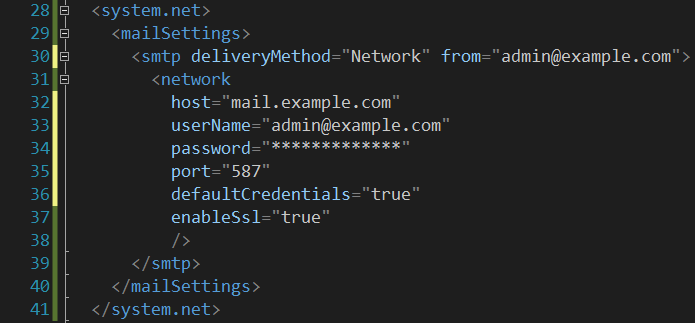
Method 7
I appears the class is sealed, so i made a manual extension. I thought i’d provide it for others here. Hope it can be of use to others.
/// <summary>
/// OldSchool extension of SmtpNetWorkElement, since it's sealed.
/// </summary>
public class SmtpNetworkElementEx
{
    private readonly SmtpNetworkElement m_SmtpNetWorkElement;

    /// <summary>
    /// Initializes a new instance of the <see cref="SmtpNetworkElementEx"/> class.
    /// </summary>
    public SmtpNetworkElementEx()
    {
        Configuration configurationFile = WebConfigurationManager.OpenWebConfiguration("~/web.config");
        var mailSettings = configurationFile.GetSectionGroup("system.net/mailSettings") as MailSettingsSectionGroup;

        if (mailSettings == null)
            return;

        m_SmtpNetWorkElement = mailSettings.Smtp.Network;
    }

    public string Host { get { return m_SmtpNetWorkElement.Host; } }
    public bool DefaultCredentials { get { return m_SmtpNetWorkElement.DefaultCredentials; } }
    public string ClientDomain { get { return m_SmtpNetWorkElement.ClientDomain; } }
    public string TargetName { get { return m_SmtpNetWorkElement.TargetName; } }
    public int Port { get { return m_SmtpNetWorkElement.Port; } }
    public string UserName { get { return m_SmtpNetWorkElement.UserName; } }
    public string Password { get { return m_SmtpNetWorkElement.Password; } }
    public bool EnableSsl { get { return Convert.ToBoolean(m_SmtpNetWorkElement.ElementInformation.Properties["enableSsl"].Value); } }
}
Use this way:
var smtpSettings = new SmtpNetworkElementEx();

_smtpClient.Host = smtpSettings.Host;
_smtpClient.Port = smtpSettings.Port;
_smtpClient.EnableSsl = smtpSettings.EnableSsl;
_smtpClient.Credentials = new System.Net.NetworkCredential(smtpSettings.UserName, smtpSettings.Password);
Method 8
I have searched almost everywhere for this.
But it seems there is no way we can configure EnableSsl Property in web.config.
Have a look at this
Method 9
I think there’s a bug in the MailSettingsSectionGroup. See below code:
Configuration configurationFile = WebConfigurationManager.OpenWebConfiguration("~/web.config");
var mailSettings = configurationFile.GetSectionGroup("system.net/mailSettings") as MailSettingsSectionGroup;

_smtpClient.Host = mailSettings.Smtp.Network.Host;
_smtpClient.Port = mailSettings.Smtp.Network.Port;
_smtpClient.EnableSsl = mailSettings.Smtp.Network.**EnableSsl**;
_smtpClient.Credentials = new System.Net.NetworkCredential(mailSettings.Smtp.Network.UserName, mailSettings.Smtp.Network.Password);
_smtpClient.UseDefaultCredentials = false;
It seems that EnableSsl does not exist as a property under Network because when I run and debug this, I can see the value, but can’t compile the code due to missing ExtensionMethod.
Method 10
Just extend the class and set EnableSsl = true and use that class.
All methods was sourced from stackoverflow.com or stackexchange.com, is licensed under cc by-sa 2.5, cc by-sa 3.0 and cc by-sa 4.0