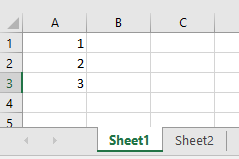
I Have Two sheets and i want to add data validation to first column and fill its value based on first sheets first column.
this is my code:
using (SpreadsheetDocument myDoc = SpreadsheetDocument.Create(path, SpreadsheetDocumentType.Workbook))
            {
                WorkbookPart workbookPart = myDoc.AddWorkbookPart();
                workbookPart.Workbook = new Workbook();

                Sheets sheets = myDoc.WorkbookPart.Workbook.AppendChild(new Sheets());

                // the data for sheet 1
                WorksheetPart worksheetPart1 = workbookPart.AddNewPart<WorksheetPart>();
                Worksheet workSheet1 = new Worksheet();
                SheetData sheetData1 = new SheetData();

                workSheet1.AppendChild(sheetData1);
                worksheetPart1.Worksheet = workSheet1;

                Sheet sheet1 = new Sheet()
                {
                    Id = myDoc.WorkbookPart.GetIdOfPart(worksheetPart1),
                    SheetId = 1,
                    Name = "Sheet1"
                };
                sheets.Append(sheet1);


                // the data for sheet 2
                WorksheetPart worksheetPart2 = workbookPart.AddNewPart<WorksheetPart>();
                Worksheet workSheet2 = new Worksheet();
                SheetData sheetData2 = new SheetData();

                workSheet2.AppendChild(sheetData2);
                worksheetPart2.Worksheet = workSheet2;

                Sheet sheet2 = new Sheet()
                {
                    Id = myDoc.WorkbookPart.GetIdOfPart(worksheetPart2),
                    SheetId = 2,
                    Name = "Sheet2"
                };
                sheets.Append(sheet2);

                DataValidations dataValidations = new DataValidations();
                DataValidation dataValidation = new DataValidation()
                {
                    Type = DataValidationValues.List,
                    AllowBlank = true,
                    SequenceOfReferences = new ListValue<StringValue>() { InnerText = "A:A" }
                };
                Formula1 data = new Formula1();
                data.Text = $""=Sheet1!$A:$A"";
                dataValidation.Append(data);
                dataValidations.Append(dataValidation);

                worksheetPart2.Worksheet.AppendChild(dataValidations);
            }
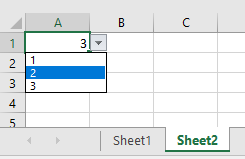
my problem is, when set data.TEXT equal $””=Sheet1!$A:$A””, it just show me a list with one row in dropdown.
I want to get values in first column of sheet 1 and fill drop down in sheet2 based on it
Answers:
Thank you for visiting the Q&A section on Magenaut. Please note that all the answers may not help you solve the issue immediately. So please treat them as advisements. If you found the post helpful (or not), leave a comment & I’ll get back to you as soon as possible.
Method 1
With a small change your code worked for me. Just remove the inner quotes.
data.Text = $"=Sheet1!$A:$A";
All methods was sourced from stackoverflow.com or stackexchange.com, is licensed under cc by-sa 2.5, cc by-sa 3.0 and cc by-sa 4.0