I have a dataframe df that loads data from a database. Most of the columns are json strings while some are even list of jsons. For example:
id     name     columnA                               columnB
1     John     {"dist": "600", "time": "0:12.10"}    [{"pos": "1st", "value": "500"},{"pos": "2nd", "value": "300"},{"pos": "3rd", "value": "200"}, {"pos": "total", "value": "1000"}]
2     Mike     {"dist": "600"}                       [{"pos": "1st", "value": "500"},{"pos": "2nd", "value": "300"},{"pos": "total", "value": "800"}]
...
As you can see, not all the rows have the same number of elements in the json strings for a column.
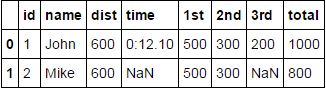
What I need to do is keep the normal columns like id and name as it is and flatten the json columns like so:
id    name   columnA.dist   columnA.time   columnB.pos.1st   columnB.pos.2nd   columnB.pos.3rd     columnB.pos.total
1     John   600            0:12.10        500               300               200                 1000
2     Mark   600            NaN            500               300               Nan                 800
I have tried using json_normalize like so:
from pandas.io.json import json_normalize
json_normalize(df)
But there seems to be some problems with keyerror. What is the correct way of doing this?
Answers:
Thank you for visiting the Q&A section on Magenaut. Please note that all the answers may not help you solve the issue immediately. So please treat them as advisements. If you found the post helpful (or not), leave a comment & I’ll get back to you as soon as possible.
Method 1
Here’s a solution using json_normalize() again by using a custom function to get the data in the correct format understood by json_normalize function.
import ast
from pandas.io.json import json_normalize

def only_dict(d):
    '''
    Convert json string representation of dictionary to a python dict
    '''
    return ast.literal_eval(d)

def list_of_dicts(ld):
    '''
    Create a mapping of the tuples formed after
    converting json strings of list to a python list
    '''
    return dict([(list(d.values())[1], list(d.values())[0]) for d in ast.literal_eval(ld)])

A = json_normalize(df['columnA'].apply(only_dict).tolist()).add_prefix('columnA.')
B = json_normalize(df['columnB'].apply(list_of_dicts).tolist()).add_prefix('columnB.pos.')
Finally, join the DFs on the common index to get:
df[['id', 'name']].join([A, B])

EDIT:- As per the comment by @MartijnPieters, the recommended way of decoding the json strings would be to use json.loads() which is much faster when compared to using ast.literal_eval() if you know that the data source is JSON.
Method 2
The quickest seems to be:
import pandas as pd
import json

json_struct = json.loads(df.to_json(orient="records"))
df_flat = pd.io.json.json_normalize(json_struct) #use pd.io.json
Method 3
TL;DR Copy-paste the following function and use it like this: flatten_nested_json_df(df)
This is the most general function I could come up with:
def flatten_nested_json_df(df):

    df = df.reset_index()

    print(f"original shape: {df.shape}")
    print(f"original columns: {df.columns}")


    # search for columns to explode/flatten
    s = (df.applymap(type) == list).all()
    list_columns = s[s].index.tolist()

    s = (df.applymap(type) == dict).all()
    dict_columns = s[s].index.tolist()

    print(f"lists: {list_columns}, dicts: {dict_columns}")
    while len(list_columns) > 0 or len(dict_columns) > 0:
        new_columns = []

        for col in dict_columns:
            print(f"flattening: {col}")
            # explode dictionaries horizontally, adding new columns
            horiz_exploded = pd.json_normalize(df[col]).add_prefix(f'{col}.')
            horiz_exploded.index = df.index
            df = pd.concat([df, horiz_exploded], axis=1).drop(columns=[col])
            new_columns.extend(horiz_exploded.columns) # inplace

        for col in list_columns:
            print(f"exploding: {col}")
            # explode lists vertically, adding new columns
            df = df.drop(columns=[col]).join(df[col].explode().to_frame())
            new_columns.append(col)

        # check if there are still dict o list fields to flatten
        s = (df[new_columns].applymap(type) == list).all()
        list_columns = s[s].index.tolist()

        s = (df[new_columns].applymap(type) == dict).all()
        dict_columns = s[s].index.tolist()

        print(f"lists: {list_columns}, dicts: {dict_columns}")

    print(f"final shape: {df.shape}")
    print(f"final columns: {df.columns}")
    return df
It takes a dataframe that may have nested lists and/or dicts in its columns, and recursively explodes/flattens those columns.
It uses pandas’ pd.json_normalize to explode the dictionaries (creating new columns), and pandas’ explode to explode the lists (creating new rows).
Simple to use:
# Test
df = pd.DataFrame(
    columns=['id','name','columnA','columnB'],
    data=[
        [1,'John',{"dist": "600", "time": "0:12.10"},[{"pos": "1st", "value": "500"},{"pos": "2nd", "value": "300"},{"pos": "3rd", "value": "200"}, {"pos": "total", "value": "1000"}]],
        [2,'Mike',{"dist": "600"},[{"pos": "1st", "value": "500"},{"pos": "2nd", "value": "300"},{"pos": "total", "value": "800"}]]
    ])

flatten_nested_json_df(df)
It’s not the most efficient thing on earth, and it has the side effect of resetting your dataframe’s index, but it gets the job done. Feel free to tweak it.
Method 4
create a custom function to flatten columnB then use pd.concat
def flatten(js):
    return pd.DataFrame(js).set_index('pos').squeeze()

pd.concat([df.drop(['columnA', 'columnB'], axis=1),
           df.columnA.apply(pd.Series),
           df.columnB.apply(flatten)], axis=1)
All methods was sourced from stackoverflow.com or stackexchange.com, is licensed under cc by-sa 2.5, cc by-sa 3.0 and cc by-sa 4.0