I have a page that sends a binari file, pdf, word or excel to web browser. In firefox, and IE both opens a dialog asking what do you whant to do with this file, “open” or “save”
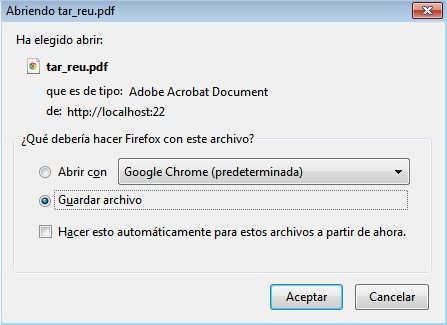
but Chrome directly save it to your computer.
Is it possible to make Chrome ask you what do you want to do with this file, placing some metadata into web response before sending the file to browser?
Answers:
Thank you for visiting the Q&A section on Magenaut. Please note that all the answers may not help you solve the issue immediately. So please treat them as advisements. If you found the post helpful (or not), leave a comment & I’ll get back to you as soon as possible.
Method 1
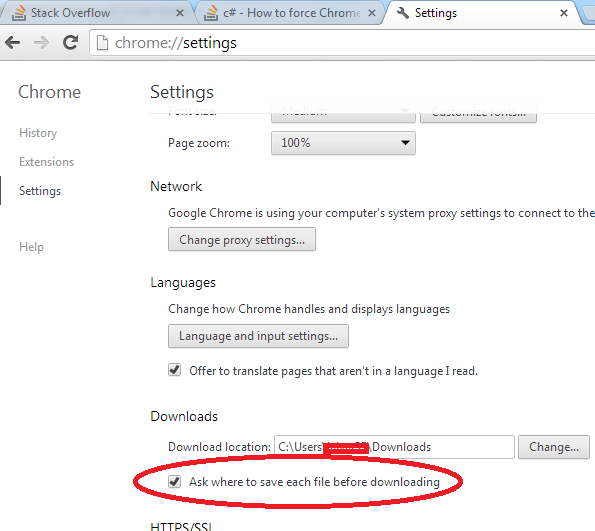
It isn’t possible to force Chrome to prompt the save dialog. The user has to change that behavior on chrome’s configuration (advanced settings).
Method 2
You need to send some headers so the browser knows how to handle the thing you are streaming like:
Response.ContentType
Content-Disposition, application,and
filename=" + FileName
which will force a download. Also refer this link for more information :
http://www.devtoolshed.com/aspnet-download-file-web-browser
Thanks
Method 3
maybe it will be helpful
System.String filePath = "c:\tempFile.pdf"
System.IO.FileInfo fileInfo = new FileInfo(filePath);

System.Web.HttpContext context = System.Web.HttpContext.Current;
System.Web.HttpResponse response = context.Response;
response.Clear();
response.ClearHeaders();
response.ClearContent();
response.ContentType = "application/pdf";
response.AppendHeader("content-type", "application/pdf");
response.AppendHeader("content-length", fileInfo.Length.ToString());
response.AppendHeader("content-disposition", String.Format("attachment; filename={0}.pdf", outputFileName));
response.TransmitFile(filePath);
response.Flush(); // this make stream and without it open chrome save dialog
context.ApplicationInstance.CompleteRequest(); // send headers and c# server-side code still continue

System.IO.File.Delete(filePath); // clean cache here if you need

response.End();
All methods was sourced from stackoverflow.com or stackexchange.com, is licensed under cc by-sa 2.5, cc by-sa 3.0 and cc by-sa 4.0