I got the following working after spinning my head around a thousand times and then referring parserrror SyntaxError: Unexpected token < – Load Partial View using jQuery Ajax in ASP.NET MVC 4
I have the following code in my ASP.Net 2.0 project. It works – but to get it to work, I am using dataType: "html". When I use JSON as datatype I get a parse error: Unexpected token <
How can we make it work with JSON?
Note: Though I am using IE8, some of my users are still using IE6. So I need a solution that works in IE6.
jQuery Ajax
   $.ajax({
            type: "GET",
            url: "admPlantParametersViewEdit.aspx/GetResult",
            contentType: "application/json; charset=utf-8",
            dataType: "html",
            success: function(msg)
            {
                alert("Hi");
            },
            error: errorFunction
        });
VB.Net
   <WebMethod()> _
    Public Shared Function GetResult() As String

        Return "hello"

    End Function
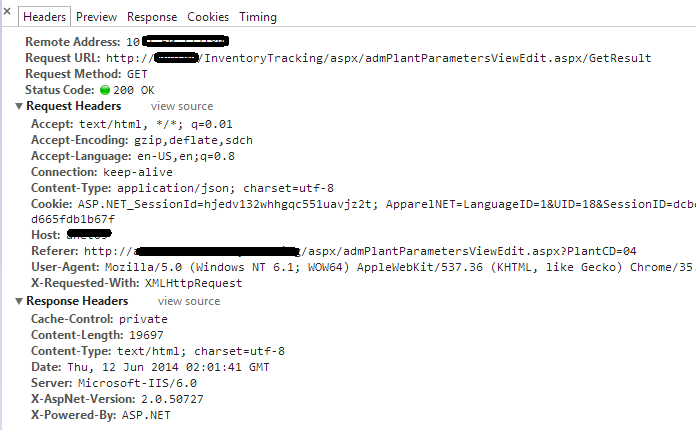
Request and Response Headers
References
- Differences between contentType and dataType in jQuery ajax function
- What is content-type and datatype in an AJAX request?
- How to return JSON from a 2.0 asmx web service
- ASP.NET AJAX PageMethods call load whole page for .NET 4.5 IIS 7.5
- Support cross-domain requests (specifically multiple methods in WebInvoke) in Rest WCF
- jQuery $.ajax(), $.post sending “OPTIONS” as REQUEST_METHOD in Firefox
- Cannot set content-type to ‘application/json’ in jQuery.ajax
Answers:
Thank you for visiting the Q&A section on Magenaut. Please note that all the answers may not help you solve the issue immediately. So please treat them as advisements. If you found the post helpful (or not), leave a comment & I’ll get back to you as soon as possible.
Method 1
in request you need to set Accept: application/json ,the if you server has json support then it will send response in json automatically,
        type: "GET",
        url: "admPlantParametersViewEdit.aspx/GetResult",
        contentType: "application/json; charset=utf-8",
        Accept: application/json,
then in response header you should see
content-type:application/json
not
content-type:text/html
Method 2
I figured it out after referring following two posts
encosia – ASP.NET web services mistake: manual JSON serialization
encosia – ASMX ScriptService mistake: Installation and configuration
Since you’re using .NET 2.0, the most likely culprit is that you’ve got the AJAX Extensions installed, but haven’t updated your web.config to use that new handler for ASMX requests.
STEPS TO SOLVE:
-
Download ASP.NET AJAX 1.0 and install it, if not done already
http://www.microsoft.com/en-us/download/details.aspx?id=883 -
Add proper httpHandler after removing the existing one as shown below [This configuration is for .Net 2.0 only. Refer the blog mentioned above for other versions]
   <httpHandlers>

    <remove verb="*" path="*.asmx"/>

    <add verb="*" path="*.asmx" validate="false"
         type="System.Web.Script.Services.ScriptHandlerFactory,
         System.Web.Extensions, Version=1.0.61025.0,
                     Culture=neutral, PublicKeyToken=31bf3856ad364e35"/>

</httpHandlers>
As
  <httpModules>
    <add name="ScriptModule" type="System.Web.Handlers.ScriptModule, System.Web.Extensions, Version=1.0.61025.0, Culture=neutral, PublicKeyToken=31bf3856ad364e35"/>
  </httpModules>
and
      <assemblies>
            <add assembly="System.Web.Extensions, Version=1.0.61025.0, Culture=neutral, PublicKeyToken=31BF3856AD364E35"/>
            <add assembly="System.Web.Extensions.Design, Version=1.0.61025.0, Culture=neutral, PublicKeyToken=31BF3856AD364E35"/>
        </assemblies>
.4. Made it as POST and json
  $.ajax({
            type: "POST",
            url: "admPlantParametersViewEdit.aspx/GetResult",
            contentType: "application/json; charset=utf-8",
            dataType: "json",
            success: function(msg)
            {
                alert(msg.d);
                alert(msg);
            },
            error: errorFunction
        });
This answer won’t be complete without quoting the following lines from encosia
The ability for ASMX services to return raw JSON is made possible by two key features originally added by the ASP.NET AJAX Extensions v1.0
- JavaScriptSerializer
- ScriptHandlerFactory
Good Reads
- Scott Gu’s – JSON Hijacking and How ASP.NET AJAX 1.0 Avoids these Attacks
- A breaking change between versions of ASP.NET AJAX
- ajax jQuery asp.net error Unexpected token <
- ASMX ScriptService mistake: Installation and configuration
- Using JSON.NET with ASP.NET Web API
- jQuery, ASP.NET Web API, and Json.NET walk into a bar…
- Deployment problems with ASP.NET AJAX applications
All methods was sourced from stackoverflow.com or stackexchange.com, is licensed under cc by-sa 2.5, cc by-sa 3.0 and cc by-sa 4.0