I have an asp.net website and a windows form application.
My Webservice’s Location is : http://localhost:12312/MyWebSiteFolder/WSFile.asmx
Problem is : the port number keeps changing, if I reopen the solution, its going to change to something else:
http://localhost:11122/MyWebSiteFolder/WSFile.asmx
Is there a way so I won’t have to update the location of the file in my windows form application everytime I reopen the website’s solution?
Answers:
Thank you for visiting the Q&A section on Magenaut. Please note that all the answers may not help you solve the issue immediately. So please treat them as advisements. If you found the post helpful (or not), leave a comment & I’ll get back to you as soon as possible.
Method 1
(assuming Visual Studio 2010)
Under the Web tab of the properties for the project, change the “Auto-assign Port” option to “Specific port” and enter the port you want to always use.
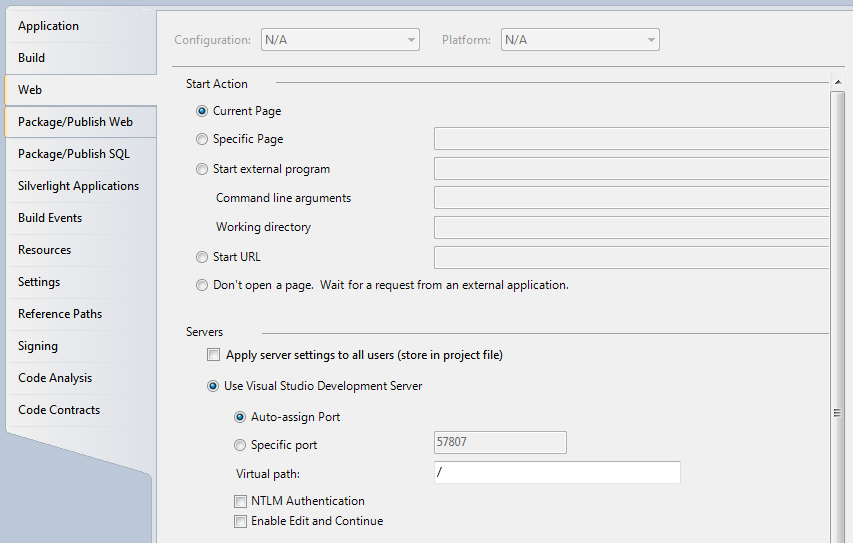
Alternately, if possible, you can choose the option to use your local IIS server.
Update:
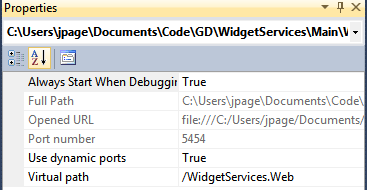
If you’re using a “Web Site” project instead of “Web Application,” the setting is located in the properties window of the project instead of the properties dialog. Note the “Use dynamic ports” option here:
Method 2
How does your web application look on the Solution explorer – does it show
<drive>:<some directory>
or
does it show the name of your web application with no path.
or
does it show http:/// <something>
In case 1 you should be able to see properties. But you wont get it for the rest
All methods was sourced from stackoverflow.com or stackexchange.com, is licensed under cc by-sa 2.5, cc by-sa 3.0 and cc by-sa 4.0