I’m working with Selenium in Python. I would like to get the .val() of a <select> element and check that it is what I expect.
This is my code:
def test_chart_renders_from_url(self):
    url = 'http://localhost:8000/analyse/'
    self.browser.get(url)
    org = driver.find_element_by_id('org')
    # Find the value of org?
How can I do this? The Selenium docs seem to have plenty about selecting elements but nothing about attributes.
Answers:
Thank you for visiting the Q&A section on Magenaut. Please note that all the answers may not help you solve the issue immediately. So please treat them as advisements. If you found the post helpful (or not), leave a comment & I’ll get back to you as soon as possible.
Method 1
You are probably looking for get_attribute(). An example is shown here as well
def test_chart_renders_from_url(self):
    url = 'http://localhost:8000/analyse/'
    self.browser.get(url)
    org = driver.find_element_by_id('org')
    # Find the value of org?
    val = org.get_attribute("attribute name")
Method 2
Python
element.get_attribute("attribute name")
Java
element.getAttribute("attribute name")
Ruby*
element.attribute("attribute name")
C#
element.GetAttribute("attribute name");
Method 3
As the recent developed Web Applications are using JavaScript, jQuery, AngularJS, ReactJS etc there is a possibility that to retrieve an attribute of an element through Selenium you have to induce WebDriverWait to synchronize the WebDriver instance with the lagging Web Client i.e. the Web Browser before trying to retrieve any of the attributes.
Some examples:
- Python:
-
To retrieve any attribute from a visible element (e.g.
<h1>tag) you need to use the expected_conditions as visibility_of_element_located(locator) as follows:attribute_value = WebDriverWait(driver, 20).until(EC.visibility_of_element_located((By.ID, "org"))).get_attribute("attribute_name") -
To retrieve any attribute from an interactive element (e.g.
<input>tag) you need to use the expected_conditions as element_to_be_clickable(locator) as follows:attribute_value = WebDriverWait(driver, 20).until(EC.element_to_be_clickable((By.ID, "org"))).get_attribute("attribute_name")
-
To retrieve any attribute from a visible element (e.g.
HTML Attributes
Below is a list of some attributes often used in HTML
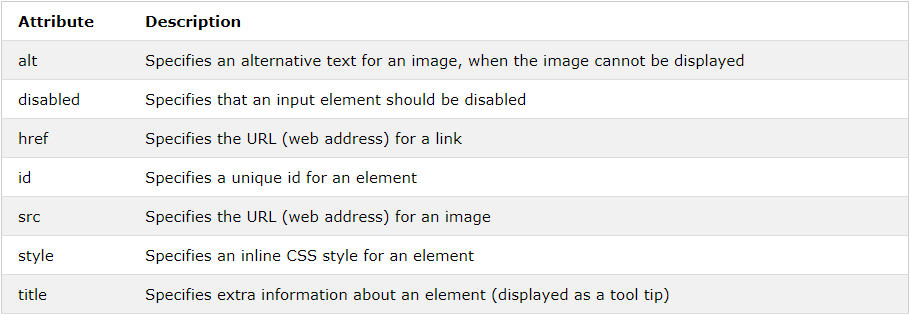
Note: A complete list of all attributes for each HTML element, is listed in: HTML Attribute Reference
All methods was sourced from stackoverflow.com or stackexchange.com, is licensed under cc by-sa 2.5, cc by-sa 3.0 and cc by-sa 4.0