I’ve been writing some class and functions to modify the path of thumbnails. I extended the original WP_Image_Editor class to achieve custom structure.
What i want: to store the thumbnails in different folders based on their slugs, in the upload directory. such as : http://example.com/uploads/medium/image.jpg
What i have already done:
class WP_Image_Editor_Custom extends WP_Image_Editor_GD {
    public function generate_filename($prefix = NULL, $dest_path = NULL, $extension = NULL) {
        global $current_size_slug;
        // If empty, generate a prefix with the parent method get_suffix().
        if(!$prefix)
            $prefix = $this->get_suffix();

        // Determine extension and directory based on file path.
        $info = pathinfo($this->file);
        $dir  = ABSPATH."/media/";
        $ext  = $info['extension'];

        // Determine image name.
        $name = wp_basename($this->file, ".$ext");

        // Allow extension to be changed via method argument.
        $new_ext = strtolower($extension ? $extension : $ext);

        // Default to $_dest_path if method argument is not set or invalid.
        if(!is_null($dest_path) && $_dest_path = realpath($dest_path))
            $dir = $_dest_path;

        // Return our new prefixed filename.
        $slug = $current_size_slug;
        return trailingslashit($dir)."{$slug}/{$name}.{$new_ext}";
    }
    function multi_resize($sizes) {
        $sizes = parent::multi_resize($sizes);
        foreach($sizes as $slug => $data)
            $sizes[$slug]['file'] = $slug."/".$data['file'];
            $current_size_slug = $slug;
        return $sizes;
    }
}
When i upload the image, the thumbnails are created properly, however the filenames are not. The $slug value is not passed from multi_resize() to generate_filename.
I tried to write the multi_resize() function as below:
class WP_Image_Editor_Custom extends WP_Image_Editor_GD {
    public function generate_filename($prefix = NULL, $dest_path = NULL, $extension = NULL) {
        global $current_size_slug;
        // If empty, generate a prefix with the parent method get_suffix().
        if(!$prefix)
            $prefix = $this->get_suffix();

        // Determine extension and directory based on file path.
        $info = pathinfo($this->file);
        $dir  = ABSPATH."/media/";
        $ext  = $info['extension'];

        // Determine image name.
        $name = wp_basename($this->file, ".$ext");

        // Allow extension to be changed via method argument.
        $new_ext = strtolower($extension ? $extension : $ext);

        // Default to $_dest_path if method argument is not set or invalid.
        if(!is_null($dest_path) && $_dest_path = realpath($dest_path))
            $dir = $_dest_path;

        // Return our new prefixed filename.
        $slug = $current_size_slug;
        return trailingslashit($dir)."{$slug}/{$name}.{$new_ext}";
    }
    function multi_resize($sizes) {
        $sizes = parent::multi_resize($sizes);
        foreach($sizes as $slug => $data)
            $sizes[$slug]['file'] = $slug."/".$data['file'];
            $current_size_slug = $slug;
        return $sizes;
    }
}
Now the $slug is passed to generate_filename() but the thumbnails are all generated in uploads folder, overwriting each other. How can i do this?
I’m clueless here, any help is appreciated.
Answers:
Thank you for visiting the Q&A section on Magenaut. Please note that all the answers may not help you solve the issue immediately. So please treat them as advisements. If you found the post helpful (or not), leave a comment & I’ll get back to you as soon as possible.
Method 1
Try adding this to functions.php:
add_filter("wp_image_editors", "my_wp_image_editors");

function my_wp_image_editors($editors) {
    array_unshift($editors, "WP_Image_Editor_Custom");
    return $editors;
}

// Include the existing classes first in order to extend them.
require_once ABSPATH . WPINC . "/class-wp-image-editor.php";
require_once ABSPATH . WPINC . "/class-wp-image-editor-gd.php";

class WP_Image_Editor_Custom extends WP_Image_Editor_GD {

    public function generate_filename($suffix = null, $dest_path = null, $extension = null) {
        // $suffix will be appended to the destination filename, just before the extension
        if (!$suffix) {
            $suffix = $this->get_suffix();
        }

        $dir = pathinfo($this->file, PATHINFO_DIRNAME);
        $ext = pathinfo($this->file, PATHINFO_EXTENSION);

        $name = wp_basename($this->file, ".$ext");
        $new_ext = strtolower($extension ? $extension : $ext );

        if (!is_null($dest_path) && $_dest_path = realpath($dest_path)) {
            $dir = $_dest_path;
        }
        //we get the dimensions using explode, we could have used the properties of $this->file[height] but the suffix could have been provided
        $size_from_suffix = explode("x", $suffix);
        //we get the slug_name for this dimension
        $slug_name = $this->get_slug_by_size($size_from_suffix[0], $size_from_suffix[1]);

        return trailingslashit($dir) . "{$slug_name}/{$name}.{$new_ext}";
    }

    function multi_resize($sizes) {
        $sizes = parent::multi_resize($sizes);

        //we add the slug to the file path
        foreach ($sizes as $slug => $data) {
            $sizes[$slug]['file'] = $slug . "/" . $data['file'];
        }

        return $sizes;
    }

    function get_slug_by_size($width, $height) {

        // Make thumbnails and other intermediate sizes.
        $_wp_additional_image_sizes = wp_get_additional_image_sizes();

        $image_sizes = array(); //all sizes the default ones and the custom ones in one array
        foreach (get_intermediate_image_sizes() as $s) {
            $image_sizes[$s] = array('width' => '', 'height' => '', 'crop' => false);
            if (isset($_wp_additional_image_sizes[$s]['width'])) {
                // For theme-added sizes
                $image_sizes[$s]['width'] = intval($_wp_additional_image_sizes[$s]['width']);
            } else {
                // For default sizes set in options
                $image_sizes[$s]['width'] = get_option("{$s}_size_w");
            }

            if (isset($_wp_additional_image_sizes[$s]['height'])) {
                // For theme-added sizes
                $image_sizes[$s]['height'] = intval($_wp_additional_image_sizes[$s]['height']);
            } else {
                // For default sizes set in options
                $image_sizes[$s]['height'] = get_option("{$s}_size_h");
            }

            if (isset($_wp_additional_image_sizes[$s]['crop'])) {
                // For theme-added sizes
                $image_sizes[$s]['crop'] = $_wp_additional_image_sizes[$s]['crop'];
            } else {
                // For default sizes set in options
                $image_sizes[$s]['crop'] = get_option("{$s}_crop");
            }
        }
        $slug_name = ""; //the slug name

        if($width >= $height){
          foreach ($image_sizes as $slug => $data) { //we start checking
            if ($data['width'] == $width) {//we use only width because regardless of the height, the width is the one used for resizing in all cases with crop 1 or 0
                $slug_name = $slug;
            }
            /*
             * There could be custom added image sizes that have the same width as one of the defaults so we also use height here
             * if there are several image sizes with the same width all of them will override the previous one leaving the last one, here we get also the last one
             * since is looping the entire list, the height is used as a max value for non-hard cropped sizes
             *  */
              if ($data['width'] == $width && $data['height'] == $height) {
                  $slug_name = $slug;
              }
          }
         }else{
           foreach ($image_sizes as $slug => $data) {
              if ($data['height'] == $height) {
                  $slug_name = $slug;
              }
              if ($data['height'] == $height && $data['width'] == $width ) {
                  $slug_name = $slug;
              }
            }
         }
        return $slug_name;
    }
}
i know you already know almost all of this code, notice that the generate_filename function has been updated to the current one, you will be more interested in the get_slug_by_size function which is the key part that you were missing.
This is also working with custom image sizes, as can be seen here:
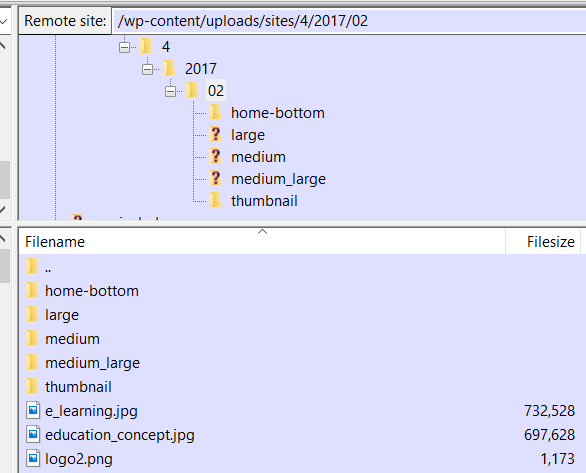
home-bottom is a image size i added. Right now wordpress has 4 different default image sizes:
    Array
    (
        [thumbnail] => Array // Thumbnail (150 x 150 hard cropped)
            (
                [width] => 150
                [height] => 150
                [crop] => 1
            )

        [medium] => Array // Medium resolution (300 x 300 max height 300px)
            (
                [width] => 300
                [height] => 300
                [crop] =>
            )

        [medium_large] => Array //Medium Large (added in WP 4.4) resolution (768 x 0 infinite height)
            (
                [width] => 768
                [height] => 0
                [crop] =>
            )

        [large] => Array // Large resolution (1024 x 1024 max height 1024px)
            (
                [width] => 1024
                [height] => 1024
                [crop] =>
            )

    )
// Full resolution (original size uploaded) this one is not in the array.
if you upload an image of width 310 only thumbnail and medium images would be created WordPress will not create bigger ones, so with the code above, only 2 folders will be created.
Method 2
A code sample explaining its use case will be more helpful.
Not sure how you’re going to use it, but to simply access all the slugs inside $sizes you can use this.
The multi_resize() gets its ‘sizes’ as a parameter, which is provided to it by wp_generate_attachment_metadata() here. A simple approach to get the sizes array will be to store it in a class property. Such as
Add this before all functions.
public $current_size_slug = '';
This is generate_filename() function with necessary modifications and comments to help you understand how it works:
public function generate_filename( $prefix = null, $dest_path = null, $extension = null ) {
// <-- Now we have the current thumbnail slug.-->
$slug = $this->current_size_slug;
// If empty, generate a prefix with the parent method get_suffix().
if ( ! $prefix ) {
    $prefix = $this->get_suffix();
}

// Determine extension and directory based on file path.
$info = pathinfo( $this->file );
$dir  = $info['dirname'];
$ext  = $info['extension'];

// Determine image name.
$name = wp_basename( $this->file, ".$ext" );

// Allow extension to be changed via method argument.
$new_ext = strtolower( $extension ? $extension : $ext );

// Default to $_dest_path if method argument is not set or invalid.
if ( ! is_null( $dest_path ) && $_dest_path = realpath( $dest_path ) ) {
    $dir = $_dest_path;
}

// Return our new prefixed filename.
// <-- Replaced prefix with slug. -->
return trailingslashit( $dir ) . "{$slug}/{$name}.{$new_ext}";

}
This multi_resize() function which actually sets the $current_size_slug before calling _save()
function multi_resize( $sizes ) {
$metadata  = array();
$orig_size = $this->size;

foreach ( $sizes as $size => $size_data ) {
    if ( ! isset( $size_data['width'] ) && ! isset( $size_data['height'] ) ) {
        continue;
    }

    if ( ! isset( $size_data['width'] ) ) {
        $size_data['width'] = null;
    }
    if ( ! isset( $size_data['height'] ) ) {
        $size_data['height'] = null;
    }

    if ( ! isset( $size_data['crop'] ) ) {
        $size_data['crop'] = false;
    }

    $image     = $this->_resize( $size_data['width'], $size_data['height'], $size_data['crop'] );
    $duplicate = ( ( $orig_size['width'] == $size_data['width'] ) && ( $orig_size['height'] == $size_data['height'] ) );

    if ( ! is_wp_error( $image ) && ! $duplicate ) {
        // We set the current slug before calling the save function.
        $this->current_size_slug = $size;

        $resized = $this->_save( $image );

        imagedestroy( $image );

        if ( ! is_wp_error( $resized ) && $resized ) {
            unset( $resized['path'] );
            $metadata[ $size ] = $resized;
        }
    }

    $this->size = $orig_size;
}

return $metadata;
}
The _save() function actually saves the file on the server, to do so it calls the generate_filename(). I hope this answers your question.
Please consider hiring a developer for custom jobs like these if you’re not comfortable with PHP and WordPress
Do Not Copy and Paste code unless you know what you’re doing.
All methods was sourced from stackoverflow.com or stackexchange.com, is licensed under cc by-sa 2.5, cc by-sa 3.0 and cc by-sa 4.0