I have a pandas data frame df like:
a b
A 1
A 2
B 5
B 5
B 4
C 6
I want to group by the first column and get second column as lists in rows:
A [1,2]
B [5,5,4]
C [6]
Is it possible to do something like this using pandas groupby?
Answers:
Thank you for visiting the Q&A section on Magenaut. Please note that all the answers may not help you solve the issue immediately. So please treat them as advisements. If you found the post helpful (or not), leave a comment & I’ll get back to you as soon as possible.
Method 1
You can do this using groupby to group on the column of interest and then apply list to every group:
In [1]: df = pd.DataFrame( {'a':['A','A','B','B','B','C'], 'b':[1,2,5,5,4,6]})
        df

Out[1]:
   a  b
0  A  1
1  A  2
2  B  5
3  B  5
4  B  4
5  C  6

In [2]: df.groupby('a')['b'].apply(list)
Out[2]:
a
A       [1, 2]
B    [5, 5, 4]
C          [6]
Name: b, dtype: object

In [3]: df1 = df.groupby('a')['b'].apply(list).reset_index(name='new')
        df1
Out[3]:
   a        new
0  A     [1, 2]
1  B  [5, 5, 4]
2  C        [6]
Method 2
A handy way to achieve this would be:
df.groupby('a').agg({'b':lambda x: list(x)})
Look into writing Custom Aggregations: https://www.kaggle.com/akshaysehgal/how-to-group-by-aggregate-using-py
Method 3
If performance is important go down to numpy level:
import numpy as np

df = pd.DataFrame({'a': np.random.randint(0, 60, 600), 'b': [1, 2, 5, 5, 4, 6]*100})

def f(df):
         keys, values = df.sort_values('a').values.T
         ukeys, index = np.unique(keys, True)
         arrays = np.split(values, index[1:])
         df2 = pd.DataFrame({'a':ukeys, 'b':[list(a) for a in arrays]})
         return df2
Tests:
In [301]: %timeit f(df)
1000 loops, best of 3: 1.64 ms per loop

In [302]: %timeit df.groupby('a')['b'].apply(list)
100 loops, best of 3: 5.26 ms per loop
Method 4
To solve this for several columns of a dataframe:
In [5]: df = pd.DataFrame( {'a':['A','A','B','B','B','C'], 'b':[1,2,5,5,4,6],'c'
   ...: :[3,3,3,4,4,4]})

In [6]: df
Out[6]:
   a  b  c
0  A  1  3
1  A  2  3
2  B  5  3
3  B  5  4
4  B  4  4
5  C  6  4

In [7]: df.groupby('a').agg(lambda x: list(x))
Out[7]:
           b          c
a
A     [1, 2]     [3, 3]
B  [5, 5, 4]  [3, 4, 4]
C        [6]        [4]
This answer was inspired from Anamika Modi‘s answer. Thank you!
Method 5
Use any of the following groupby and agg recipes.
# Setup
df = pd.DataFrame({
  'a': ['A', 'A', 'B', 'B', 'B', 'C'],
  'b': [1, 2, 5, 5, 4, 6],
  'c': ['x', 'y', 'z', 'x', 'y', 'z']
})
df

   a  b  c
0  A  1  x
1  A  2  y
2  B  5  z
3  B  5  x
4  B  4  y
5  C  6  z
To aggregate multiple columns as lists, use any of the following:
df.groupby('a').agg(list)
df.groupby('a').agg(pd.Series.tolist)

           b          c
a
A     [1, 2]     [x, y]
B  [5, 5, 4]  [z, x, y]
C        [6]        [z]
To group-listify a single column only, convert the groupby to a SeriesGroupBy object, then call SeriesGroupBy.agg. Use,
df.groupby('a').agg({'b': list})  # 4.42 ms
df.groupby('a')['b'].agg(list)    # 2.76 ms - faster

a
A       [1, 2]
B    [5, 5, 4]
C          [6]
Name: b, dtype: object
Method 6
As you were saying the groupby method of a pd.DataFrame object can do the job.
Example
 L = ['A','A','B','B','B','C']
 N = [1,2,5,5,4,6]

 import pandas as pd
 df = pd.DataFrame(zip(L,N),columns = list('LN'))


 groups = df.groupby(df.L)

 groups.groups
      {'A': [0, 1], 'B': [2, 3, 4], 'C': [5]}
which gives and index-wise description of the groups.
To get elements of single groups, you can do, for instance
 groups.get_group('A')

     L  N
  0  A  1
  1  A  2

  groups.get_group('B')

     L  N
  2  B  5
  3  B  5
  4  B  4
Method 7
It is time to use agg instead of apply .
When
df = pd.DataFrame( {'a':['A','A','B','B','B','C'], 'b':[1,2,5,5,4,6], 'c': [1,2,5,5,4,6]})
If you want multiple columns stack into list , result in pd.DataFrame
df.groupby('a')[['b', 'c']].agg(list)
# or
df.groupby('a').agg(list)
If you want single column in list, result in ps.Series
df.groupby('a')['b'].agg(list)
#or
df.groupby('a')['b'].apply(list)
Note, result in pd.DataFrame is about 10x slower than result in ps.Series when you only aggregate single column, use it in multicolumns case .
Method 8
Just a suplyment. pandas.pivot_table is much more universal and seems more convenient:
"""data"""
df = pd.DataFrame( {'a':['A','A','B','B','B','C'],
                    'b':[1,2,5,5,4,6],
                    'c':[1,2,1,1,1,6]})
print(df)

   a  b  c
0  A  1  1
1  A  2  2
2  B  5  1
3  B  5  1
4  B  4  1
5  C  6  6
"""pivot_table"""
pt = pd.pivot_table(df,
                    values=['b', 'c'],
                    index='a',
                    aggfunc={'b': list,
                             'c': set})
print(pt)
           b       c
a
A     [1, 2]  {1, 2}
B  [5, 5, 4]     {1}
C        [6]     {6}
Method 9
If looking for a unique list while grouping multiple columns this could probably help:
df.groupby('a').agg(lambda x: list(set(x))).reset_index()
Method 10
The easiest way I have found to achieve the same thing, at least for one column, which is similar to Anamika’s answer, just with the tuple syntax for the aggregate function.
df.groupby('a').agg(b=('b','unique'), c=('c','unique'))
Method 11
Building upon @B.M answer, here is a more general version and updated to work with newer library version: (numpy version 1.19.2, pandas version 1.2.1)
And this solution can also deal with multi-indices:
However this is not heavily tested, use with caution.
If performance is important go down to numpy level:
import pandas as pd
import numpy as np

np.random.seed(0)
df = pd.DataFrame({'a': np.random.randint(0, 10, 90), 'b': [1,2,3]*30, 'c':list('abcefghij')*10, 'd': list('hij')*30})


def f_multi(df,col_names):
    if not isinstance(col_names,list):
        col_names = [col_names]

    values = df.sort_values(col_names).values.T

    col_idcs = [df.columns.get_loc(cn) for cn in col_names]
    other_col_names = [name for idx, name in enumerate(df.columns) if idx not in col_idcs]
    other_col_idcs = [df.columns.get_loc(cn) for cn in other_col_names]

    # split df into indexing colums(=keys) and data colums(=vals)
    keys = values[col_idcs,:]
    vals = values[other_col_idcs,:]

    # list of tuple of key pairs
    multikeys = list(zip(*keys))

    # remember unique key pairs and ther indices
    ukeys, index = np.unique(multikeys, return_index=True, axis=0)

    # split data columns according to those indices
    arrays = np.split(vals, index[1:], axis=1)

    # resulting list of subarrays has same number of subarrays as unique key pairs
    # each subarray has the following shape:
    #    rows = number of non-grouped data columns
    #    cols = number of data points grouped into that unique key pair

    # prepare multi index
    idx = pd.MultiIndex.from_arrays(ukeys.T, names=col_names)

    list_agg_vals = dict()
    for tup in zip(*arrays, other_col_names):
        col_vals = tup[:-1] # first entries are the subarrays from above
        col_name = tup[-1]  # last entry is data-column name

        list_agg_vals[col_name] = col_vals

    df2 = pd.DataFrame(data=list_agg_vals, index=idx)
    return df2
Tests:
In [227]: %timeit f_multi(df, ['a','d'])

2.54 ms ± 64.7 µs per loop (mean ± std. dev. of 7 runs, 100 loops each)

In [228]: %timeit df.groupby(['a','d']).agg(list)

4.56 ms ± 61.5 µs per loop (mean ± std. dev. of 7 runs, 100 loops each)
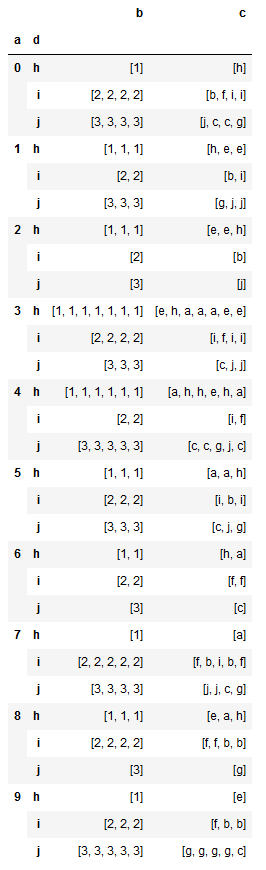
Results:
for the random seed 0 one would get:
Method 12
Let us using df.groupby with list and Series constructor
pd.Series({x : y.b.tolist() for x , y in df.groupby('a')})
Out[664]:
A       [1, 2]
B    [5, 5, 4]
C          [6]
dtype: object
Method 13
Here I have grouped elements with “|” as a separator
    import pandas as pd

    df = pd.read_csv('input.csv')

    df
    Out[1]:
      Area  Keywords
    0  A  1
    1  A  2
    2  B  5
    3  B  5
    4  B  4
    5  C  6

    df.dropna(inplace =  True)
    df['Area']=df['Area'].apply(lambda x:x.lower().strip())
    print df.columns
    df_op = df.groupby('Area').agg({"Keywords":lambda x : "|".join(x)})

    df_op.to_csv('output.csv')
    Out[2]:
    df_op
    Area  Keywords

    A       [1| 2]
    B    [5| 5| 4]
    C          [6]
Method 14
Answer based on @EdChum’s comment on his answer. Comment is this –
groupby is notoriously slow and memory hungry, what you could do is sort by column A, then find the idxmin and idxmax (probably store this in a dict) and use this to slice your dataframe would be faster I think
Let’s first create a dataframe with 500k categories in first column and total df shape 20 million as mentioned in question.
df = pd.DataFrame(columns=['a', 'b'])
df['a'] = (np.random.randint(low=0, high=500000, size=(20000000,))).astype(str)
df['b'] = list(range(20000000))
print(df.shape)
df.head()
# Sort data by first column
df.sort_values(by=['a'], ascending=True, inplace=True)
df.reset_index(drop=True, inplace=True)

# Create a temp column
df['temp_idx'] = list(range(df.shape[0]))

# Take all values of b in a separate list
all_values_b = list(df.b.values)
print(len(all_values_b))
# For each category in column a, find min and max indexes
gp_df = df.groupby(['a']).agg({'temp_idx': [np.min, np.max]})
gp_df.reset_index(inplace=True)
gp_df.columns = ['a', 'temp_idx_min', 'temp_idx_max']

# Now create final list_b column, using min and max indexes for each category of a and filtering list of b.
gp_df['list_b'] = gp_df[['temp_idx_min', 'temp_idx_max']].apply(lambda x: all_values_b[x[0]:x[1]+1], axis=1)

print(gp_df.shape)
gp_df.head()
This above code takes 2 minutes for 20 million rows and 500k categories in first column.
Method 15
Sorting consumes O(nlog(n)) time which is the most time consuming operation in the solutions suggested above
For a simple solution (containing single column) pd.Series.to_list would work and can be considered more efficient unless considering other frameworks
e.g.
import pandas as pd
from string import ascii_lowercase
import random

def generate_string(case=4):
    return ''.join([random.choice(ascii_lowercase) for _ in range(case)])

df = pd.DataFrame({'num_val':[random.randint(0,100) for _ in range(20000000)],'string_val':[generate_string() for _ in range(20000000)]})


%timeit df.groupby('string_val').agg({'num_val':pd.Series.to_list})
For 20 million records it takes about 17.2 seconds. compared to apply(list) which takes about 19.2 and lambda function which takes about 20.6s
All methods was sourced from stackoverflow.com or stackexchange.com, is licensed under cc by-sa 2.5, cc by-sa 3.0 and cc by-sa 4.0