When plotting a graph with a discontinuity/asymptote/singularity/whatever, is there any automatic way to prevent Matplotlib from ‘joining the dots’ across the ‘break’? (please see code/image below).
I read that Sage has a [detect_poles] facility that looked good, but I really want it to work with Matplotlib.
import matplotlib.pyplot as plt
import numpy as np
from sympy import sympify, lambdify
from sympy.abc import x

fig = plt.figure(1)
ax = fig.add_subplot(111)

# set up axis
ax.spines['left'].set_position('zero')
ax.spines['right'].set_color('none')
ax.spines['bottom'].set_position('zero')
ax.spines['top'].set_color('none')
ax.xaxis.set_ticks_position('bottom')
ax.yaxis.set_ticks_position('left')

# setup x and y ranges and precision
xx = np.arange(-0.5,5.5,0.01)

# draw my curve
myfunction=sympify(1/(x-2))
mylambdifiedfunction=lambdify(x,myfunction,'numpy')
ax.plot(xx, mylambdifiedfunction(xx),zorder=100,linewidth=3,color='red')

#set bounds
ax.set_xbound(-1,6)
ax.set_ybound(-4,4)

plt.show()
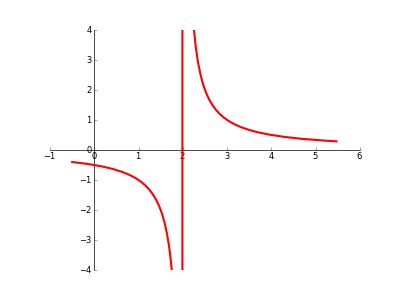
Answers:
Thank you for visiting the Q&A section on Magenaut. Please note that all the answers may not help you solve the issue immediately. So please treat them as advisements. If you found the post helpful (or not), leave a comment & I’ll get back to you as soon as possible.
Method 1
By using masked arrays you can avoid plotting selected regions of a curve.
To remove the singularity at x=2:
import matplotlib.numerix.ma as M    # for older versions, prior to .98
#import numpy.ma as M                # for newer versions of matplotlib
from pylab import *

figure()

xx = np.arange(-0.5,5.5,0.01)
vals = 1/(xx-2)
vals = M.array(vals)
mvals = M.masked_where(xx==2, vals)

subplot(121)
plot(xx, mvals, linewidth=3, color='red')
xlim(-1,6)
ylim(-5,5)
This simple curve might be a bit more clear on which points are excluded:
xx = np.arange(0,6,.2)
vals = M.array(xx)
mvals = M.masked_where(vals%2==0, vals)
subplot(122)
plot(xx, mvals, color='b', linewidth=3)
plot(xx, vals, 'rx')
show()
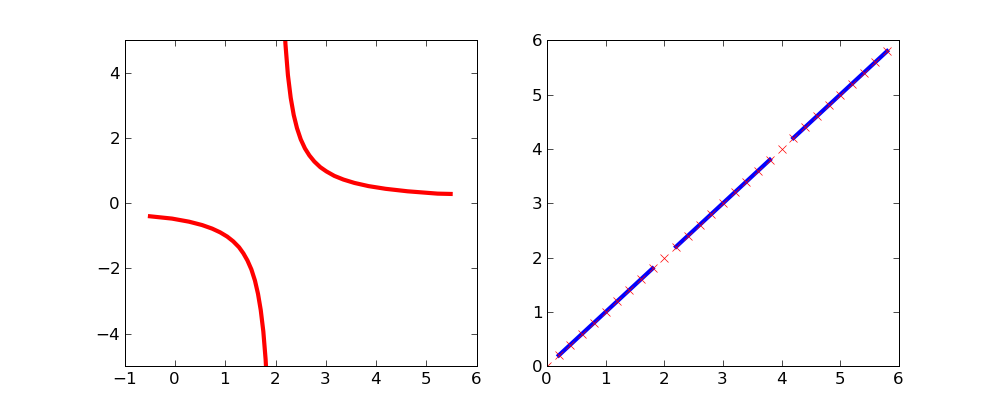
Method 2
This may not be the elegant solution you are looking for, but if just want results for most cases, you can “clip” large and small values of your plotted data to +∞ and -∞ respectively. Matplotlib does not plot these. Of course you have to be careful not to make your resolution too low or your clipping threshold too high.
utol = 100.
ltol = -100.
yy = 1/(xx-2)
yy[yy>utol] = np.inf
yy[yy<ltol] = -np.inf

ax.plot(xx, yy, zorder=100, linewidth=3, color='red')
Method 3
No, I think there is no built-in way to tell matplotlib to ignore these
points. After all, it just connects points and knows nothing about functions
or what happens in between the points.
However, you can use sympy to find the poles, and then patch the continuous pieces of your function together. Here some admittedly ugly code that does exactly that:
from pylab import *
from sympy import solve
from sympy.abc import x
from sympy.functions.elementary.complexes import im

xmin = -0.5
xmax = 5.5
xstep = 0.01

# solve for 1/f(x)=0 -- we will have poles there
discontinuities = sort(solve(1/(1/(x-2)),x))

# pieces from xmin to last discontinuity
last_b = xmin
for b in discontinuities:
    # check that this discontinuity is inside our range, also make sure it's real
    if b<last_b or b>xmax or im(b):
      continue
    xi = np.arange(last_b, b, xstep)
    plot(xi, 1./(xi-2),'r-')
    last_b = b

# from last discontinuity to xmax
xi = np.arange(last_b, xmax, xstep)
plot(xi, 1./(xi-2),'r-')

xlim(xmin, xmax)
ylim(-4,4)
show()
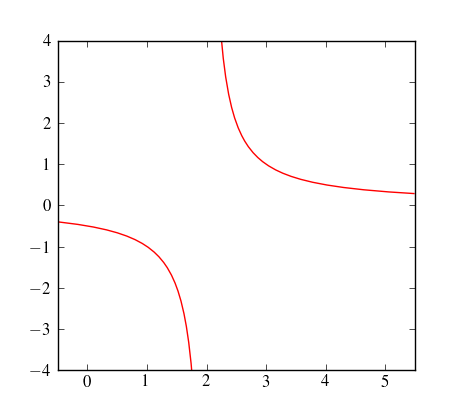
Method 4
Had the same issue.
The solution for me was to separate X into two different intervals: one before and the other after the singularity. The plot separate curves on the same plot.
All methods was sourced from stackoverflow.com or stackexchange.com, is licensed under cc by-sa 2.5, cc by-sa 3.0 and cc by-sa 4.0