In our Dynamics CRM online custom project – we’ve the default ACTIVITIES tab in a custom entity named DocProject‘s form
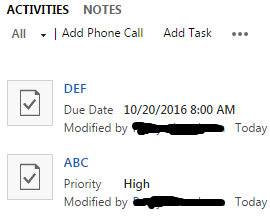
ACTIVITIES is able to take multiple entries.
Also, there is NOTES tab in the same form
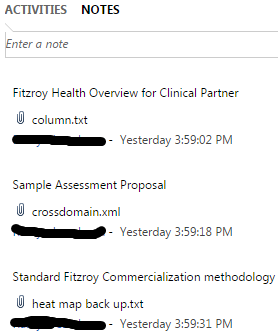
NOTES is also able to take multiple entries.
Okey, this is done by Dynamics CRM guys. So far so good.
In the same form, we also have a DocProjectActivities lookup field for a custom entity DocProjectActivities

This is a lookup field, hence it has got a 1:N relationship.
Clarification: Our problem is not only about Activities. WKT Notes also behaves similarly. We just need some
configwhich will allow us to make multiple entries for one single field
Problem:
How do one makes sure that this custom entity
DocProjectActivitiesallows to make multiple entries as that for ACTIVITIES & NOTES?
Answers:
Thank you for visiting the Q&A section on Magenaut. Please note that all the answers may not help you solve the issue immediately. So please treat them as advisements. If you found the post helpful (or not), leave a comment & I’ll get back to you as soon as possible.
Method 1
In order to have the associated activity grid like the one in the DocProject entity, you need to enable the option Activities when you’re creating the entity (this option can’t be changed after the entity is created). This option will create the association with the activities entities and allow you to track all the related phone calls, task, etc.
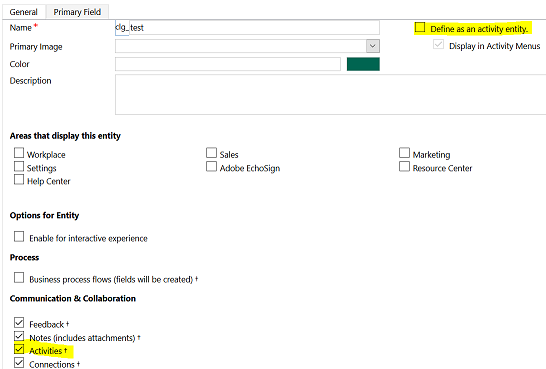
I think that the problem that you’re having is that you defined the DocProjectActivities as an activity entity and therefore you can’t have this kind of relationship with the other activities entities. I recommend you to take a look to the differences between Entities and Activity Entities.
Method 2
Do you mean you need multiple docprojectactivities on the form where you have the activities?
You need to create a 1:n relationship between the form and the docprojectactivities and add the subgrid on that form allowing you to create multiple records for the docprojectactivities.
A lookup field is the ‘1’ side of the 1:n relationship and thus the wrong direction.
Go to docprojectactivities, add a new field type relationship towards the entity you are working on.
Save and publish.
Now go back to the form designer of the entity you need the entries on and go to the tab ‘insert’.
Click on sub-grid and select only related records docprojectactivities (entity you are working on)
Method 3
If you want your custom entity to work as an activity entity, you should have selected “Define as an activity entity” when you created it.
You cannot make a normal lookup field to multiple entities (with the exception being the possibility of creating Customer fields that was introduced in 2016.1).
All methods was sourced from stackoverflow.com or stackexchange.com, is licensed under cc by-sa 2.5, cc by-sa 3.0 and cc by-sa 4.0