I’ve got two projects: a .Net 4.0 Console Application and an Asp.Net 4.0 Website (they are in the same solution). Now I’d like to include the console application (its .exe) in the web application, because I need to run it on the server when the user clicks on a certain button.
Now I would like to include it in a way that the console application will be updated whenever I recompile the solution, so it stays up to date.
So… how can I include my .exe in my web app?
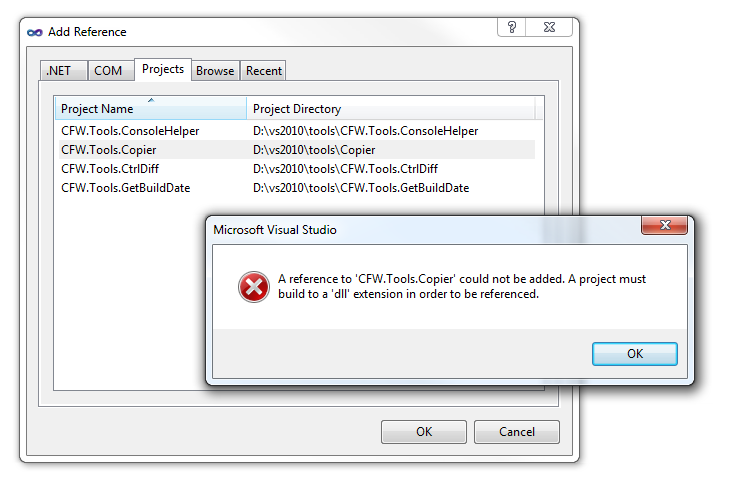
Ps. Referencing doesn’t work:
Answers:
Thank you for visiting the Q&A section on Magenaut. Please note that all the answers may not help you solve the issue immediately. So please treat them as advisements. If you found the post helpful (or not), leave a comment & I’ll get back to you as soon as possible.
Method 1
Have you tried just adding it as a “Project Reference” to the Website project? Right click on the website project, select “Add Reference…” and switch to the “Projects” tab.
A quick test here showed that by doing that the output of the console app project (the .exe) was copied to the /bin folder of the website when I built the solution.
You should then be able to use your standard deployment mechanisms to ensure that this is copied to the server at the same time as the other libraries.
Apologies, you’re right, this doesn’t work with a WebSite project, only with a Web Applciation.
In this case, you’ll have to use a “Post Build” event on your console app to copy it to the website’s folder.
Right click on the console app project in the Solution Explorer and select “Properties” or when you have a file from the project open use the “Project” menu.
Then on the “Build Events” tab, update the “Post-build event command line” to something like:
xcopy "$(TargetDir)$(TargetFileName)" "c:users[UserName]DocumentsVisual Studio 2010Websites[ProjectName]bin" /D /S /I /Y
If you want to include the PDB and config files as well then something like the following would be better:
xcopy "$(TargetDir)$(TargetName).*" "c:users[UserName]DocumentsVisual Studio 2010Websites[ProjectName]bin" /D /S /I /Y
Method 2
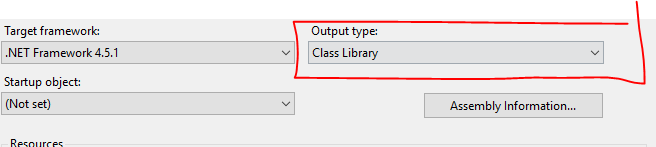
On the project you are trying to reference, make sure you change the output type to class Library. This should fix it.
Method 3
The exe option is available if you, use the browse tab instead.
All methods was sourced from stackoverflow.com or stackexchange.com, is licensed under cc by-sa 2.5, cc by-sa 3.0 and cc by-sa 4.0