I need Swagger generate API documentation include UI to test operations.
When use ASP.NET in my project, deps XML files are generated, everything is OK, look like this:
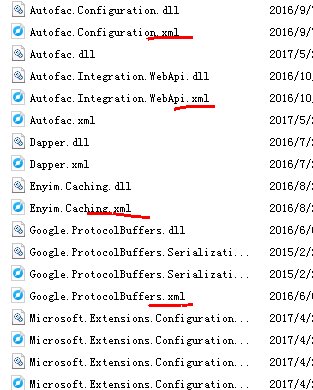
But when I use ASP.NET Core in my project, deps XML files are not generated. It just generates my project comments XML file, look like this:
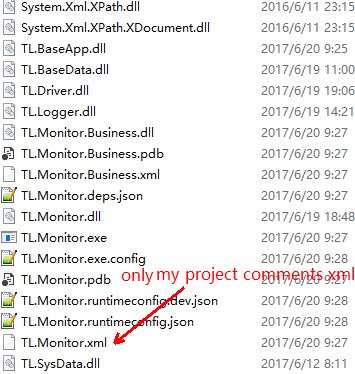
And when I deploy my project to IIS, the project XML not in deploy files list.
Answers:
Thank you for visiting the Q&A section on Magenaut. Please note that all the answers may not help you solve the issue immediately. So please treat them as advisements. If you found the post helpful (or not), leave a comment & I’ll get back to you as soon as possible.
Method 1
For .Net Core 2 upto 3.1 versions it’s slightly different, for those who come across it using a newer version you would create your
private void ConfigureSwagger(IServiceCollection services) constructor, add the reference to swagger services.AddSwaggerGen(c => { c.SwaggerDoc(/*populate with your info */); then define a new parameter which will be the path for your swagger XML documentation:
var filePath = Path.Combine(AppContext.BaseDirectory, "YourApiName.xml"); c.IncludeXmlComments(filePath);.
It should look something like this:
private void ConfigureSwagger(IServiceCollection services)
    {
        services.AddSwaggerGen(c =>
        {
            c.SwaggerDoc("v1", new Info
            {
                Version = "v1",
                Title = "YourApiName",
                Description = "Your Api Description.",
                TermsOfService = "None",
                Contact = new Contact
                    {Name = "Contact Title", Email = "<a href="https://getridbug.com/cdn-cgi/l/email-protection" class="__cf_email__" data-cfemail="e2818d8c96838196878f838b8e83868690879191a2868d8f838b8ccc818d8f">[email protected]</a>", Url = ""}
            });
            var filePath = Path.Combine(AppContext.BaseDirectory, "YourApiName.xml");
            c.IncludeXmlComments(filePath);
        });
    }
For this to work, you need to ensure that the build’s Output has the documentation file checked (see red arrow) and the path set appropriately. I’ve noticed that you can strip the pre-filled path and just use binYourApiName.xml, just like below:
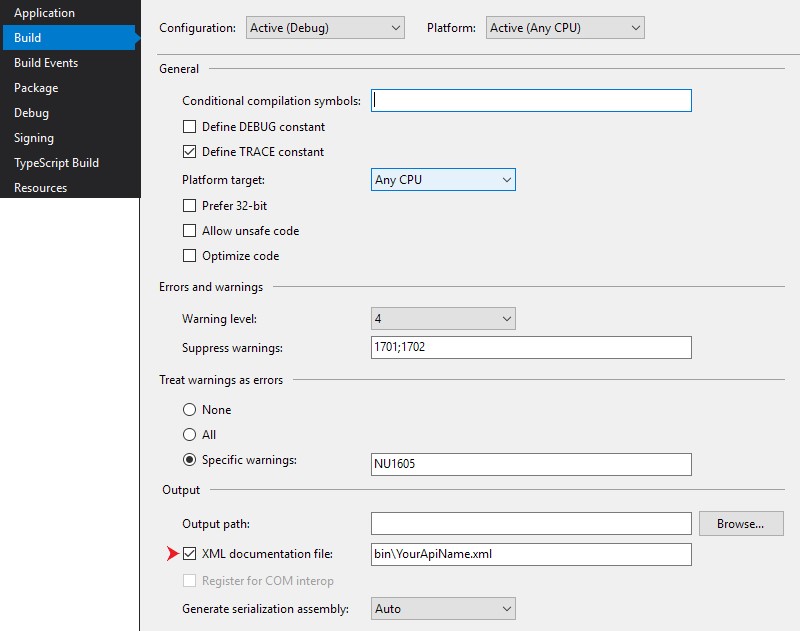
Update: If these changes aren’t working as expected, please check the configuration. In the example, the config is set to Debug. If you’re running from a different environment (env) you may need to check whether these setting apply to that env.
Update 2: Since the release of OpenAPI I thought I’d update my example (below) to show a more accurate reference to this specification which should follow something similar to:
services.AddSwaggerGen(o =>
            {
                o.SwaggerDoc("v1",
                    new OpenApiInfo
                    {
                        Title = "Your API Name",
                        Description = "Your API Description",
                        Version = "v1",
                        TermsOfService = null,
                        Contact = new OpenApiContact
                        {
                            // Check for optional parameters
                        },
                        License = new OpenApiLicense
                        {
                            // Optional Example
                            // Name = "Proprietary",
                            // Url = new Uri("https://someURLToLicenseInfo.com")
                        }
                    });
            });
Method 2
Enable “XML documentation file” checkbox for each project you depend on to generate their files on build. It could be done at project’s properties Build tab.
To include all XML files on deploy, add this target to the published project’s csproj file:
<Target Name="PrepublishScript" BeforeTargets="PrepareForPublish">
    <ItemGroup>
        <DocFile Include="bin***.xml" />
    </ItemGroup>
    <Copy SourceFiles="@(DocFile)"
          DestinationFolder="$(PublishDir)"
          SkipUnchangedFiles="false" />
</Target>
This will copy all XML files from bin folder and nested subfolders (like binReleasenetcoreapp1.1) to publish dir. Of course you can customize that target.
Method 3
For .Net Core 3.1 and NuGet xml files I add this to project file:
<Project>

  <!-- Here is you other csproj code -->

  <Target Name="_ResolveCopyLocalNuGetPackageXmls" AfterTargets="ResolveReferences">
    <ItemGroup>
      <ReferenceCopyLocalPaths Include="@(ReferenceCopyLocalPaths->'%(RootDir)%(Directory)%(Filename).xml')" Condition="'%(ReferenceCopyLocalPaths.NuGetPackageId)' != '' and Exists('%(RootDir)%(Directory)%(Filename).xml')" />
    </ItemGroup>
  </Target>
</Project>
P.S. This is modified code from https://github.com/ctaggart/SourceLink#known-issues (2.8.3 version)
Method 4
I use this way to register XML file:
  foreach (var filePath in System.IO.Directory.GetFiles(Path.Combine(Path.GetDirectoryName(Assembly.GetExecutingAssembly().Location)), "*.xml"))
                {
                    try
                    {
                        c.IncludeXmlComments(filePath);
                    }
                    catch (Exception e)
                    {
                        Console.WriteLine(e);
                    }
                }
Method 5
Microsoft themselves have documentation for this question available here, I found it quite helpful.
In short, the following changes are required:
Startup.cs, ConfigureServices()
services.AddSwaggerGen(c =>
{
    ...
    c.IncludeXmlComments(Path.Combine(AppContext.BaseDirectory, $"{Assembly.GetExecutingAssembly().GetName().Name}.xml"));
});
{project_name}.csproj
<PropertyGroup>
    <GenerateDocumentationFile>true</GenerateDocumentationFile>
    <NoWarn>$(NoWarn);1591</NoWarn>
</PropertyGroup>
Method 6
The Microsoft documentation here suggests using a DocumentationFile tag in your csproj file.
Just make sure you have the correct build for your deployment (Release/Debug):
<PropertyGroup Condition="'$(Configuration)|$(Platform)'=='Release|AnyCPU'">
    <DocumentationFile>binReleasenetcoreapp2.0APIProject.xml</DocumentationFile>
</PropertyGroup>
I just used this in practice (with the tweaks below) and it works well:
<PropertyGroup Condition="'$(Configuration)|$(Platform)'=='Release|AnyCPU'">
  <DocumentationFile>binRelease$(TargetFramework)$(MSBuildProjectName).xml</DocumentationFile>
  <NoWarn>1701;1702;1705;1591</NoWarn>
</PropertyGroup>
Method 7
In .net core 3.1,Please follow the below steps:
Go to Startup.cs Page and add the below code
public void ConfigureServices(IServiceCollection services)
        {
            services.AddDbContext<ApplicationDbContext>(options =>
                options.UseSqlServer(
                    Configuration.GetConnectionString("DefaultConnection")));
            services.AddDefaultIdentity<IdentityUser>(options => options.SignIn.RequireConfirmedAccount = true)
                .AddEntityFrameworkStores<ApplicationDbContext>();
            services.AddSwaggerGen(c => {
            c.SwaggerDoc("v1", new OpenApiInfo
            {
            Title="Book Store API",
            Version="v1",
            Description="This is an educational site"});
                var xfile = $"{Assembly.GetExecutingAssembly().GetName().Name}.xml";
                var xpath = Path.Combine(AppContext.BaseDirectory,xfile);
                c.IncludeXmlComments(xpath);
            });

            services.AddControllers();
        }
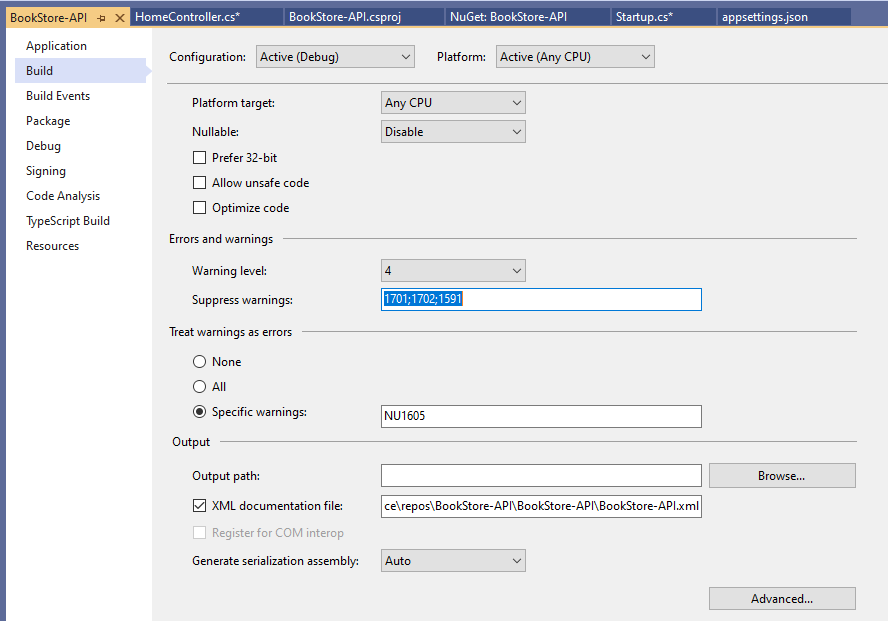
After that go to Properties of the project and click on the XML Documentation File option and save it.
All methods was sourced from stackoverflow.com or stackexchange.com, is licensed under cc by-sa 2.5, cc by-sa 3.0 and cc by-sa 4.0