Say I am building a c# application.
The purpose of application to :
- get username & password from user.
- and show some information present on the website.
in the background, after taking username and password, it should :
- log in to a website with those credentials.
- and click on the anchor link that appears after logging in.
- find out the span that hold the info.
- get the info.
that was an example. I am actually building an app to show bandwidth usage information.
The server does not expose any API for that.
Is there any tutorial/info/article available for similar purpose ? I just don’t what to search for ?
Answers:
Thank you for visiting the Q&A section on Magenaut. Please note that all the answers may not help you solve the issue immediately. So please treat them as advisements. If you found the post helpful (or not), leave a comment & I’ll get back to you as soon as possible.
Method 1
Basic Introduction To HttpWebRequests
Firstly, you’re going to need the right tools for the job. Go and download the Live HTTP Headers plugin for Firefox. This will allow you to view HTTP headers in real time so you can view the POST data that is sent when you interact with the website. Once you know the data that is sent to the website you can emulate the process by creating your own HTTP web requests programmatically. Tool > Live HTTP Headers
Load Live HTTP Headers by navigating to Tools > Live HTTP Headers. Once you’ve loaded the GUI navigate to the website you wish to login to, I will use Facebook for demonstration purposes. Type in your credentials ready to login, but before you do Clear the GUI text window and ensure that the check box labeled Capture is checked. Once you hit login you will see the text window flood with various information about the requests including the POST data which you need.
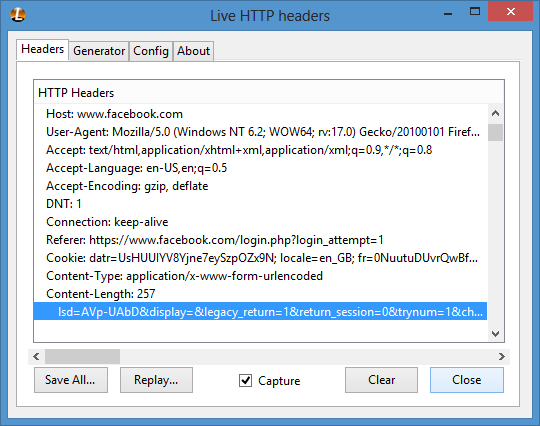
I find it best to click Save All… and then search for your username in the text document so that you can identify the POST data easily. For my request the POST data looked like this:
lsd=AVp-UAbD&display=&legacy_return=1&return_session=0&trynum=1&charset_test=%E2%82%AC%2C%C2%B4%2C%E2%82%AC%2C%C2%B4%2C%E6%B0%B4%2C%D0%94%2C%D0%84&timezone=0&lgnrnd=214119_mDgc&lgnjs=1356154880&email=%myfacebookemail40outlook.com&pass=myfacebookpassword&default_persistent=0
Which can then be defined in C# like so:
StringBuilder postData = new StringBuilder();
postData.Append("lsd=AVqRGVie&display=");
postData.Append("&legacy_return=1");
postData.Append("&return_session=0");
postData.Append("&trynum=1");
postData.Append("&charset_test=%E2%82%AC%2C%C2%B4%2C%E2%82%AC%2C%C2%B4%2C%E6%B0%B4%2C%D0%94%2C%D0%84");
postData.Append("&timezone=0");
postData.Append("&lgnrnd=153743_eO6D");
postData.Append("&lgnjs=1355614667");
postData.Append(String.Format("&email={0}", "CUSTOM_EMAIL"));
postData.Append(String.Format("&pass={0}", "CUSTOM_PASSWORD"));
postData.Append("&default_persistent=0");
I’m aiming to show you the relation between the POST data that we can send ‘manually’ via the web browser and how we can use said data to emulate the request in C#. Understand that sending POST data is far from deterministic. Different websites work in different ways and can throw all kinds of things your way. Below is a function I put together to validate that Facebook credentials are correct. I can’t and shouldn’t go into extraordinary depth here as the classes and their members are well self-documented. You can find better information than I can offer about the methods used at MSDN for example, WebRequest.Method Property
    private bool ValidateFacebookCredentials(string email, string password)
    {
        CookieContainer cookies = new CookieContainer();
        HttpWebRequest request = null;
        HttpWebResponse response = null;
        string returnData = string.Empty;

        //Need to retrieve cookies first
        request = (HttpWebRequest)WebRequest.Create(new Uri("https://www.facebook.com/login.php?login_attempt=1"));
        request.Method = "GET";
        request.CookieContainer = cookies;
        response = (HttpWebResponse)request.GetResponse();

        //Set up the request
        request = (HttpWebRequest)WebRequest.Create(new Uri("https://www.facebook.com/login.php?login_attempt=1"));
        request.Method = "POST";
        request.ContentType = "application/x-www-form-urlencoded";
        request.UserAgent = "Mozilla/5.0 (Windows; U; Windows NT 6.1; en-US; rv:1.9.2.13) Gecko/20101203 Firefox/3.6.13";
        request.Referer = "https://www.facebook.com/login.php?login_attempt=1";
        request.AllowAutoRedirect = true;
        request.KeepAlive = true;
        request.CookieContainer = cookies;

        //Format the POST data
        StringBuilder postData = new StringBuilder();
        postData.Append("lsd=AVqRGVie&display=");
        postData.Append("&legacy_return=1");
        postData.Append("&return_session=0");
        postData.Append("&trynum=1");
        postData.Append("&charset_test=%E2%82%AC%2C%C2%B4%2C%E2%82%AC%2C%C2%B4%2C%E6%B0%B4%2C%D0%94%2C%D0%84");
        postData.Append("&timezone=0");
        postData.Append("&lgnrnd=153743_eO6D");
        postData.Append("&lgnjs=1355614667");
        postData.Append(String.Format("&email={0}", email));
        postData.Append(String.Format("&pass={0}", password));
        postData.Append("&default_persistent=0");

        //write the POST data to the stream
        using(StreamWriter writer = new StreamWriter(request.GetRequestStream()))
            writer.Write(postData.ToString());

        response = (HttpWebResponse)request.GetResponse();

        //Read the web page (HTML) that we retrieve after sending the request
        using (StreamReader reader = new StreamReader(response.GetResponseStream()))
            returnData = reader.ReadToEnd();

        return !returnData.Contains("Please re-enter your password");
    }
Method 2
Sample Code on Grabbing Contents (Screen Scraping)
 Uri uri = new Uri("http://www.microsoft.com/default.aspx");
 if(uri.Scheme = Uri.UriSchemeHttp)
 {
     HttpWebRequest request = HttpWebRequest.Create(uri);
     request.Method = WebRequestMethods.Http.Get;
     HttpWebResponse response = request.GetResponse();
     StreamReader reader = new StreamReader(response.GetResponseStream());
     string  tmp = reader.ReadToEnd();
     response.Close();
     Response.Write(tmp);
  }
Sample Code on how to Post Data to remote Web Page using HttpWebRequest
   Uri uri = new Uri("http://www.amazon.com/exec/obidos/search-handle-form/102-5194535-6807312");
   string data = "field-keywords=ASP.NET 2.0";
   if (uri.Scheme == Uri.UriSchemeHttp)
   {
       HttpWebRequest request = (HttpWebRequest)HttpWebRequest.Create(uri);
       request.Method = WebRequestMethods.Http.Post;
       request.ContentLength = data.Length;
       request.ContentType = "application/x-www-form-urlencoded";
       StreamWriter writer = new StreamWriter(request.GetRequestStream());
       writer.Write(data);
       writer.Close();
       HttpWebResponse response = (HttpWebResponse)request.GetResponse();
       StreamReader reader = new StreamReader(response.GetResponseStream());
       string tmp = reader.ReadToEnd();
       response.Close();
       Response.Write(tmp);
   }
Method 3
Any HTTP client implementation, there are tons of open-source libraries for that. look at curl for example. Some dude made a .NET wrapper for it.
Method 4
You can continue using WebClient to POST (instead of GET, which is the HTTP verb you’re currently using with DownloadString), but I think you’ll find it easier to work with the (slightly) lower-level classes WebRequest and WebResponse.
There are two parts to this – the first is to post the login form, the second is recovering the “Set-cookie” header and sending that back to the server as “Cookie” along with your GET request. The server will use this cookie to identify you from now on (assuming it’s using cookie-based authentication which I’m fairly confident it is as that page returns a Set-cookie header which includes “PHPSESSID”).
All methods was sourced from stackoverflow.com or stackexchange.com, is licensed under cc by-sa 2.5, cc by-sa 3.0 and cc by-sa 4.0