I have been researching on Google and WPSE and the only thing I see repeatedly is to use showposts, that is deprecated.
I am familiar with WP_Query, and I thought that if I set posts_per_page to my limit (ie. 5), and nopaging to true, it would become to something like “Ok, I’ll give you only 5 posts“. But this doesn’t work.
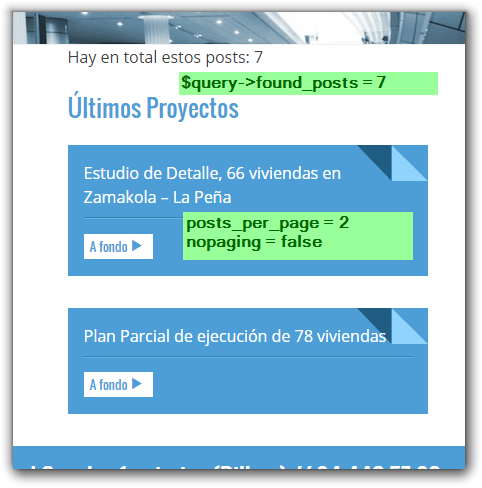
How can I do this?
Answers:
Thank you for visiting the Q&A section on Magenaut. Please note that all the answers may not help you solve the issue immediately. So please treat them as advisements. If you found the post helpful (or not), leave a comment & I’ll get back to you as soon as possible.
Method 1
I think that now I understand what you are trying to do. When you run a custom query with WP_Query and set the limit to get only 5 posts per page, only 5 posts will be retrieved by the query and that query will only hold 5 posts, BUT for the sake of pagination, WP_Query still runs through the whole database and counts all the posts that matches the criteria of the query.
That can be seen when you look at the $found_posts and $max_num_pages properties of the query. Lets take an example:
You have 20 posts belonging to the default post type post. You only need the latest 5 posts without pagination. Your query looks like this
$q = new WP_Query( 'posts_per_page=5' );
var_dump( $q->posts )will give you the latest 5 posts as expectedecho $q->found_postswill give you20echo $q->max_num_pageswill give you4
The impact of this extra work is minimal on sites with only a few posts, but this can gt expensive if you are running a site with hundreds or thousands of posts. This is a waste of resources if you are only ever going to need the 5 latest posts
There is an undocumented parameter called no_found_rows which uses boolean values which you can use to make your query bail after it found the 5 posts you need. This will force WP_Query not to look for any more posts mathing the criteria after it has retrieved the amount of posts queried. This parameter is already build into get_posts, that is why get_posts is a bit faster than WP_Query although get_posts uses WP_Query
Conclusion
In conclusion, if you are not going to use pagination on a query, it is always wise to 'no_found_rows=true' in your query to speed things up and to save on wasting resources.
Method 2
Ok , lets you have post type called ‘blog_posts’ , and you want to fetch 5 posts of that post type . Here is what you need to do
$args = array(
        'post_type' => 'blog_posts',
        'posts_per_page' => '5',
);


$query = new WP_Query($args);
The above query will return 5 posts of type ‘blog_posts’ , if it is not a custom post type , then just replace like this 'post_type' => 'posts', if you want to fetch all posts then replace like this 'posts_per_page' => '-1', , for more details WP Query
Method 3
After the conversation with @Pieter Goosen on the comments of the question, I think I can answer the question and explain my mistake.
The key is that found_posts was confussing me. I thougth that, that number is the posts retrieved but is not. It is the number of posts that match the criteria. It’s like the WP_Query had 2 parts: one for finding (all) the posts, and other for fetching the content, when it checks for the pagination parameters. So we have the $post_count property that is the number of posts fetched (Codex says The number of posts being displayed), that of course is equal to the number on posts_per_page parameter, and the number of items on the $posts array property.
So WP_Query is not doing any useless work, as I thought ^^
Hope this helps others!
Method 4
I know that @user1750063 has mentioned the code but try this
$args = array (
    'post_type'              => 'custom_post',
    'nopaging'               => false,
    'posts_per_page'         => '5',
    'order'                  => 'DESC',
    'orderby'                => 'ID',
);

$query = new WP_Query( $args );

if ( $query->have_posts() ) {
    while ( $query->have_posts() ) {
        $query->the_post();
        // display content
    }
} else {
    // display when no posts found
}

wp_reset_postdata();     // Restore original Post Data
Method 5
I would limit it with custom fields, check this query sample below:
$wp_query = new WP_Query("orderby=DESC&post_type=portfolio&meta_key=FeaturedProject&meta_value=1&posts_per_page=6");
It will return 6 Featured projects.
All methods was sourced from stackoverflow.com or stackexchange.com, is licensed under cc by-sa 2.5, cc by-sa 3.0 and cc by-sa 4.0