I need to make my tkinter rectangles transparent. Does anyone know how to do that?
I have tried to specify alpha=".5", opacity=".5", and I have tried to add two more digits in the end of the color code: fill="#ff000066". None of these things seem to work, I can’t find the right syntax.
import tkinter

root = tkinter.Tk()
canvas = tkinter.Canvas(root, width=800, height=600)
canvas.pack()

canvas.create_rectangle(50, 50, 100, 100, fill="#ff0000", alpha=0.5)

root.mainloop()
This code gives me this message: _tkinter.TclError: unknown option "-alpha", so this is obviously not the right way to do it.
Answers:
Thank you for visiting the Q&A section on Magenaut. Please note that all the answers may not help you solve the issue immediately. So please treat them as advisements. If you found the post helpful (or not), leave a comment & I’ll get back to you as soon as possible.
Method 1
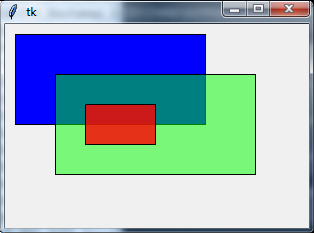
You can use transparent image to simulate the result. Use Pillow to create transparent image and then use canvas.create_image(...) to draw it. Below is a sample code:
from tkinter import *
from PIL import Image, ImageTk

root = Tk()

images = []  # to hold the newly created image

def create_rectangle(x1, y1, x2, y2, **kwargs):
    if 'alpha' in kwargs:
        alpha = int(kwargs.pop('alpha') * 255)
        fill = kwargs.pop('fill')
        fill = root.winfo_rgb(fill) + (alpha,)
        image = Image.new('RGBA', (x2-x1, y2-y1), fill)
        images.append(ImageTk.PhotoImage(image))
        canvas.create_image(x1, y1, image=images[-1], anchor='nw')
    canvas.create_rectangle(x1, y1, x2, y2, **kwargs)

canvas = Canvas(width=300, height=200)
canvas.pack()

create_rectangle(10, 10, 200, 100, fill='blue')
create_rectangle(50, 50, 250, 150, fill='green', alpha=.5)
create_rectangle(80, 80, 150, 120, fill='#800000', alpha=.8)

root.mainloop()
And the output:
Method 2
In a canvas if you want some widget to be transparent, simply let the fill parameter be empty:
fill=""
All methods was sourced from stackoverflow.com or stackexchange.com, is licensed under cc by-sa 2.5, cc by-sa 3.0 and cc by-sa 4.0