I have the next problem:
I need merge the rows with the same value for this table:
This table is in a GridView, and I realize the method that merge that rows
private void AgruparGridView(GridViewRowCollection rows, int indiceInicial, int totalCeldasAgrupar)
{
    //Si no hay celdas a agrupar no realiza ninguna acción
    if (totalCeldasAgrupar == 0)
        return;
    int i, count = 1;
    ArrayList lst = new ArrayList();
    // Los elementos del gridview son llenados en la lista.
    lst.Add(rows[0]);
    var ctrl = rows[0].Cells[indiceInicial];
    //Recorrer los registros que se tengan para agrupar
    for (i = 1; i < rows.Count; i++)
    {
        TableCell nextCell = rows[i].Cells[indiceInicial];
        if (ctrl.Text == nextCell.Text)
        {
            count++;
            nextCell.Visible = false;
            lst.Add(rows[i]);
        }
        else
        {
            if (count > 1)
            {
                ctrl.RowSpan = count;
                AgruparGridView(new GridViewRowCollection(lst), indiceInicial + 1, totalCeldasAgrupar - 1);
            }
            count = 1;
            lst.Clear();
            ctrl = rows[i].Cells[indiceInicial];
            lst.Add(rows[i]);
        }
    }
    if (count > 1)
    {
        ctrl.RowSpan = count;
        AgruparGridView(new GridViewRowCollection(lst), indiceInicial + 1, totalCeldasAgrupar - 1);
    }
    count = 1;
    lst.Clear();
}
I need realize the same result on a PDF Report with iTextSharp, but I haven’t idea for this process.
The fragment of the code that builds this section is this:
public PdfPTable Tablas(int TipoSeccion, int TipoDoc, int ClaveEntidad, int ClaveSubSis, string descripcion)
    {
        PDFEvents oPDFEvents = new PDFEvents();
        string sError = string.Empty;
        int columns = 1;
        int i = 0;
        DataSet _DatosTabla = null;
        PdfPTable Table;
        PdfPCell CeldaNoBorde = new PdfPCell(CeldasSinBorde("", 1, 1, 4, 255, 255, 255));
        #region PerfilesDOCENTE
        #region Tipo3
        if (TipoSeccion == 3)
        {

            columns = 3;

            Table = new PdfPTable(columns);
            Table.WidthPercentage = 80;
            float[] widhts = new float[] { 15, 50 };
            //Header Superior
            if (this.TipoSeccionOriginal == 3 || this.TipoSeccionOriginal==0)
            {

               Table.AddCell(Celdas("ASIGNATURAS POR EXAMEN DISCIPLINAR PARA FUNCIONES DOCENTES", 2, 3, 8, 238, 233, 233));
                    Table.AddCell(Celdas("Área disciplinar", 3, 1, 10, 238, 233, 233));
                    Table.AddCell(Celdas("Asignatura", 3, 1, 10, 238, 233, 233));
                    Table.AddCell(Celdas("Evaluación Disciplinar", 3, 1, 10, 238, 233, 233));
                    _DatosTabla = DameDatosTablaPerfilesTelebach(ClaveEntidad, ClaveSubSis);
            }
            else
            {
                Table.AddCell(Celdas("ASIGNATURAS A CONCURSO PARA FUNCIONES TÉCNICO DOCENTES", 1, 2, 8, 238, 233, 233));
                Table.AddCell(Celdas("Evaluación", 2, 1, 10, 238, 233, 233));
                Table.AddCell(Celdas("Asignaturas", 2, 1, 10, 238, 233, 233));
                _DatosTabla = DameDatosTablaPerfiles(TipoDoc, ClaveEntidad, ClaveSubSis, true);
            }

            if (_DatosTabla != null)
            {
                while (i < _DatosTabla.Tables[0].Rows.Count)
                    {
                        Table.AddCell(oPDFEvents.FontPhrase(_DatosTabla.Tables[0].Rows[i][0].ToString(), 10));
                        Table.AddCell(oPDFEvents.FontPhrase(_DatosTabla.Tables[0].Rows[i][1].ToString(), 10));
                        Table.AddCell(oPDFEvents.FontPhrase(_DatosTabla.Tables[0].Rows[i][2].ToString(), 10));
                        i = i + 1;
                    }
            }
            return Table;
        }
My result is this
Sorry for my bad english!!
Thank you for you attention!
Answers:
Thank you for visiting the Q&A section on Magenaut. Please note that all the answers may not help you solve the issue immediately. So please treat them as advisements. If you found the post helpful (or not), leave a comment & I’ll get back to you as soon as possible.
Method 1
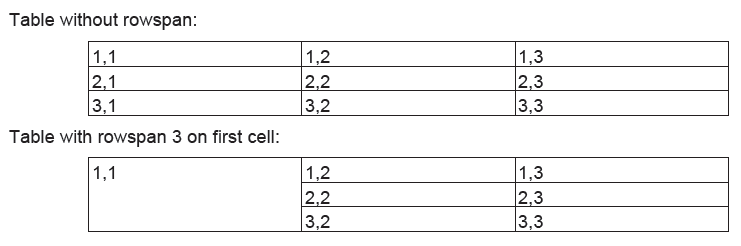
You need to set Rowspan = n on the appropriate PdfPCell and omit adding the next n-1 cells in that column. Here’s an example that first builds a regular 3×3 table. Cells are marked row,column. Then a table is built with Rowspan = 3 on the first cell. The fourth (2,1) and seventh (3,1) cell are not added.
Document doc = new Document();
PdfWriter writer =
  PdfWriter.GetInstance(doc, new FileStream("tables.pdf", FileMode.Create));
doc.Open();
doc.Add(new Paragraph("Table without rowspan:"));
PdfPTable table = new PdfPTable(3);
table.SpacingBefore = 10;
table.AddCell(new PdfPCell(new Phrase("1,1")));
table.AddCell(new PdfPCell(new Phrase("1,2")));
table.AddCell(new PdfPCell(new Phrase("1,3")));
table.AddCell(new PdfPCell(new Phrase("2,1")));
table.AddCell(new PdfPCell(new Phrase("2,2")));
table.AddCell(new PdfPCell(new Phrase("2,3")));
table.AddCell(new PdfPCell(new Phrase("3,1")));
table.AddCell(new PdfPCell(new Phrase("3,2")));
table.AddCell(new PdfPCell(new Phrase("3,3")));
doc.Add(table);
doc.Add(new Paragraph("Table with rowspan 3 on first cell:"));
PdfPTable tableWithRowspan = new PdfPTable(3);
tableWithRowspan.SpacingBefore = 10;
PdfPCell cellWithRowspan = new PdfPCell(new Phrase("1,1"));
// The first cell spans 3 rows
cellWithRowspan.Rowspan = 3;
tableWithRowspan.AddCell(cellWithRowspan);
tableWithRowspan.AddCell(new PdfPCell(new Phrase("1,2")));
tableWithRowspan.AddCell(new PdfPCell(new Phrase("1,3")));
// Cell 2,1 does not exist
tableWithRowspan.AddCell(new PdfPCell(new Phrase("2,2")));
tableWithRowspan.AddCell(new PdfPCell(new Phrase("2,3")));
// Cell 3,1 does not exist
tableWithRowspan.AddCell(new PdfPCell(new Phrase("3,2")));
tableWithRowspan.AddCell(new PdfPCell(new Phrase("3,3")));
doc.Add(tableWithRowspan);
doc.Close();
The result:
All methods was sourced from stackoverflow.com or stackexchange.com, is licensed under cc by-sa 2.5, cc by-sa 3.0 and cc by-sa 4.0