My Idle is throwing errors that and says tkinter can’t be imported.
Is there a simple way to install tkinter via pip or easy_install?
There seem to be a lot of package names flying around for this…
This and other assorted variations with tkinter-pypy aren’t working.
pip install python-tk
I’m on Windows with Python 2.7 and I don’t have apt-get or other system package managers.
Answers:
Thank you for visiting the Q&A section on Magenaut. Please note that all the answers may not help you solve the issue immediately. So please treat them as advisements. If you found the post helpful (or not), leave a comment & I’ll get back to you as soon as possible.
Method 1
The Tkinter library is built-in with every Python installation. And since you are on Windows, I believe you installed Python through the binaries on their website?
If so, Then most probably you are typing the command wrong. It should be:
import Tkinter as tk
Note the capital T at the beginning of Tkinter.
For Python 3,
import tkinter as tk
Method 2
If you are using virtualenv, it is fine to install tkinter using sudo apt-get install python-tk(python2), sudo apt-get install python3-tk(python3), and and it will work fine in the virtual environment
Method 3
Well I can see two solutions here:
1) Follow the Docs-Tkinter install for Python (for Windows):
Tkinter (and, since Python 3.1, ttk) are included with all standard Python distributions. It is important that you use a version of Python supporting Tk 8.5 or greater, and ttk. We recommend installing the “ActivePython” distribution from ActiveState, which includes everything you’ll need.
In your web browser, go to Activestate.com, and follow along the links to download the Community Edition of ActivePython for Windows. Make sure you’re downloading a 3.1 or newer version, not a 2.x version.
Run the installer, and follow along. You’ll end up with a fresh install of ActivePython, located in, e.g. C:python32. From a Windows command prompt, or the Start Menu’s “Run…” command, you should then be able to run a Python shell via:
% C:python32python
This should give you the Python command prompt. From the prompt, enter these two commands:
>>> import tkinter
>>> tkinter._test()
This should pop up a small window; the first line at the top of the window should say “This is Tcl/Tk version 8.5”; make sure it is not 8.4!
2) Uninstall 64-bit Python and install 32 bit Python.
Method 4
When installing make sure that under Tcl/Tk you select Will be installed on hard drive. If it is installing with a cross at the left then Tkinter will not be installed.
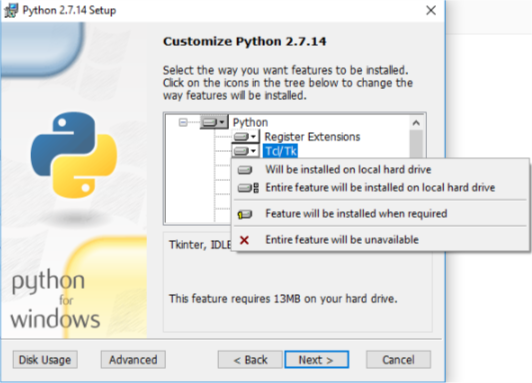
The same goes for Python 3:
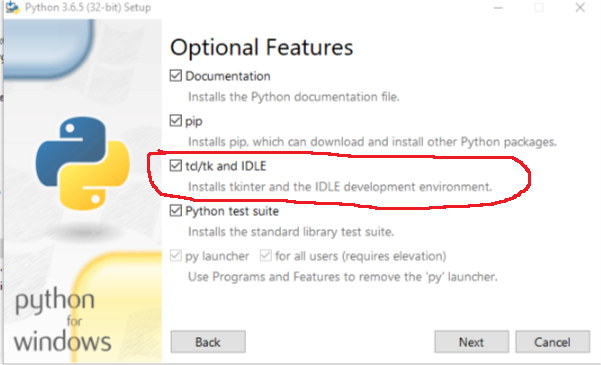
Method 5
When you install python for Windows, use the standard option or install everything it asks. I got the error because I deselected tcl.
Method 6
I came here looking for an answer to this same question and none of the answers above actually answer the question at all!
So after some investigation I found out:
there is a package (for python 3.x at least):
pip3 install pytk
The problem is, it is only the python part of the equation and doesn’t install the tkinter libraries in your OS, so the answer is that you can’t install it completely via pip
https://tkdocs.com/tutorial/install.html
Personally I find this very annoying as i’m packaging a python application to be installed via pip that uses tkinter and I was looking for a way to have pip ensure that tkinter is installed and the answer is I can’t I have to instruct users to install it if it’s not installed already, a very poor experience for end users who should not need to know or care what tkinter is to use my application.
Method 7
Had the same problem in Linux. This solved it. (I’m on Debian 9 derived Bunsen Helium)
$ sudo apt-get install python3-tk
Method 8
In python, Tkinter was a default package, you can repair the installation and select Tcl/Tk. 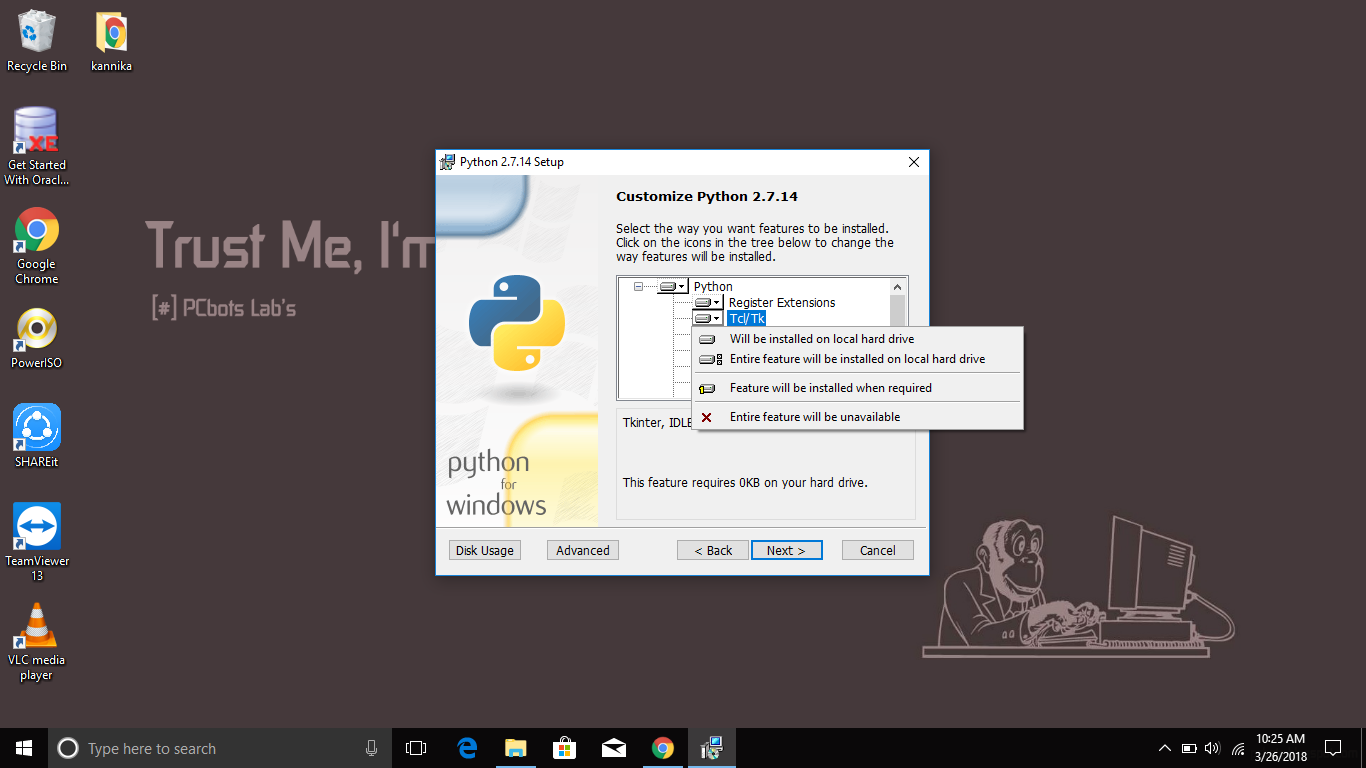 When you run this, DDL should be installed like so: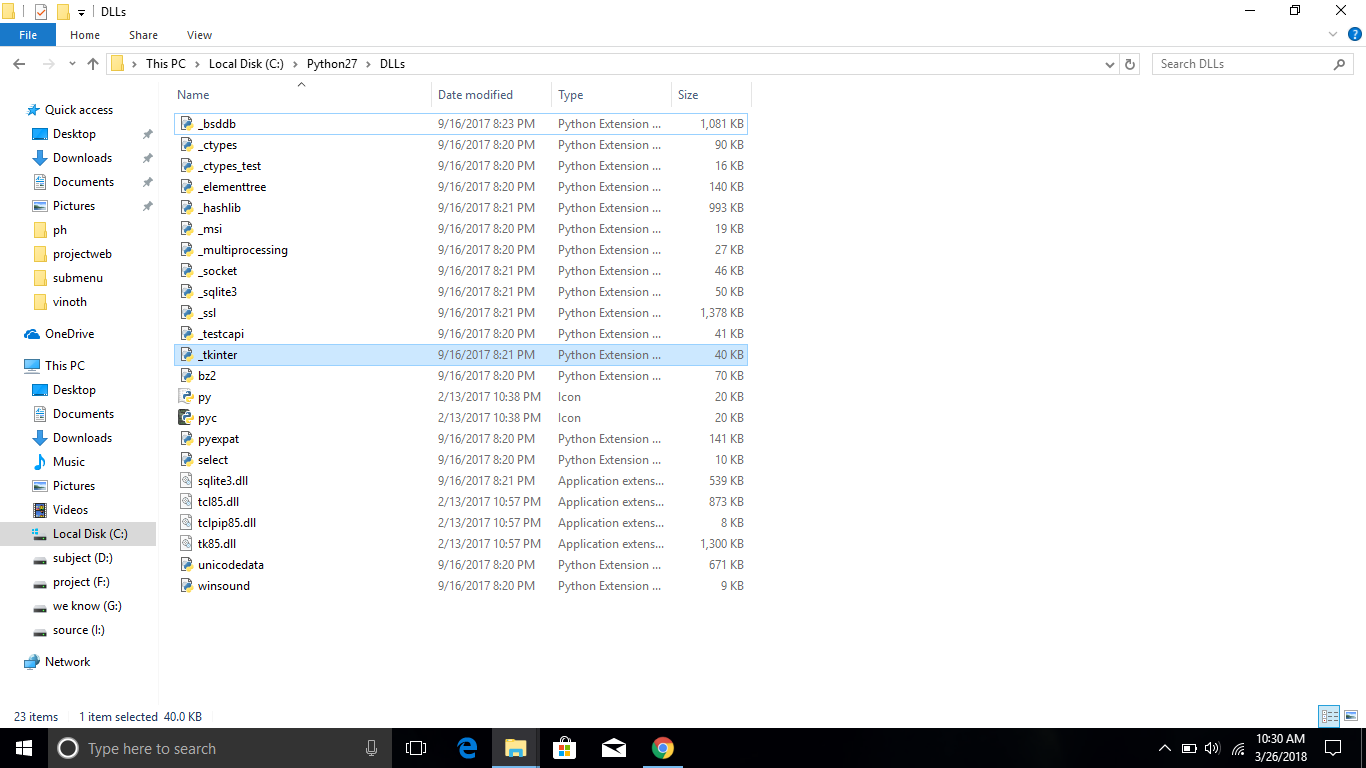
Method 9
I’m posting as the top answer requotes the documentation which I didn’t find useful.
tkinter comes packaged with python install on windows IFF you select it during the install window.
The solution is to repair the installation (via uninstall GUI is fine), and select to install tk this time. You may need to point at or redownload the binary in this process. Downloading directly from activestate did not work for me.
This is a common problem people have on windows as it’s easy to not want to install TCL/TK if you don’t know what it is, but Matplotlib etc require it.
Method 10
I was trying to upgrade my tkinter from the python built-in and found this method useful:
conda install -c anaconda tk
Method 11
I had the similar problem with Win-8 and python-3.4 32 bit , I got it resolved by downloading same version from python.org .
Next step will be to hit the repair button and Install the Tk/tkinter Package or Just hit the repair.
Now should get Python34/Lib/tkinter Module present.
The import tkinter should work ..
Method 12
Easiest way to do this:
cd C:Users%User%AppDataLocalProgramsPythonPython37Scripts>
pip install pythonds

Method 13
Inside cmd, run command pip install tk and Tkinter should install.
Method 14
if your using python 3.4.1 just write this line from tkinter import * this will put everything in the module into the default namespace of your program. in fact instead of referring to say a button like tkinter.Button you just type Button
All methods was sourced from stackoverflow.com or stackexchange.com, is licensed under cc by-sa 2.5, cc by-sa 3.0 and cc by-sa 4.0