I came across a tricky issue about the matplotlib in Python. I want to create a grouped bar chart with several codes, but the chart goes wrong. Could you please offer me some advice? The code is as follows.
import numpy as np
import pandas as pd
file="https://s3-api.us-geo.objectstorage.softlayer.net/cf-courses-data/CognitiveClass/DV0101EN/labs/coursera/Topic_Survey_Assignment.csv"
df=pd.read_csv(file,index_col=0)

df.sort_values(by=['Very interested'], axis=0,ascending=False,inplace=True)

df['Very interested']=df['Very interested']/2233
df['Somewhat interested']=df['Somewhat interested']/2233
df['Not interested']=df['Not interested']/2233
df

df_chart=df.round(2)
df_chart

labels=['Data Analysis/Statistics','Machine Learning','Data Visualization',
       'Big Data (Spark/Hadoop)','Deep Learning','Data Journalism']
very_interested=df_chart['Very interested']
somewhat_interested=df_chart['Somewhat interested']
not_interested=df_chart['Not interested']

x=np.arange(len(labels))
w=0.8

fig,ax=plt.subplots(figsize=(20,8))
rects1=ax.bar(x-w,very_interested,w,label='Very interested',color='#5cb85c')
rects2=ax.bar(x,somewhat_interested,w,label='Somewhat interested',color='#5bc0de')
rects3=ax.bar(x+w,not_interested,w,label='Not interested',color='#d9534f')

ax.set_ylabel('Percentage',fontsize=14)
ax.set_title("The percentage of the respondents' interest in the different data science Area",
            fontsize=16)
ax.set_xticks(x)
ax.set_xticklabels(labels)
ax.legend(fontsize=14)

def autolabel(rects):
    """Attach a text label above each bar in *rects*, displaying its height."""
    for rect in rects:
        height = rect.get_height()
        ax.annotate('{}'.format(height),
                    xy=(rect.get_x() + rect.get_width() / 3, height),
                    xytext=(0, 3),  # 3 points vertical offset
                    textcoords="offset points",
                    ha='center', va='bottom')


autolabel(rects1)
autolabel(rects2)
autolabel(rects3)

fig.tight_layout()

plt.show()
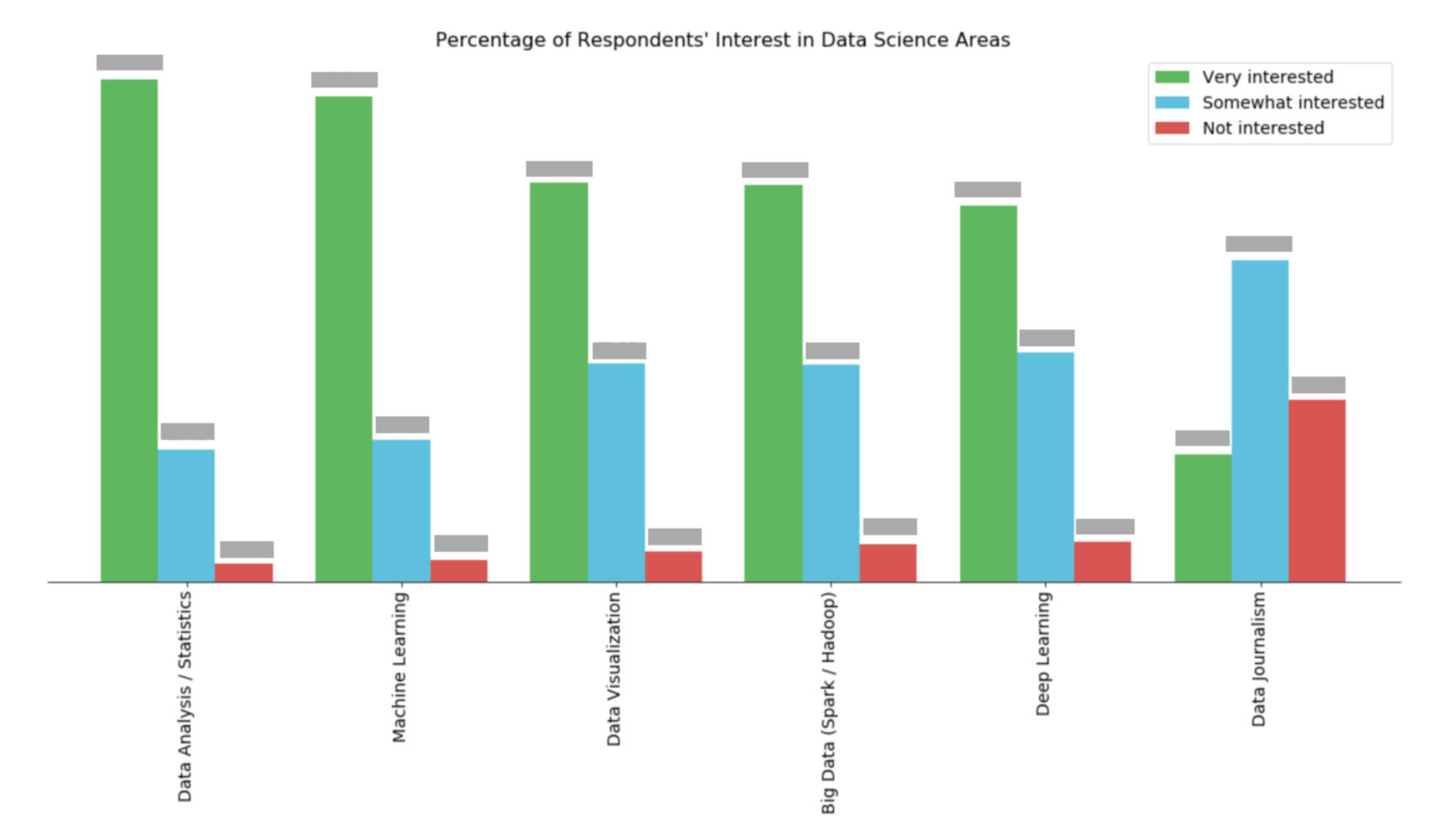
The output of this code module is really a mess. But what I expect should look like the bar chart in the picture. Could you please tell me which point is not correct in my codes?
Answers:
Thank you for visiting the Q&A section on Magenaut. Please note that all the answers may not help you solve the issue immediately. So please treat them as advisements. If you found the post helpful (or not), leave a comment & I’ll get back to you as soon as possible.
Method 1
Imports and DataFrame
import pandas as pd
import matplotlib.pyplot as plt

# given the following code to create the dataframe
file="https://s3-api.us-geo.objectstorage.softlayer.net/cf-courses-data/CognitiveClass/DV0101EN/labs/coursera/Topic_Survey_Assignment.csv"
df=pd.read_csv(file, index_col=0)

df.sort_values(by=['Very interested'], axis=0, ascending=False, inplace=True)

# all columns are being divided by 2233 so those lines can be replace with the following single line
df = df.div(2233)

# display(df)
                            Very interested  Somewhat interested  Not interested
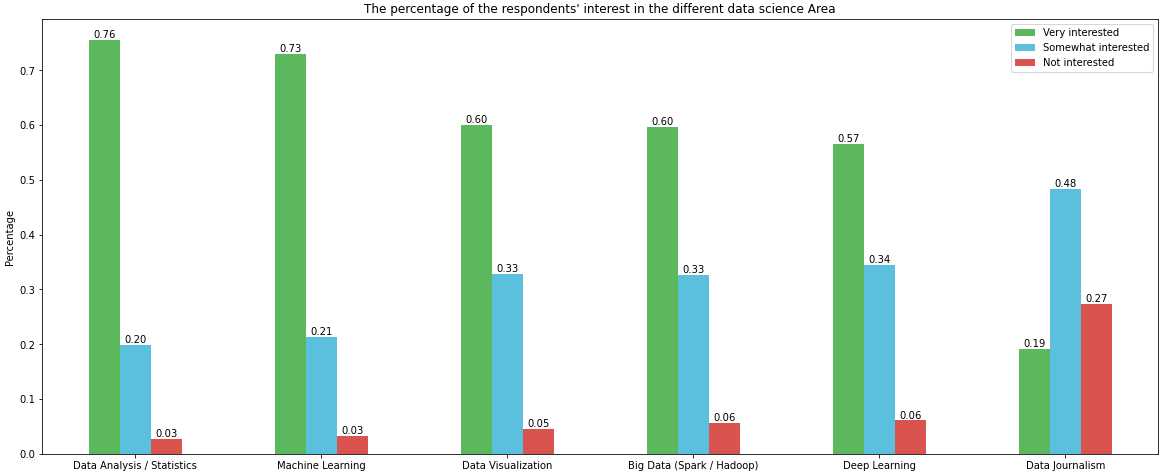
Data Analysis / Statistics         0.755934             0.198836        0.026870
Machine Learning                   0.729512             0.213614        0.033139
Data Visualization                 0.600090             0.328706        0.045678
Big Data (Spark / Hadoop)          0.596507             0.326467        0.056874
Deep Learning                      0.565607             0.344828        0.060905
Data Journalism                    0.192118             0.484102        0.273175
Using since matplotlib v3.4.2
- Uses
matplotlib.pyplot.bar_labelandpandas.DataFrame.plot - See the matplotlib: Bar Label Demo page for additional formatting options.
- Some formatting can be done with the
fmtparameter, but more sophisticated formatting should be done with thelabelsparameter, as show in the bottom Demo example, and in How to add multiple annotations to a barplot.
- Some formatting can be done with the
# your colors
colors = ['#5cb85c', '#5bc0de', '#d9534f']

# plot with annotations is probably easier
p1 = df.plot(kind='bar', color=colors, figsize=(20, 8), rot=0, ylabel='Percentage', title="The percentage of the respondents' interest in the different data science Area")

for p in p1.containers:
    p1.bar_label(p, fmt='%.2f', label_type='edge')
Annotation Resources – from matplotlib v3.4.2
- Adding value labels on a matplotlib bar chart
- How to annotate each segment of a stacked bar chart
- Stacked Bar Chart with Centered Labels
- How to plot and annotate multiple data columns in a seaborn barplot
- How to annotate a seaborn barplot with the aggregated value
- stack bar plot in matplotlib and add label to each section
- How to add multiple annotations to a barplot
Using before matplotlib v3.4.2
w = 0.8 / 3will resolve the issue, given the current code.- However, generating the plot can be accomplished more easily with
pandas.DataFrame.plot
# your colors
colors = ['#5cb85c', '#5bc0de', '#d9534f']

# plot with annotations is probably easier
p1 = df.plot.bar(color=colors, figsize=(20, 8), ylabel='Percentage', title="The percentage of the respondents' interest in the different data science Area")
p1.set_xticklabels(p1.get_xticklabels(), rotation=0)

for p in p1.patches:
    p1.annotate(f'{p.get_height():0.2f}', (p.get_x() + p.get_width() / 2., p.get_height()), ha = 'center', va = 'center', xytext = (0, 10), textcoords = 'offset points')
All methods was sourced from stackoverflow.com or stackexchange.com, is licensed under cc by-sa 2.5, cc by-sa 3.0 and cc by-sa 4.0