I have dataframe total_year, which contains three columns (year, action, comedy) .
total_year
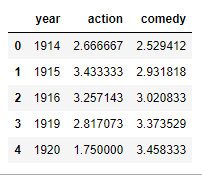
I want to plot the year column on the x-axis, and action & comedy both on the y-axis.
How can I plot two columns (action and comedy) on y-axis?
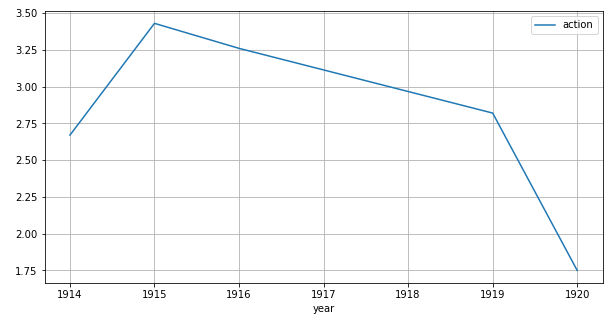
My code plots only one column on y-axis.
total_year[-15:].plot(x='year', y='action', figsize=(10,5), grid=True)
Answers:
Thank you for visiting the Q&A section on Magenaut. Please note that all the answers may not help you solve the issue immediately. So please treat them as advisements. If you found the post helpful (or not), leave a comment & I’ll get back to you as soon as possible.
Method 1
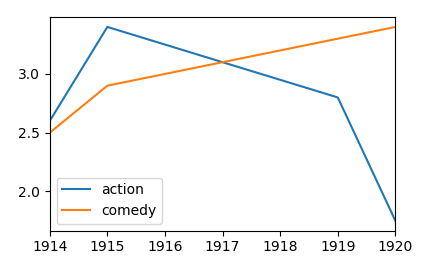
Several column names may be provided to the y argument of the pandas plotting function. Those should be specified in a list, as follows.
df.plot(x="year", y=["action", "comedy"])
Complete example:
import matplotlib.pyplot as plt
import pandas as pd

df = pd.DataFrame({"year": [1914,1915,1916,1919,1920],
                   "action" : [2.6,3.4,3.25,2.8,1.75],
                   "comedy" : [2.5,2.9,3.0,3.3,3.4] })
df.plot(x="year", y=["action", "comedy"])
plt.show()
Method 2
Pandas.DataFrame.plot() per default uses index for plotting X axis, all other numeric columns will be used as Y values.
So setting year column as index will do the trick:
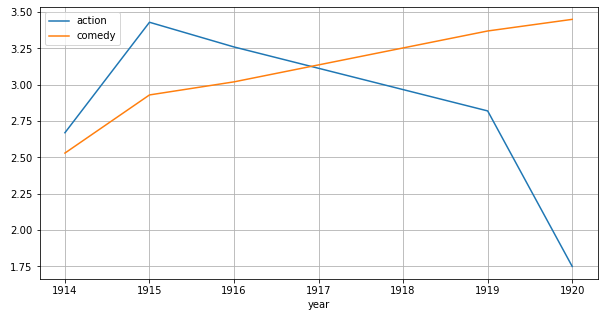
total_year.set_index('year').plot(figsize=(10,5), grid=True)
Method 3
- When using
pandas.DataFrame.plot, it’s only necessary to specify a column to thexparameter.- The caveat is, the rest of the columns with
numericvalues will be used fory. - The following code contains extra columns to demonstrate. Note,
'date'is left as astring. However, if'date'is converted to adatetimedtype, the plot API will also plot the'date'column on the y-axis.
- The caveat is, the rest of the columns with
- If the dataframe includes many columns, some of which should not be plotted, then specify the
yparameter as shown in this answer, but if the dataframe contains only columns to be plotted, then specify only thexparameter. - In cases where the index is to be used as the x-axis, then it is not necessary to specify
x=.
import pandas as pd

# test data
data = {'year': [1914, 1915, 1916, 1919, 1920],
        'action': [2.67, 3.43, 3.26, 2.82, 1.75],
        'comedy': [2.53, 2.93, 3.02, 3.37, 3.45],
        'test1': ['a', 'b', 'c', 'd', 'e'],
        'date': ['1914-01-01', '1915-01-01', '1916-01-01', '1919-01-01', '1920-01-01']}

# create the dataframe
df = pd.DataFrame(data)

# display(df)
   year  action  comedy test1        date
0  1914    2.67    2.53     a  1914-01-01
1  1915    3.43    2.93     b  1915-01-01
2  1916    3.26    3.02     c  1916-01-01
3  1919    2.82    3.37     d  1919-01-01
4  1920    1.75    3.45     e  1920-01-01

# plot the dataframe
df.plot(x='year', figsize=(10, 5), grid=True)
All methods was sourced from stackoverflow.com or stackexchange.com, is licensed under cc by-sa 2.5, cc by-sa 3.0 and cc by-sa 4.0