I have a Pandas DataFrame containing the date that a stream gage started measuring flow and the date that the station was decommissioned. I want to generate a plot showing these dates graphically. Here is a sample of my DataFrame:
import pandas as pd

data = {'index': [40623, 40637, 40666, 40697, 40728, 40735, 40742, 40773, 40796, 40819, 40823, 40845, 40867, 40887, 40945, 40964, 40990, 41040, 41091, 41100], 'StationId': ['UTAHDWQ-5932100', 'UTAHDWQ-5932230', 'UTAHDWQ-5932240', 'UTAHDWQ-5932250', 'UTAHDWQ-5932253', 'UTAHDWQ-5932254', 'UTAHDWQ-5932280', 'UTAHDWQ-5932290', 'UTAHDWQ-5932750', 'UTAHDWQ-5983753', 'UTAHDWQ-5983754', 'UTAHDWQ-5983755', 'UTAHDWQ-5983756', 'UTAHDWQ-5983757', 'UTAHDWQ-5983759', 'UTAHDWQ-5983760', 'UTAHDWQ-5983775', 'UTAHDWQ-5989066', 'UTAHDWQ-5996780', 'UTAHDWQ-5996800'], 'amin': ['1994-07-19 13:15:00', '2006-03-16 13:55:00', '1980-10-31 16:00:00', '1981-06-11 17:45:00', '2006-06-28 13:15:00', '2006-06-28 13:55:00', '1981-06-11 15:30:00', '1992-06-10 15:45:00', '2005-10-03 16:30:00', '2006-04-25 09:56:00', '2006-04-25 11:05:00', '2006-04-25 13:50:00', '2006-04-25 14:20:00', '2006-04-25 12:45:00', '2008-04-08 13:03:00', '2008-04-08 13:15:00', '2008-04-15 12:47:00', '2005-10-04 10:15:00', '1995-03-09 13:59:00', '1995-03-09 15:13:00'], 'amax': ['1998-06-30 14:51:00', '2007-01-24 12:55:00', '2007-07-31 11:35:00', '1990-08-01 08:30:00', '2007-01-24 13:35:00', '2007-01-24 14:05:00', '2006-08-22 16:00:00', '1998-06-30 11:33:00', '2005-10-22 15:00:00', '2006-04-25 10:00:00', '2008-04-08 12:16:00', '2008-04-08 09:10:00', '2008-04-08 09:30:00', '2008-04-08 11:27:00', '2008-04-08 13:05:00', '2008-04-08 13:23:00', '2009-04-07 13:15:00', '2005-10-05 11:40:00', '1996-03-14 10:40:00', '1996-03-14 11:05:00']}
df = pd.DataFrame(data)
df.set_index('index', inplace=True)

# display(df.head())

             StationId                 amin                 amax
index
40623  UTAHDWQ-5932100  1994-07-19 13:15:00  1998-06-30 14:51:00
40637  UTAHDWQ-5932230  2006-03-16 13:55:00  2007-01-24 12:55:00
40666  UTAHDWQ-5932240  1980-10-31 16:00:00  2007-07-31 11:35:00
40697  UTAHDWQ-5932250  1981-06-11 17:45:00  1990-08-01 08:30:00
40728  UTAHDWQ-5932253  2006-06-28 13:15:00  2007-01-24 13:35:00
I want to create a plot similar to this (please note that I did not make this plot using the above data):
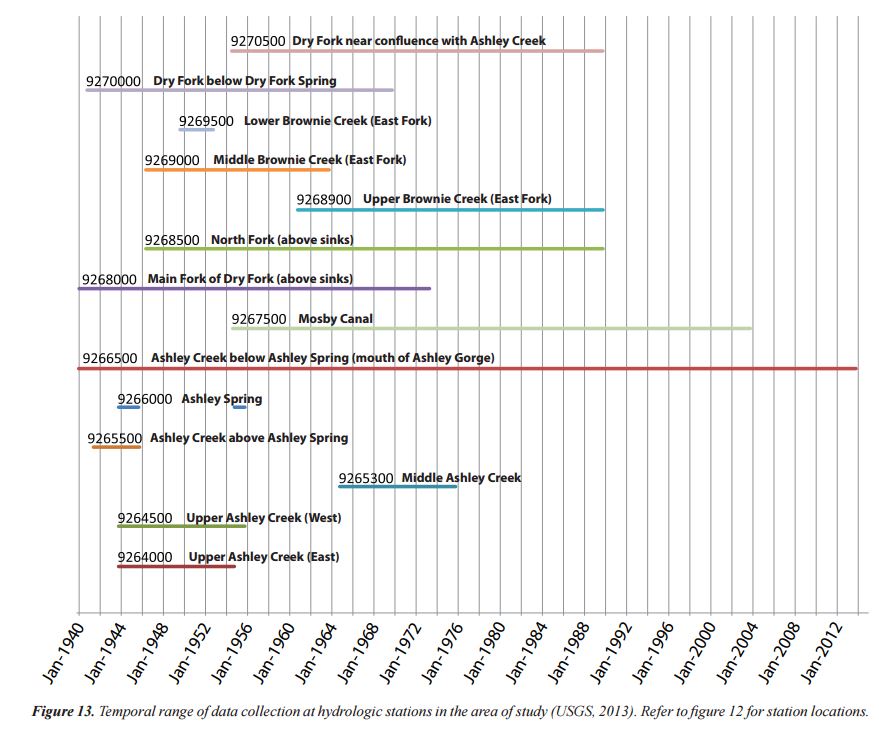
The plot does not have to have the text shown along each line, just the y-axis with station names.
While this may seem like a niche application of pandas, I know several scientists that would benefit from this plotting ability.
The closest answer I could find is here:
- How to plot stacked proportional graph?
- How to plot two columns of a pandas data frame using points?
- Matplotlib timelines
- Create Gantt Plot with python matplotlib
The last answer is closest to suiting my needs.
While I would prefer a way to do it through the Pandas wrapper, I would be open and grateful to a straight matplotlib solution.
Answers:
Thank you for visiting the Q&A section on Magenaut. Please note that all the answers may not help you solve the issue immediately. So please treat them as advisements. If you found the post helpful (or not), leave a comment & I’ll get back to you as soon as possible.
Method 1
- I think you are trying to create a gantt plot.
- This suggests using
hlines - Tested in
matplotlib 3.4.2
import pandas as pd
import matplotlib.pyplot as plt
import matplotlib.dates as dt

# using df from the OP

# convert columns to a datetime dtype
df.amin = pd.to_datetime(df.amin)
df.amax = pd.to_datetime(df.amax)

fig, ax = plt.subplots(figsize=(8, 5))
ax = ax.xaxis_date()
ax = plt.hlines(df.index, dt.date2num(df.amin), dt.date2num(df.amax))
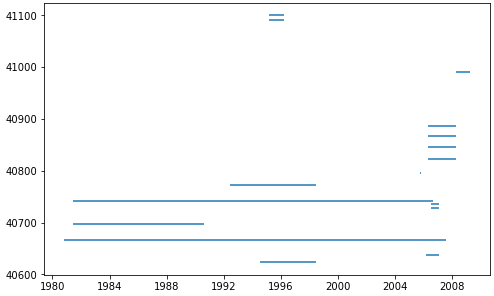
- The following code also works
# using df from the OP

df.amin = pd.to_datetime(df.amin)
df.amax = pd.to_datetime(df.amax)

fig, ax = plt.subplots(figsize=(8, 5))
ax = plt.hlines(df.index, df.amin, df.amax)
Method 2
You can use Bokeh (a python library) to make gantt chart and its really beautiful.
Here is a code I copied from a twiiter.
http://nbviewer.jupyter.org/gist/quebbs/10416d9fb954020688f2
from bokeh.plotting import figure, show, output_notebook, output_file
from bokeh.models import ColumnDataSource, Range1d
from bokeh.models.tools import HoverTool
from datetime import datetime
from bokeh.charts import Bar
output_notebook()
#output_file('GanntChart.html') #use this to create a standalone html file to send to others
import pandas as ps

DF=ps.DataFrame(columns=['Item','Start','End','Color'])
Items=[
    ['Contract Review & Award','2015-7-22','2015-8-7','red'],
    ['Submit SOW','2015-8-10','2015-8-14','gray'],
    ['Initial Field Study','2015-8-17','2015-8-21','gray'],
    ['Topographic Procesing','2015-9-1','2016-6-1','gray'],
    ['Init. Hydrodynamic Modeling','2016-1-2','2016-3-15','gray'],
    ['Prepare Suitability Curves','2016-2-1','2016-3-1','gray'],
    ['Improvement Conceptual Designs','2016-5-1','2016-6-1','gray'],
    ['Retrieve Water Level Data','2016-8-15','2016-9-15','gray'],
    ['Finalize Hydrodynamic Models','2016-9-15','2016-10-15','gray'],
    ['Determine Passability','2016-9-15','2016-10-1','gray'],
    ['Finalize Improvement Concepts','2016-10-1','2016-10-31','gray'],
    ['Stakeholder Meeting','2016-10-20','2016-10-21','blue'],
    ['Completion of Project','2016-11-1','2016-11-30','red']
    ] #first items on bottom

for i,Dat in enumerate(Items[::-1]):
    DF.loc[i]=Dat

#convert strings to datetime fields:
DF['Start_dt']=ps.to_datetime(DF.Start)
DF['End_dt']=ps.to_datetime(DF.End)


G=figure(title='Project Schedule',x_axis_type='datetime',width=800,height=400,y_range=DF.Item.tolist(),
        x_range=Range1d(DF.Start_dt.min(),DF.End_dt.max()), tools='save')

hover=HoverTool(tooltips="Task: @Item<br>
Start: @Start<br>
End: @End")
G.add_tools(hover)

DF['ID']=DF.index+0.8
DF['ID1']=DF.index+1.2
CDS=ColumnDataSource(DF)
G.quad(left='Start_dt', right='End_dt', bottom='ID', top='ID1',source=CDS,color="Color")
#G.rect(,"Item",source=CDS)
show(G)
Method 3
It’s possible to do this with horizontal bars too: broken_barh(xranges, yrange, **kwargs)
Method 4
While I do not know of any way to do this in MatplotLib, you may want to take a look at options with visualizing the data in the way you want by using D3, for example, with this library:
https://github.com/jiahuang/d3-timeline
If you must do it with Matplotlib, here is one way in which it has been done:
All methods was sourced from stackoverflow.com or stackexchange.com, is licensed under cc by-sa 2.5, cc by-sa 3.0 and cc by-sa 4.0