For a demo environment, I would like to pre-fill the username and password fields of the wp-login form with respectively “demo” and “demo” string.
Thus users will just need to click on the “Log-in” button to connect to the admin area.
There is a way to do that ? Maybe with a hook ?
Thanks for your advises
Answers:
Thank you for visiting the Q&A section on Magenaut. Please note that all the answers may not help you solve the issue immediately. So please treat them as advisements. If you found the post helpful (or not), leave a comment & I’ll get back to you as soon as possible.
Method 1
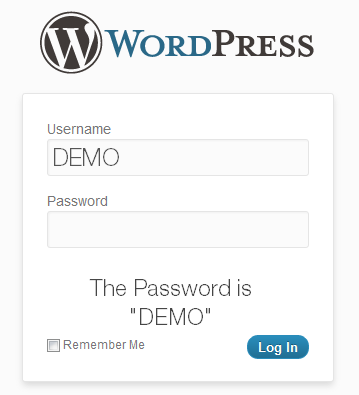
The Result
Username
You can declare the form field value global and prefill it.
This will override any setting done via the “Remember me”-Checkbox.
/**
 * Changes the default user name to "DEMO"
 *
 * @return string $user_login
 */
function login_form_username()
{
    global $user_login;
    return $user_login = 'DEMO';
}
add_action( 'login_head', 'login_form_username' );
Password
I found nothing that you can use to prefill it, so I’d add a note. Gladly/Sadly there’s the whole set of stylesheets for the admin UI available. So .wrap in connection with h2 gives a nice styling. The function is hooked to the additional fields hook for the admin hook. The priority is 0 to set it above additional fields.
/**
 * Adds a note beyond the user login name & password field
 *
 * @return string
 */
function login_form_note()
{
    print '<div class="wrap"><h2 style="text-align: center;">The Password is "DEMO"</h2></div>';
}
add_action( 'login_form', 'login_form_note', 0 );
Security: Hide Errors
As someone would get a visual proof that he entered an existing user name by default, I’d add the following to your functions.php file, to avoid telling if the username was guessed right:
/**
 * Hide wrong login names
 *
 * @return string
 */
function no_login_error()
{
    return __( 'Wrong Credentials.' );
}
add_filter( 'login_errors', 'no_login_error' );
Other filters
Notes:
- If you want to replace other stuff like styles, then you can use the
login_enqueue_scriptshook. - You can also replace the link behind the logo using the
login_headerurlfilter that filters the url. The linktitlecan be replaced usinglogin_headertitle. Both trigger for multisite as well a single site setups. - The login message can be changed using the
login_messagefilter.
Method 2
you could use this code to auto login the user:
add_action('init', 'auto_login');
add_action('admin_init', 'auto_login');
function auto_login() {
    if (!is_user_logged_in()) {
      //by user name
      $user = get_user_by( 'login', 'demo' );
      //Or by user id, 2 being the ID of the demo user
      //$user = get_userdata(2);
      wp_set_current_user($user->ID, $user->user_login);
      wp_set_auth_cookie($user->ID);
      do_action('wp_login', $user->user_login);
    }
}
Method 3
Here are 3 ways to do it:
The first way is to use the wp_signon hook
$creds = array();
$creds['user_login'] = 'example';
$creds['user_password'] = 'plaintextpw';
$creds['remember'] = true;
$user = wp_signon( $creds, false );
if ( is_wp_error($user) ) {
   echo $user->get_error_message();
}
The second way, is to use jQuery .val() and add it to your login page
$("#user_login").val('username');
$("#user_pass").val('password');
The last way is to edit your wp-login.php file (Note, this is not recommended although it would work).
All methods was sourced from stackoverflow.com or stackexchange.com, is licensed under cc by-sa 2.5, cc by-sa 3.0 and cc by-sa 4.0