I’m hosting the ASP.NET runtime via the ApplicationHost.CreateApplicationHost method. When I modify the web.config while the application is running, i see lots of first chance ThreadAbortExceptions thrown. This is right before my application comes crashing down. I’m assuming this is because the runtime has detected changes to the configuration and wants to restart.
This isn’t really a supported scenario for us, so i’d prefer if I could just switch off the automatic reloading.
Does anyone know how to do this?
Answers:
Thank you for visiting the Q&A section on Magenaut. Please note that all the answers may not help you solve the issue immediately. So please treat them as advisements. If you found the post helpful (or not), leave a comment & I’ll get back to you as soon as possible.
Method 1
Actually, the first two answers are incorrect. It is possible, and quite easy, to prevent this recycling from happening, and this feature has been available since at least IIS6.
Method 1 (system wide)
Change the DWORD registry setting for HKLMSOFTWAREWow6432NodeMicrosoftASP.NETFCNMode to the value 1, which will disable all file change notifications.
Don’t be confused by the location: Wow6432Node has, in this case, no influence on the bitness of your web application.
Method 2 (.NET 4.5+)
If you are using .NET 4.5, then it is now possible to disable this on a per-site level, simply use the following in your web.config:
<httpRuntime fcnMode="Disabled"/>
Method 3 (IIS6+)
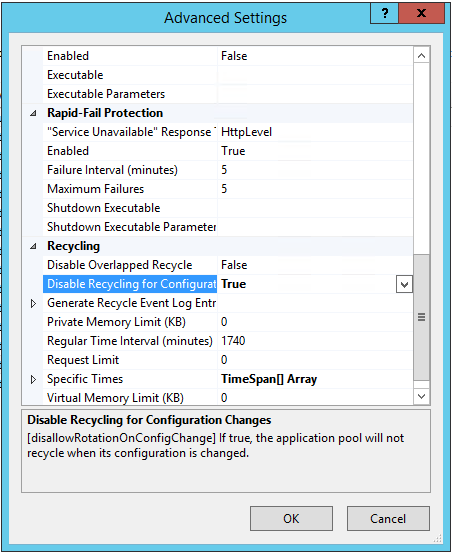
Finally, and also (at least) around since IIS6, there’s a setting called DisallowRotationOnConfigChange as a setting for only the application pool (at least that is what I think the text on MSDN tries to say, but I haven’t tested it). Set it to true and changes to the configuration of the application pool will not result in an immediate recycle.
This last setting can also be set from Advanced Settings of the application pool:
Method 4 (ASP.NET 1.0 and 1.1)
For (old) websites using ASP.NET 1.0 or 1.1, there is a confirmed bug that can cause rapid and repeated recycles on file changes. The workaround at the time was similar to what MartinHN suggested under the main question, namely, something like the following in your web.config:
<compilation
   debug="false"
   defaultLanguage="vb"
   numRecompilesBeforeAppRestart="5000">
This does not disable recycling, but it does so only after 5000 recompilations have taken place. Whether this number is useful depends on the size of your application. Microsoft does not clearly say what a recompilation really is. The default, however, is 15.
As an aside: regardless of the version of .NET or Windows, we find that when the application is run from a share and used in a load-balanced environment, that the site recycles continuously. The only way to solve it was by adding that FNCMode setting to the registry (but now there are more fine-grained options).
Method 2
As far as I am aware there is no way to disable this behavior, changes to the webconfig force the application to be restarted.
Update: it is actually possible, there are a number of methods, well documented, as explained in this answer*
Original answer:
There is a similar question here just for other reference. I found additional info that may be helpful.
Configuration Changes Cause a Restart
of the Application Domain
Changes to
configuration settings in Web.config
files indirectly cause the application
domain to restart. This behavior
occurs by design. You can optionally
use the configSource attribute to
reference external configuration files
that do not cause a restart when a
change is made. For more information,
see configSource in General Attributes
Inherited by Section Elements.
From This MSDN Article
* Disclaimer: I wrote the other answer and normally wouldn’t make a self-reference, but find it relevant enough to link here since 8 years after this post it is really quite different: a solution is very easy by clicking through the IIS front-end, and workarounds exist since ASP.NET 1.0.
Method 3
I ran in to an even bigger problem along the same lines – changes to any file or sub-folder in the AppDomain base directory cause the hosting environment to shutdown. This is a pretty big issue for our application as we’re running a WPF UI in the same AppDomain and we can’t restart it without being distruptive to the user.
I really wanted to avoid having to run a separate AppDomain for the web based part of the application so I did some digging with Reflector. I found that the culprit was the internal class FileChangesMonitor.
So I wrote a horrible horrible reflection hack to solve the problem. I thought I’d post it here as a potential solution for anyone else having the same problem. You just need to call HttpInternals.StopFileMonitoring() to disable shutdown on file/folder changes.
internal static class HttpInternals
{
    private static readonly FieldInfo s_TheRuntime = typeof(HttpRuntime).GetField("_theRuntime", BindingFlags.NonPublic | BindingFlags.Static);

    private static readonly FieldInfo s_FileChangesMonitor = typeof(HttpRuntime).GetField("_fcm", BindingFlags.NonPublic | BindingFlags.Instance);
    private static readonly MethodInfo s_FileChangesMonitorStop = s_FileChangesMonitor.FieldType.GetMethod("Stop", BindingFlags.NonPublic | BindingFlags.Instance);

    private static object HttpRuntime
    {
        get
        {
            return s_TheRuntime.GetValue(null);
        }
    }

    private static object FileChangesMonitor
    {
        get
        {
            return s_FileChangesMonitor.GetValue(HttpRuntime);
        }
    }

    public static void StopFileMonitoring()
    {
        s_FileChangesMonitorStop.Invoke(FileChangesMonitor, null);
    }
}
Method 4
A solution would be adding following element to web.config section :
<httpRuntime
    waitChangeNotification="315360000"
    maxWaitChangeNotification="315360000"
/>
Method 5
As mentioned by jfburdet the solution is to use waitChangeNotification and maxWaitChangeNotification.
That being said, you should know they don’t work on IIS 7 if ASP.NET is run in mixed mode: http://forums.iis.net/t/1149344.aspx
All methods was sourced from stackoverflow.com or stackexchange.com, is licensed under cc by-sa 2.5, cc by-sa 3.0 and cc by-sa 4.0