I am facing a strange behavior of the round() function:
for i in range(1, 15, 2):
    n = i / 2
    print(n, "=>", round(n))
This code prints:
0.5 => 0
1.5 => 2
2.5 => 2
3.5 => 4
4.5 => 4
5.5 => 6
6.5 => 6
I expected the floating values to be always rounded up, but instead, it is rounded to the nearest even number.
Why such behavior, and what is the best way to get the correct result?
I tried to use the fractions but the result is the same.
Answers:
Thank you for visiting the Q&A section on Magenaut. Please note that all the answers may not help you solve the issue immediately. So please treat them as advisements. If you found the post helpful (or not), leave a comment & I’ll get back to you as soon as possible.
Method 1
The Numeric Types section documents this behaviour explicitly:
round(x[, n])
x rounded to n digits, rounding half to even. If n is omitted, it defaults to 0.
Note the rounding half to even. This is also called bankers rounding; instead of always rounding up or down (compounding rounding errors), by rounding to the nearest even number you average out rounding errors.
If you need more control over the rounding behaviour, use the decimal module, which lets you specify exactly what rounding strategy should be used.
For example, to round up from half:
>>> from decimal import localcontext, Decimal, ROUND_HALF_UP
>>> with localcontext() as ctx:
...     ctx.rounding = ROUND_HALF_UP
...     for i in range(1, 15, 2):
...         n = Decimal(i) / 2
...         print(n, '=>', n.to_integral_value())
...
0.5 => 1
1.5 => 2
2.5 => 3
3.5 => 4
4.5 => 5
5.5 => 6
6.5 => 7
Method 2
For example:
from decimal import Decimal, ROUND_HALF_UP

Decimal(1.5).quantize(0, ROUND_HALF_UP)

# This also works for rounding to the integer part:
Decimal(1.5).to_integral_value(rounding=ROUND_HALF_UP)
Method 3
You can use this:
import math
def normal_round(n):
    if n - math.floor(n) < 0.5:
        return math.floor(n)
    return math.ceil(n)
It will round number up or down properly.
Method 4
round() will round either up or down, depending on if the number is even or odd. A simple way to only round up is:
int(num + 0.5)
If you want this to work properly for negative numbers use:
((num > 0) - (num < 0)) * int(abs(num) + 0.5)
Note, this can mess up for large numbers or really precise numbers like 5000000000000001.0 and 0.49999999999999994.
Method 5
The behavior you are seeing is typical IEEE 754 rounding behavior. If it has to choose between two numbers that are equally different from the input, it always picks the even one. The advantage of this behavior is that the average rounding effect is zero – equally many numbers round up and down. If you round the half way numbers in a consistent direction the rounding will affect the expected value.
The behavior you are seeing is correct if the objective is fair rounding, but that is not always what is needed.
One trick to get the type of rounding you want is to add 0.5 and then take the floor. For example, adding 0.5 to 2.5 gives 3, with floor 3.
Method 6
Love the fedor2612 answer. I expanded it with an optional “decimals” argument for those who want to use this function to round any number of decimals (say for example if you want to round a currency $26.455 to $26.46).
import math

def normal_round(n, decimals=0):
    expoN = n * 10 ** decimals
    if abs(expoN) - abs(math.floor(expoN)) < 0.5:
        return math.floor(expoN) / 10 ** decimals
    return math.ceil(expoN) / 10 ** decimals

oldRounding = round(26.455,2)
newRounding = normal_round(26.455,2)

print(oldRounding)
print(newRounding)
Output:
26.45
26.46
Method 7
Why make it so complicated?
def HalfRoundUp(value):
    return int(value + 0.5)
You could of course make it into a lambda which would be:
HalfRoundUp = lambda value: int(value + 0.5)
Method 8
Short version: use the decimal module. It can represent numbers like 2.675 precisely, unlike Python floats where 2.675 is really 2.67499999999999982236431605997495353221893310546875 (exactly). And you can specify the rounding you desire: ROUND_CEILING, ROUND_DOWN, ROUND_FLOOR, ROUND_HALF_DOWN, ROUND_HALF_EVEN, ROUND_HALF_UP, ROUND_UP, and ROUND_05UP are all options.
Method 9
Rounding to the nearest even number has become common practice in numerical disciplines. “Rounding up” produces a slight bias towards larger results.
So, from the perspective of the scientific establishment, round has the correct behavior.
Method 10
Here is another solution.
It will work as normal rounding in excel.
from decimal import Decimal, getcontext, ROUND_HALF_UP

round_context = getcontext()
round_context.rounding = ROUND_HALF_UP

def c_round(x, digits, precision=5):
    tmp = round(Decimal(x), precision)
    return float(tmp.__round__(digits))
c_round(0.15, 1) -> 0.2, c_round(0.5, 0) -> 1
Method 11
The following solution achieved “school fashion rounding” without using the decimal module (which turns out to be slow).
def school_round(a_in,n_in):
''' python uses "banking round; while this round 0.05 up" '''
    if (a_in * 10 ** (n_in + 1)) % 10 == 5:
        return round(a_in + 1 / 10 ** (n_in + 1), n_in)
    else:
        return round(a_in, n_in)
e.g.
print(round(0.005,2)) # 0
print(school_round(0.005,2)) #0.01
Method 12
In the question this is basically an issue when dividing a positive integer by 2. The easisest way is int(n + 0.5) for individual numbers.
However we cannot apply this to series, therefore what we then can do for example for a pandas dataframe, and without going into loops, is:
import numpy as np
df['rounded_division'] = np.where(df['some_integer'] % 2 == 0, round(df['some_integer']/2,0), round((df['some_integer']+1)/2,0))
Method 13
So just to make sure there is a crystal clear working example here, I wrote a small convenience function
def round_half_up(x: float, num_decimals: int) -> float:
    """Use explicit ROUND HALF UP. See references, for an explanation.

    This is the proper way to round, as taught in school.

    Args:
        x:
        num_decimals:

    Returns:
            https://stackoverflow.com/questions/33019698/how-to-properly-round-up-half-float-numbers-in-python

    """

    if num_decimals < 0:
        raise ValueError("Num decimals needs to be at least 0.")
    target_precision = "1." + "0" * num_decimals
    rounded_x = float(Decimal(x).quantize(Decimal(target_precision), ROUND_HALF_UP))
    return rounded_x
And an appropriate set of test cases
def test_round_half_up():
    x = 1.5
    y = round_half_up(x, 0)
    assert y == 2.0

    y = round_half_up(x, 1)
    assert y == 1.5

    x = 1.25
    y = round_half_up(x, 1)
    assert y == 1.3

    y = round_half_up(x, 2)
    assert y == 1.25
Method 14
A small addition as the rounding half up with some of the solutions might not work as expected in some cases.
Using the function from above for instance:
from decimal import Decimal, ROUND_HALF_UP
def round_half_up(x: float, num_decimals: int) -> float:
    if num_decimals < 0:
        raise ValueError("Num decimals needs to be at least 0.")
    target_precision = "1." + "0" * num_decimals
    rounded_x = float(Decimal(x).quantize(Decimal(target_precision), ROUND_HALF_UP))
    return rounded_x
round_half_up(1.35, 1)
1.4
round_half_up(4.35, 1)
4.3
Where I was expecting 4.4. What did the trick for me was converting x into a string first.
from decimal import Decimal, ROUND_HALF_UP
def round_half_up(x: float, num_decimals: int) -> float:
    if num_decimals < 0:
        raise ValueError("Num decimals needs to be at least 0.")
    target_precision = "1." + "0" * num_decimals
    rounded_x = float(Decimal(str(x)).quantize(Decimal(target_precision), ROUND_HALF_UP))
    return rounded_x

round_half_up(4.35, 1)
4.4
Method 15
You can use:
from decimal import Decimal, ROUND_HALF_UP

for i in range(1, 15, 2):
    n = i / 2
    print(n, "=>", Decimal(str(n)).quantize(Decimal("1"), rounding=ROUND_HALF_UP))
Method 16
A classical mathematical rounding without any libraries
def rd(x,y=0):
''' A classical mathematical rounding by Voznica '''
m = int('1'+'0'*y) # multiplier - how many positions to the right
q = x*m # shift to the right by multiplier
c = int(q) # new number
i = int( (q-c)*10 ) # indicator number on the right
if i >= 5:
    c += 1
return c/m

Compare:

print( round(0.49), round(0.51), round(0.5), round(1.5), round(2.5), round(0.15,1))  # 0  1  0  2  2  0.1

print( rd(0.49), rd(0.51), rd(0.5), rd(1.5), rd(2.5), rd(0.15,1))  # 0  1  1  2  3  0.2
Method 17
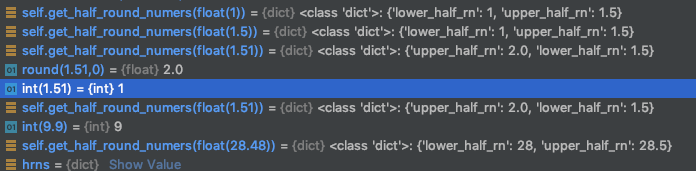
Knowing that round(9.99,0) rounds to int=10 and int(9.99) rounds to int=9 brings success:
Goal: Provide lower and higher round number depending on value
    def get_half_round_numers(self, value):
        """
        Returns dict with upper_half_rn and lower_half_rn
        :param value:
        :return:
        """
        hrns = {}
        if not isinstance(value, float):
            print("Error>Input is not a float. None return.")
            return None

        value = round(value,2)
        whole = int(value) # Rounds 9.99 to 9
        remainder = (value - whole) * 100

        if remainder >= 51:
            hrns['upper_half_rn'] = round(round(value,0),2)  # Rounds 9.99 to 10
            hrns['lower_half_rn'] = round(round(value,0) - 0.5,2)
        else:
            hrns['lower_half_rn'] = round(int(value),2)
            hrns['upper_half_rn'] = round(int(value) + 0.5,2)

        return hrns
Some testing:
yw
Method 18
import math
# round tossing n digits from the end
def my_round(n, toss=1):

    def normal_round(n):
        if isinstance(n, int):
            return n
        intn, dec = str(n).split(".")
        if int(dec[-1]) >= 5:
            if len(dec) == 1:
                return math.ceil(n)
            else:
                return float(intn + "." + str(int(dec[:-1]) + 1))
        else:
            return float(intn + "." + dec[:-1])

    while toss >= 1:
        n = normal_round(n)
        toss -= 1
    return n


for n in [1.25, 7.3576, 30.56]:
    print(my_round(n, 2))

1.0
7.36
31
Method 19
You can try this
def round(num):
    return round(num + 10**(-9))
it will work since num = x.5 will always will be x.5 + 0.00...01 in the process which its closer to x+1 hence the round function will work properly and it will round x.5 to x+1
All methods was sourced from stackoverflow.com or stackexchange.com, is licensed under cc by-sa 2.5, cc by-sa 3.0 and cc by-sa 4.0